
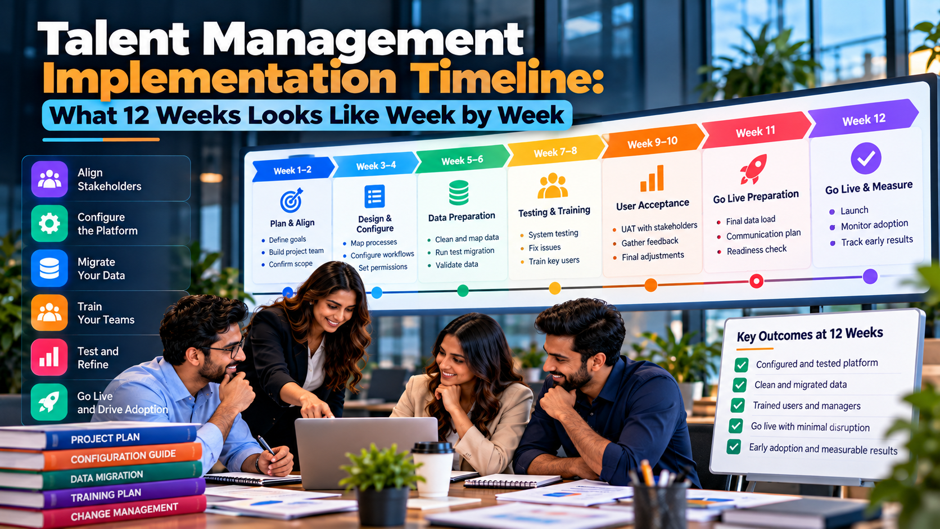
A talent management roll-out that finishes in 12 weeks is realistic for a narrow scope and unrealistic for a broad scope. Picture a 600-person company that wants 3 talent modules in a single system before the next review cycle opens. The vendor kickoff is on the calendar, and the sponsor keeps asking when it goes live. It’s really a plan that holds only if decisions land on time, data arrives clean and nobody adds scope in week 6.
This guide lays out that plan week by week. It assumes a reference project: about 600 employees, 1 legal entity, 3 modules, 1 HR system feeding employee data, single sign-on, and a pilot group of 40 to 60 people. The hours and dates are illustrative, built from that reference project and from timelines that vendors and consultancies publish, which we attribute where we use them. Your contract and your data quality will move the dates. Confirm anything contractual or priced directly with your vendor before you commit to it.
TL;DR
- 12 weeks works for a narrow scope. A single entity, 3 modules, 1 HR feed and a pilot group of 40 to 60 people fit in 12 weeks when decisions are made on schedule. Vendors publish ranges of 6 to 12 weeks for talent management plus core HR, and mid-market projects often run 3 to 6 months, so the scope you set in week 1 decides which range you land in.
- The calendar front-loads decisions and back-loads people. Weeks 1 to 4 settle design choices and specs, weeks 5 to 8 build and test, and weeks 9 to 12 pilot and launch. Most slips start in week 2, when the rating scale stays undecided, or in week 7, when the first data load fails reconciliation.
- Internal effort is about 802 hours in this model. At a loaded $60 an hour that’s roughly $48,120 of your own time, on top of vendor fees. Cut scope in a set order when you fall behind, and run a written go/no-go review in week 11 so launch is a decision instead of a drift.
What 12 weeks can and can’t cover
Published timelines vary widely, and that’s the first thing to understand before you commit to a date. HROne describes talent management alongside core HR as roughly 6 to 12 weeks, with focused goal and appraisal setups at 2 to 6 weeks and enterprise roll-outs at 8 to 16 weeks. Lite space puts mid-market projects at 3 to 6 months. ZingHR and SoftwareFinder both cite 3 to 12 months for HR and talent systems. These are vendor and consultancy figures, so treat them as ranges to test against your own project rather than as guarantees.
The 12-week plan fits inside the lower end of those ranges only when scope stays tight. In this reference plan, tight means 1 legal entity, 3 modules, 1 inbound HR feed, single sign-on, standard reports and 1 pilot group. It excludes custom analytics, multi-country rating scales, complex 360 feedback, learning content migration and payroll integration. Each excluded item can add 2 to 6 weeks on its own, so write the exclusions into the charter in week 1 and have the sponsor sign it.
Count the 12 weeks from the day the vendor team and your internal team are both named, not from the day the contract is signed. Procurement review and security questionnaires often take 2 to 6 weeks before kickoff, and none of that time sits inside the plan. If your review cycle opens on a fixed date, count backward from that date and add a buffer of 1 week for the surprises every project has.
The 12-week calendar at a glance
| Week | Phase | Main work | Output to sign off |
| 1 | Mobilize | Name the team, write the charter, list exclusions, start the data audit | Signed charter and scope list |
| 2 | Decide | Settle the rating scale, review calendar, calibration rules and environments | Decision log with owners |
| 3 | Design | Draft review templates, goal workflows and the permissions matrix | Approved templates and role matrix |
| 4 | Specify | Write integration and data-mapping specs plus the test plan | Signed specs and test scripts |
| 5 | Configure | Build templates and workflows in the test environment | Configured test tenant |
| 6 | Integrate | Connect the HR feed and single sign-on, then test the sync | Working feed and login |
| 7 | Load | Run a mock data load and reconcile record counts | Reconciliation report with open defects |
| 8 | Test | Run system integration testing and user acceptance testing, then a 2-day fix window | UAT sign-off |
| 9 | Pilot | Run a mini review cycle with 40 to 60 people | Pilot findings list |
| 10 | Train and communicate | Train managers and employees, send launch messages | Training completion above target |
| 11 | Rehearse | Run the final load rehearsal, set up support and hold the go/no-go review | Written go or no-go decision |
| 12 | Launch | Go live, watch the first 7 days and log issues daily | Live system and issue log |
Read the calendar as a chain of dependencies rather than as 12 separate weeks. The week 4 specs can’t be written until the week 2 decisions are final, and the week 7 load can’t start until the week 6 feed works. A 1-week slip in weeks 1 to 4 usually pushes everything after it by 1 week, because the build team sits idle or builds the wrong thing. Slips after week 8 are easier to absorb, since pilot and training tasks can overlap by a few days when the pilot is small.
Weeks 1 and 2: mobilize and decide
Week 1 starts with a charter that names people and exclusions. Put the sponsor, the HR lead, the HRIS admin, an IT contact and a vendor project manager on 1 page, along with weekly meeting times and the decision rights each person holds. Add a list of what’s out of scope, such as payroll integration, custom analytics and additional entities. The charter takes about 6 hours to draft and prevents weeks of argument later.
The data audit also starts in week 1. Pull an export from your HR system and check the fields the talent system needs: employee ID, manager, job title, department, location, hire date and status. Look for missing managers, duplicate IDs, broken reporting lines and terminated employees who still appear active. ZingHR calls data migration the highest-risk phase of an HR software project, and an early audit is the cheapest way to lower that risk. Give the HRIS admin 2 to 3 days to produce a defect list with owners.
Week 2 is for the decisions that block everything after it. Settle the rating scale, the review calendar, the calibration rules, the goal cycle and who sees what. These choices feel small and cause the most delay, because configuration and training both depend on them. Hold a single 2-hour decision session with the sponsor in the room, and log each outcome with an owner and a date. Anything still open on Friday of week 2 goes on a risk list with a named escalation path.
Week 2 closes with environments and access. Ask the vendor to confirm the test and production environments, the sandbox refresh rules and the named admin accounts. Submit the security questionnaire and the single sign-on requirements to IT by Wednesday, because security reviews often take longer than the build itself. Confirm who approves test users and how test data will be masked. Missing access in week 5 costs far more than the 3 hours it takes to request it now.
Weeks 3 and 4: design and specify
- Review templates come first. Draft the review and goal templates on paper before anyone opens the configuration screens. Cut every question that nobody will read or act on, and write rating definitions in plain language so a manager in week 12 reads them the same way as a manager in week 3. Limit the template to what the review cycle needs, since every extra field adds testing and training time.
- Workflows and permissions follow. Map who submits, who approves, who can see what, and what happens when a manager leaves mid-cycle. Build the permissions matrix as a grid of roles against actions, and have HR and IT review it together. Include a row for HR admins and a row for former managers who still hold open reviews. Most privacy and audit problems later trace back to a matrix that nobody checked in week 3, so give this task a full half day.
- Integration specs get written in week 4. The HR feed spec lists each field, its source, its format, the sync schedule and how errors are reported. The single sign-on spec names the identity provider and the fallback login. Ask the vendor to confirm both in writing with named owners and dates, then have IT sign off before configuration moves forward. Skipping this review is a common cause of rework in week 6.
- The test plan is drafted before building starts. Write the UAT scripts from the templates and workflows, with expected results and named testers. Assign each script to a person now, so nobody learns about their role in week 8. Aim for 25 to 40 scripts that cover each role, each workflow and each report. Writing scripts early exposes design gaps while they’re still cheap to fix, and it gives testers 4 weeks of notice instead of 4 days.
Weeks 5 and 6: configure and integrate
| Task | Owner | Typical effort | Done when |
| Build review and goal templates | Vendor consultant with HRIS admin | 3 to 5 days | Templates match the approved designs |
| Set up roles and permissions | HRIS admin | 2 days | Matrix tested for every role |
| Configure workflows and notifications | Vendor consultant | 3 days | Every step triggers the right message |
| Build standard reports | Vendor consultant | 2 to 3 days | Report output checked against sample data |
| Connect the HR feed | HRIS admin and IT | 4 to 6 days | Nightly sync runs without errors |
| Set up single sign-on | IT and security | 2 to 3 days | Test users log in through the identity provider |
| Run the first sync test | HRIS admin | 1 day | Record counts match the source |
The effort figures above are illustrative for the reference plan, and they shift with the vendor’s tools and your data quality. What matters is the order. Templates and permissions come first because the feed and login tests need real roles to test against. The HR feed is the task most likely to overrun, so start it on Monday of week 5 and keep the HRIS admin free of other work.
Weeks 7 and 8: load data and test
Week 7 is a mock load, and its purpose is to find defects while there’s still time to fix them. Load current employees, their managers and the current cycle’s goals into the test environment, then reconcile the result against the source system. Compare record counts by status and department, and check 50 records by hand. Lite space puts migration and UAT together at 4 to 6 weeks for mid-market projects. The reference plan compresses that by loading only current employees and the current cycle, and by leaving historical review data for after launch.
Week 8 combines system integration testing with user acceptance testing. ERP and Salesforce implementation guides commonly cite UAT of 2 to 5 weeks, so a 1-week test plus a 2-day fix window only works when scripts are written in week 4 and testers are booked in advance. Assign each tester 6 to 8 scripts, give them a shared log, and agree on severity levels before testing starts. Blockers must be fixed before the pilot. Lower-severity items get a dated fix or a documented workaround.
Run a 30 minute triage call every day during test week. The HR lead, the HRIS admin and the vendor consultant review new defects, assign owners and decide what blocks the pilot. Keep the decision rule simple: a defect that stops a task or exposes private data is a blocker. Everything else waits. Without a daily call, defects pile up until Thursday, and the 2-day fix window turns into a 2-day argument about what counts as serious.
Weeks 9 and 10: pilot and training
The pilot is a mini cycle with real stakes. Pick 40 to 60 people across at least 3 departments, including 12 managers who’ll run the full flow: set goals, write a short check-in, complete a review and see the result. Choose managers who give honest feedback rather than friendly feedback. Run the pilot for 5 working days, hold a 45 minute debrief on day 5, and collect every issue in a single log with a severity next to each item.
Pilot findings get 3 days to become changes. Sort the log into items to fix now and items to fix after launch. Fix-now items block a task or show wrong data, and so does anything that confuses more than 1 in 5 pilot users. Anything else waits for a post-launch release, with a date attached so the person who raised it knows it wasn’t ignored. Re-test every fix with the person who found it before it reaches production.
Manager training comes before employee training. In the reference plan, 60 managers get 2 hours each, which adds up to 120 hours, and they attend before the all-employee messages go out. Managers answer most questions from their teams, so they need to know the calendar and the rating definitions before anyone asks. Record a 10 minute walk through for each task, since managers forget details between training and their first review.
Employee communication starts in week 10. Plan 30 minutes of employee time across 500 people, which is 250 hours, delivered through a short video and a 1 page guide. Send the first message at the start of week 10 with the launch date and the reason for the change. Send a reminder on the Monday of week 12 with the login link and the help desk contact. Short, dated messages beat a single long announcement.
Week 11: rehearse and decide
- Run the final load rehearsal. Repeat the data load in a clean environment using a fresh export from your HR system, then compare the result against the week 7 reconciliation report. The rehearsal should finish inside the time window you plan to use on launch day, with every count matching. If the rehearsal fails twice in a row, treat that as a signal to move the date rather than push through.
- Set up support before you need it. Name the first line of help, usually HR operations, and the second line, usually the HRIS admin, with a vendor escalation contact for each severity level. Write 10 to 15 answers to the questions pilot users asked, and place them in a shared document. Agree on response times, such as 2 hours for blockers and 1 business day for everything else, so employees know what to expect.
- Hold the go/no-go meeting on Thursday. Review the scorecard with the sponsor, the HR lead, the IT lead and the vendor project manager, and record a written decision. Every red item needs an owner and a fix date, or it becomes a reason to wait. A Thursday meeting leaves Friday for communications and a clear weekend for contingency work if the answer is go. Invite the HRIS admin too, since they know which defects are still open.
- Write the fallback plan. Decide what happens if login fails or the feed breaks on launch day: who tells employees and how long you’ll wait before rolling back. A rollback in a talent system usually means pausing access and keeping the old process running, since the new data hasn’t been used for decisions yet. Writing this plan takes about 2 hours, and in most projects it never gets used. Share it with the vendor too.
Week 12: launch and the first 7 days
Launch day should be uneventful if weeks 7 to 11 went well. Open access on a Monday morning, send the launch message from the sponsor, and keep the HRIS admin and a vendor contact on a shared call line for the first 4 hours. Monitor the login success rate and the HR feed sync every hour. The goal for day 1 is to find problems while few people are affected, and a Monday start leaves 4 working days to fix them before the weekend.
The first 7 days are a hyper-care period with a daily rhythm. Hold a 20 minute triage call each morning, review the issue log by severity, and publish a short daily note to managers listing what was fixed and what’s still open. ERP and Salesforce implementation guides commonly describe hyper-care of 4 to 8 weeks for larger systems. For a 600-person roll-out with 3 modules, plan on 7 days of daily triage followed by 2 to 4 weeks of weekly check-ins.
Internal hours behind the plan
| Role | Hours | What the hours cover |
| HR lead | 180 | Charter, decisions, design reviews and UAT |
| HRIS admin | 120 | Data audit, feed, configuration support and reconciliation |
| IT and security | 72 | Environments, security review, single sign-on and feed support |
| Sponsor | 12 | Decisions, launch message and go/no-go |
| 12 pilot managers | 48 | 4 hours each for the pilot cycle and debrief |
| 60 managers (training) | 120 | 2 hours each |
| 500 employees (training) | 250 | 30 minutes each |
| Total | 802 | About 67 hours a week across 12 weeks |
The table totals 802 hours. At a loaded rate of $60 an hour, which is an assumption you should replace with your own, that’s $48,120 of internal time. Spread across 12 weeks, it averages about 67 hours a week, though the load peaks in weeks 8 and 10 when testing and training land. Training takes 370 of the 802 hours, or 46%, which surprises most sponsors. These figures exclude vendor fees and contractor help, which you’ll need to confirm in your own contract.
Risks and early warnings
Late decisions on the rating scale and calendar. The warning sign is a decision log that still has open items at the end of week 2. The fix is to give the sponsor 48 hours to choose, and to record the choice even if it’s imperfect. A decent decision made on Tuesday beats a perfect decision made in week 5, because every later task depends on it and every day of delay moves the launch by a day.
Data defects found late. The warning sign is a first mock load in week 7 that fails reconciliation on more than 1 in 50 records, an illustrative threshold you should adjust. The fix is to run the audit in week 1 and a small test load in week 5, so the first big load isn’t the first load. ZingHR names data migration as the riskiest phase for a reason: the defects are rarely in the tool, and they’re almost always in the source data.
Scope creep. The warning sign is a new request for a report, a custom field or a second entity after week 3. The fix is a change process with a trade-off attached: each addition names what leaves the plan or which week moves. Sponsors accept this when it’s shown on a 1 page calendar, and they rarely accept it when it’s explained in a long email after the fact. Put the trade-off in writing the same day.
Tester and manager availability. The warning sign is fewer than 80% of UAT scripts executed by Wednesday of week 8, or pilot managers who haven’t attended training. The fix is to book testers in week 4 and treat their time as protected, with the sponsor’s name on the invitation. People skip testing when it competes with their day job, so make the competing work visible to their managers early. Send a reminder on Monday of week 8.
What to cut first when you’re behind
- Cut custom reports first. Standard reports are enough for launch, and most custom requests turn out to be needs that fade after the first cycle. Defer anything that needs a new data model, and move it to a post-launch backlog with an owner. Tell requester the date their report will be built. This cut saves 1 to 2 weeks in many projects and carries little risk, since the data is still collected and reports can be built later.
- Defer the third module second. TalearnX estimates about 8 to 13 weeks per Cornerstone module, which shows how strongly module count drives the schedule. If the reference plan covers 3 modules, launching 2 and phasing in the third after the first cycle recovers 2 to 3 weeks. Choose the module whose first use is furthest from the launch date. Tell the sponsor which module moves and why, in writing, before the cut is made.
- Shrink the pilot third. Reduce the pilot from 60 people to 30, but keep at least 8 managers and 3 departments so the test still reflects real use. A smaller pilot trims 1 to 2 days of coordination and a smaller feedback pile. Don’t reduce the pilot below the point where a single unusual manager can skew the result. Record who was left out so the post-launch roll-out can collect their feedback.
- Protect UAT and data reconciliation. These 2 tasks prevent public failures, so cutting them trades a short delay for a long recovery. If you must choose between a late launch and a launch without them, choose the late launch. Employees remember a broken first review cycle far longer than they remember a 2-week delay. Manager training sits in the same category, since a trained manager answers questions that would otherwise reach the help desk.
Go/no-go scorecard
| Criterion | Green | Red |
| UAT scripts | At least 95% executed, no open blockers | Open blockers, or under 80% executed |
| Data reconciliation | Counts match the source, open defects under 1% | Unexplained mismatches |
| HR feed | 5 straight nightly syncs without errors | Failed or manual syncs |
| Single sign-on | Every role type logs in | Any role fails |
| Manager training | At least 85% of managers trained | Under 70% trained |
| Support | Named staff, drafted answers, agreed response times | No named staff |
| Fallback plan | Written and approved | Not written |
| Sponsor | Present at the review, decision recorded | Absent or undecided |
Treat the thresholds above as illustrative starting points and set your own in week 4, before anyone knows how the project is going. Setting them early keeps the review honest. A red on UAT blockers, data reconciliation or single sign-on should delay launch. A red on a lower-risk item, such as drafted support answers, can pass with a dated fix and an owner. Record the decision and the reasons in writing, because someone will ask in month 3.
After week 12: the first 90 days
Days 1 to 30 are for stabilizing. Hold weekly check-ins with the vendor, burn down the issue log and release the fix-after-launch items that pilot users raised. Review the adoption numbers each Friday and send managers who haven’t set goals a short reminder with a link to the walk through. Resist new feature requests until the log is below 10 open items, since each new request competes with fixes for the same admin hours.
Days 31 to 60 usually cover the first real review or goal cycle. Run calibration with the rules decided in week 2, check that ratings flow into reports correctly, and gather feedback from managers within 3 days of cycle close. This is the first time the system carries real decisions, so expect questions about visibility, edits after submission and how comments appear. Log the answers in the support guide for the next cycle.
Days 61 to 90 are for review and planning. Hold a retrospective with the project team, compare actual hours against the 802-hour model, and decide what goes into phase 2: the deferred module, historical data, custom reports or an additional entity. Phase 2 plans are easier to write now because you know your real data quality, your vendor’s response times and your managers’ habits. Set the next scope with those facts rather than with the assumptions you had in week 1.
Mistakes that add weeks
Treating the contract date as the start date. Teams count 12 weeks from signature and then discover that procurement, security review and staffing used up 4 weeks first. Count from the day the full team is named and the vendor has confirmed its consultant. If the date matters to the business, write the real start date into the plan and tell the sponsor in week 1. Name that date in the charter.
Starting configuration before decisions are final. Building in week 3 feels like progress, and it creates rework when the rating scale changes in week 5. Configuration is cheap to start and expensive to redo, because every change touches the templates and the training material. Hold the build until the decision log is closed, even if the vendor consultant is available and the team feels pressure to move. Progress that gets thrown away isn’t progress.
Training too early. Training in week 7 means managers forget it by week 12, and the interface may have changed since. Schedule manager sessions in week 10 and keep each session close to the launch date. Plan a refresher at the start of week 12. Pair each session with a short recording and a 1 page guide, so managers who miss the live session or forget a step still have a way to find it.
Skipping the pilot to save a week. A pilot costs about 1 week and 48 hours of manager time in this model. Skipping it sends the same defects to 600 people, and each defect becomes a support ticket and a lost hour of trust. Even a small pilot with 8 managers finds the confusing label and the notification that fires at the wrong time. A week spent on the pilot is the cheapest insurance in the plan.
FAQs
Is 12 weeks realistic for a talent management implementation?
It’s realistic for a narrow scope with 1 entity, about 600 employees, 3 modules, 1 HR feed and single sign-on. HROne describes talent management with core HR at 6 to 12 weeks, while Lite space and ZingHR describe 3 to 6 months and up to 12 months for broader projects. Your timeline depends on scope, data quality and how fast decisions get made. Treat the 12-week plan as a target that needs weekly protection, and confirm the vendor’s commitment in the statement of work.
What causes the most delay in a 12-week plan?
Late decisions in week 2 and data defects in week 7 cause most slips. Rating scales and calibration rules block configuration and training, so a 1-week delay there moves everything behind it. Data defects take time because they need the source system’s owner to fix them, and that person is often outside the project team. Run the data audit in week 1 and keep the decision log visible to the sponsor.
How many people do we need on the project team?
The reference plan uses a sponsor, an HR lead, an HRIS admin and an IT contact as the core team, plus a vendor project manager and consultant. Add 12 pilot managers in week 9 and a pool of testers in week 8. The HR lead carries the largest share at about 180 hours. If a single person holds 2 of these roles, add buffer time, since the HR lead and HRIS admin are the most likely to be pulled into other work.
Can the pilot and training run at the same time?
They can overlap by a few days, but running them fully in parallel is risky. Pilot findings often change labels or workflows, and training material built before the pilot ends has to be rewritten. A workable approach is to train pilot managers in week 8, run the pilot in week 9, and start the broader manager sessions in week 10 once the 3-day fix window has closed. Keep the pilot group out of the broader sessions.
Does a 12-week plan cost more than a 6-month plan?
It can, because a compressed schedule shifts cost to your side. This model puts internal effort at about 802 hours, or $48,120 at a loaded $60 an hour, and a longer plan spreads similar hours across more weeks while adding some coordination overhead. Ask your vendor whether a compressed timeline changes its fees or staffing, and get the answer in writing, since pricing terms vary by vendor and by contract.
What if our review cycle opens before week 12 ends?
Move the launch or reduce the scope. If the cycle opens in week 10, launch goals and development plans first and run the review in the old process for another cycle. Don’t squeeze UAT or reconciliation to hit the date. A late start on a new module costs a cycle, while a failed first cycle damages manager trust for much longer, and trust is harder to rebuild than a schedule.
Should we migrate historical review data before launch?
Usually not. Historical ratings and comments add mapping work and privacy review, and they rarely change how the first cycle runs. Employees rarely ask for last year’s ratings in the first month of use. Load current employees, current managers and the current cycle’s goals, and leave historical data for phase 2. If legal or audit requirements demand older records, confirm the need with counsel and plan a separate load after launch.
What happens after go-live?
Plan 7 days of daily triage, then 2 to 4 weeks of weekly check-ins, then a retrospective at day 90. Implementation guides for ERP and Salesforce projects commonly describe hyper-care of 4 to 8 weeks, and a talent roll-out at this size can usually run shorter. Track the login rate and the goal-setting rate each Friday, and decide with the sponsor which deferred items go into phase 2. Share the results with managers too.
