
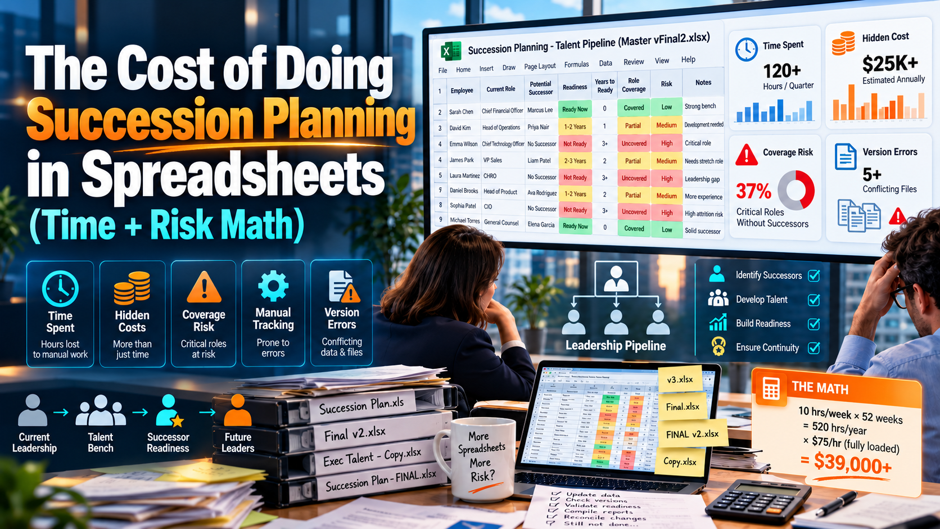
A chief human resources officer opens the succession workbook the night before a board meeting and finds 3 versions in her inbox, each with different readiness ratings for the same 2 successors. One shows a regional vice president as ready now, another shows ready in 1 to 2 years, and a third has a note that says the person resigned last month. Nobody knows which is current, the analyst who built the workbook is on leave and the board paper goes out in the morning with whichever version looks most complete.
This guide puts numbers on what that situation costs. It covers the research on spreadsheet errors, the arithmetic of error probability, a time model for a single review cycle, the staleness that builds between updates, the expected cost of an unready leadership bench, security and audit gaps, and the point at which a purpose-built tool pays for itself. The figures come from published research and from clearly labeled assumptions, so replace the assumptions with your own data before using any total in a business case.
TL;DR
- Spreadsheets contain errors far more often than their owners expect. Audits of real-world spreadsheets summarized by Panko found errors in 94% of 88 spreadsheets, with an average cell error rate of 5.2%, and a later study of 50 spreadsheets found 1.79%, so a succession workbook with hundreds of formulas and manual entries is very likely to contain at least 1 mistake that nobody has caught. Few of those workbooks are ever tested.
- The time cost is real and the risk cost is larger. In the worked example, a 390-hour review cycle costs about $29,250 and $58,500 a year at 2 cycles, while the expected annual loss from critical roles without a ready successor ranges from $146,880 to $587,520 under stated assumptions, so even a small reduction in that exposure can outweigh the cost of a tool. Replace the assumptions with your own data first.
- Spreadsheets aren’t always wrong, and a threshold exists. Small organizations with a handful of critical roles can run a hardened workbook, while organizations with dozens of critical roles, many business units and board-level reporting needs hit limits in access control, version control, analysis and audit, and the right test is the cost of an error against the cost of better tooling. Pain from consolidation and disputed ratings is the clearest signal to move.
Why the Spreadsheet Feels Free
A spreadsheet looks free because everyone already owns the software and nobody has to approve a purchase. A talent leader can build a succession workbook in an afternoon with columns for the role, the incumbent, 2 or 3 successors, a readiness rating and a development note. It’s flexible, familiar and easy to share, which explains why most organizations start there, and why a large share never move beyond it, even as the number of roles, business units and reviewers grows.
The cost doesn’t show up as a line item. It appears as hours of analyst time spent chasing updates, hours of executive time spent reconciling versions, errors that surface at the worst moment and gaps in the data that make a board question hard to answer. Surveys of how common formal planning is show the scale of the problem: SHRM’s research reports that only about 21% to 22% of organizations have a formal succession plan, and DDI’s 2025 Global Leadership Forecast reports that only about 20% of leaders say they have a prepared successor.
Those figures don’t prove that spreadsheets cause weak succession planning, and many weak plans exist in software too. The more modest claim is that a manual tool makes it harder to keep a plan accurate, current and visible, and that the effort of keeping it so competes with other work. Naming the costs in hours and dollars lets a team decide whether the flexibility of a spreadsheet is worth what it takes to keep the data trustworthy as the organization grows.
What the Research Says About Spreadsheet Errors
| Source | Finding | Relevance to Succession Workbooks |
| Panko summary of field audits | Errors found in 94% of 88 audited operational spreadsheets, with a weighted average cell error rate of 5.2% across 43 | Operational spreadsheets rarely escape errors |
| Powell and colleagues, 50 operational spreadsheets | Cell error rate of 1.79% across 270,722 formulas | Lower than the earlier average and still significant at scale |
| Panko on error probability | If each formula has error probability p, a spreadsheet with n formulas has probability 1 minus (1 minus p) to the power n of at least 1 error | Even small cell error rates produce high odds of an error |
| Panko interviews with auditors | About 5% of spreadsheets contain what 1 principal called show-stopper errors | A meaningful share of errors change decisions |
| Panko on testing | Testing is rare among spreadsheet developers, compared with programmers who spend a quarter to 40% of development time on it | Few workbooks are verified before use |
| Human error research | Developers make uncorrected errors in about 2% to 5% of formulas | Carefulness reduces errors only modestly |
The table doesn’t say that every succession workbook is wrong. It says that errors are the norm in operational spreadsheets, that they’re hard to see and that most workbooks aren’t tested. A caution applies: succession workbooks usually contain few formulas, such as a count of ready successors per role, and many manually typed entries. The relevant risk is therefore less a miscalculated formula than a wrong name, a stale rating or a pasted row that points to the wrong role, which research on human error suggests happen at similar rates.
The Error Probability Math
The Formula and What It Predicts If each formula has an independent error probability p and a workbook has n formulas, the probability of at least 1 error is 1 minus (1 minus p) raised to the power n. At p of 1% and n of 50, the probability is about 39.5%. At n of 100 it’s 63.4%, and at n of 300 it’s 95.1%. At p of 0.5% and n of 300, it’s 77.8%, and at 1.79%, the rate in the later study, 300 formulas give 99.6%.
What It Means for a Typical Succession Workbook A workbook with 40 critical roles, a count of ready successors, a bench-strength percentage and a summary by business unit might hold 150 to 300 formulas, and the same arithmetic applies to manual entries such as names and ratings. With 40 roles, 3 successors each and 4 data fields, there are 480 manual entries. At a 1% entry error rate, about 5 entries would be wrong at any time, and nobody would know which ones without checking.
The Bottom-Line Error Is the Costly One Most errors are small and harmless, though some change a decision. Panko reports that about 5% of spreadsheets contain errors that auditors called show-stoppers, and that field audits found errors that were financially material or could affect decisions. In succession terms, a bench-strength figure that overstates readiness by 10 points can lead a board to approve a plan that isn’t safe, so the cost of an error depends on the decision it supports.
The Caveats Matter The probability formula assumes independent errors and equal rates, which real workbooks don’t have. Error rates vary by author, review and complexity, and some workbooks are checked carefully. The estimate is a warning, not a measurement. The practical response is to reduce the number of formulas and manual entries, add validation and review steps and test the workbook before each board meeting, because errors that were never looked for can’t be said to be absent.
Time Cost: Where the Hours Go
- Collecting inputs from many people. Each business unit sends its own list of critical roles, successors and ratings, and HR business partners spend hours requesting, reminding and clarifying, because the input arrives in different formats, with missing fields and late replies, and each follow-up costs minutes that add up across 10 or 20 units. A shared intake form with fixed fields and due dates would remove most of these follow-ups for the whole team.
- Consolidating into 1 master. An analyst pastes the units’ data into the master workbook, fixes formatting, aligns role names, removes duplicates and rebuilds summary views, and this manual work repeats each cycle because the structure isn’t enforced, so a single mislabeled department can cost an hour to find. Standardizing role names from a master list before data is submitted removes a large share of this cleanup, since mismatched labels are a leading cause of duplicate rows.
- Reconciling versions and conflicts. When 2 managers rate the same person differently or 2 copies disagree, someone has to find the source of the difference and decide which is correct, and the effort grows with the number of people who can edit and the number of copies in circulation. Keeping a log of each conflict and its resolution shortens the next cycle, because repeated disagreements usually trace back to unclear rating definitions.
A Time Model for 1 Review Cycle
| Role | Assumed Activity | Hours | Source of Estimate |
| 6 HR business partners | Collect, clarify and follow up with business units | 120 | 20 hours each |
| 1 HR analyst | Consolidate, clean and build summaries | 80 | Assumption |
| 40 managers | Complete ratings and successor lists | 120 | 3 hours each |
| 10 executives | Prepare for and review talent discussions | 40 | 4 hours each |
| HR team | Reconcile errors and conflicts | 30 | Assumption |
| Total per cycle | 390 | ||
| Cost per cycle at $75 per hour | $29,250 | Loaded rate assumption | |
| Cost per year at 2 cycles | $58,500 |
These figures are illustrative assumptions rather than measured data. A company with different headcount, more or fewer business units or a different review cadence will have different numbers, and a firm with a more mature process may be well below them. Run your own time audit by asking each group to log hours for 1 cycle, then use the actual total. Even this modest model shows that the spreadsheet isn’t free: 390 hours is nearly 10 working weeks of effort every cycle.
Staleness and Version Drift
A succession workbook starts to age the moment it’s saved. Successors get promoted, leave, relocate or change readiness, incumbents announce retirement and roles are restructured. As an illustration, a workbook with 40 critical roles and 3 successors each has 120 entries. If 15% of those entries change in a year, that’s 18 changes. When the workbook is updated once a year, an average of 9 changes are pending at any moment, or 7.5% of entries stale, rising to 15% just before the annual refresh.
Version drift adds a second kind of error. When a workbook is emailed, downloaded and edited, copies diverge, and each copy contains part of the truth. A manager’s local version might show a successor as ready, while HR’s master shows development needed, and an executive prints a third. The more copies exist, the more time goes into reconciling them and the less anyone trusts the numbers, which is the situation in the opening story, where 3 versions disagreed and nobody could say which was current.
Staleness matters most for the roles that matter most. Critical roles often have short lists, so 1 wrong entry changes the bench picture, for example when the only ready-now successor has left. A system that records changes as they happen, prompts owners to review and shows the date of the last update lets leaders judge how much to trust each entry. A workbook can approximate this with a last-updated column and monthly reminders, though maintaining it takes discipline that busy teams often can’t sustain.
Risk Math: The Expected Cost of an Unready Bench
What the Benchmarks Say About Readiness DDI’s 2025 Global Leadership Forecast, covering 10,796 leaders in 2,014 organizations, reports that only 20% of HR leaders say they have leaders ready now to fill critical roles, and a secondary summary adds that only 49% of critical roles could be filled internally on an immediate basis. A 2024 Spencer Stuart survey found that 45% of directors were concerned they wouldn’t have even 1 internal successor ready for critical positions.
Turning Readiness Into an Expected Annual Loss Expected loss equals the number of critical-role departures per year times the share with no ready successor times the cost of each unfilled vacancy. As an illustration, assume 40 critical roles, 8% annual departures, so 3.2 per year, and use 51% with no immediate internal successor, the complement of the 49% figure. That gives about 1.63 roles a year. For a $180,000 role, a commonly cited replacement cost of 50% to 200% of salary is $90,000 to $360,000.
The Result and Its Range Multiplying 1.632 roles by $90,000 gives $146,880, and by $360,000 gives $587,520 per year. These figures use assumed turnover, an assumed cost range and a benchmark readiness rate, so they’re an illustration rather than a forecast. Your numbers will differ. The point is the order of magnitude: a few unprepared critical vacancies can cost several times the annual price of a talent tool, which means small improvements in readiness accuracy can matter financially.
What a Spreadsheet Adds to the Risk A spreadsheet doesn’t cause departures or weak benches. Its contribution to risk is indirect: it may overstate readiness through stale ratings, hide gaps through version drift and make it harder to see the bench at the speed a decision requires. If stale or wrong entries overstate readiness by 9 points, for example, leaders may believe 49% of roles are covered when 40% are, and they will invest less in development than the real gap demands.
Security, Privacy and Audit Gaps
- Spreadsheets lack row-level access control. Succession data includes candid assessments of potential, flight risk and compensation context, and a workbook typically gives every viewer access to every row, so an HR business partner for 1 unit may see another unit’s ratings, and a forwarded email can expose the entire file to people who should never see it. Even a careful owner can’t hide rows from some viewers without splitting the file into several copies.
- Copies escape control. Each download, email attachment and personal drive copy creates a version outside company oversight, and these copies can’t be recalled, tracked or deleted, which creates privacy exposure under employee data protection rules and makes it hard to answer a data subject request or respond to a leak. Ask IT where copies of the workbook live today, and the answer is often a surprise that justifies a closer look at how the file is shared.
- Change history is weak or absent. An auditor, a legal team or a board member may ask who changed a rating and why, and a workbook’s change tracking is limited, easy to switch off and unreliable across copies, so the organization may be unable to show how a decision was reached or whether a rating was changed after the fact. Without it, explaining a decision months later depends on memory and email searches.
Where Spreadsheets Break by Company Size
| Situation | Spreadsheet Fit | Signals That It’s Time to Move |
| Under 100 employees, 3 to 5 critical roles, 1 location | Reasonable with discipline | Frequent changes, a board asking for deeper views |
| 100 to 500 employees, 10 to 25 critical roles, a few units | Strained | Multiple editors, version conflicts, annual refresh feels late |
| 500 to 2,000 employees, 25 to 60 critical roles, many units | Hard to sustain | Hours of consolidation each cycle, board reporting needs, privacy concerns |
| Over 2,000 employees, global operations | Rarely adequate | Multiple regions, regulatory needs, mobility and development tracking |
These thresholds are judgments rather than research findings, and they depend on how much change the organization experiences and how much the board wants to see. A small company in a stable industry may use a workbook for years, while a 300-person company that’s growing fast and adding locations may outgrow it in 18 months. The better signal than headcount is pain: if people dread the cycle, if numbers are disputed or if a leader asks for something the workbook can’t provide, the cost of staying is already rising.
Hidden Costs Beyond Time and Risk
Key-Person Dependency on the Workbook Owner Many succession workbooks depend on a single analyst who understands the structure, the macros and the quirks. That person becomes a bottleneck during peak periods, and a single point of failure if they leave. Documenting the workbook helps, though documentation of a complex file seldom keeps pace with edits, and the organization pays for the dependency in lost time, delayed reports and anxiety around every leave or resignation. Cross-train a second person.
Limited Analysis and Decision Quality A workbook shows a list. Leaders also want to ask questions: how many ready-now successors exist per function, which successors appear for several roles, how diverse the pipeline is, what development is under way and how long a readiness gap has persisted. Answering those questions in a spreadsheet takes custom work for each request, so many questions go unasked, and decisions rely on partial pictures and the memory of the people in the room.
Weak Link to Development and Mobility Succession planning matters only if successors are developed and moved into stretch roles. A workbook records a development note, though it doesn’t connect to learning, assignments or internal job postings, so actions depend on manual follow-up. LinkedIn’s 2025 report found that only 15% of employees said a manager helped build a career plan in the past 6 months, which suggests that follow-through is already weak without added friction. Link each action to a date.
Slow Response to Events A resignation, an acquisition or a sudden health event requires leaders to see the bench within hours. If the data lives in several files that must be consolidated first, the response is slower and less certain. Organizations with a current, accessible view can name interim and successor candidates quickly, and those without it often rely on whoever remembers the latest version, which is a poor basis for a decision with serious consequences.
When Spreadsheets Are Fine, and How to Harden One
- A spreadsheet can be a sound choice for small, stable situations. With a handful of critical roles, a single reviewer and infrequent change, a workbook is cheap, flexible and good enough, and moving to software would add cost without much benefit, so the right question is whether the current approach is accurate, current and secure for the decisions it supports. Review the choice each year as roles, units and reporting needs change.
- Use 1 master file with 1 owner and 1 backup. Store the file in a controlled location with restricted access, rename copies as read-only extracts and name a backup owner who knows the structure, so there’s a single source of truth and a plan for absences instead of copies spread across inboxes. Rename extracts clearly as read-only copies with the date, so anyone holding 1 can see it isn’t the source.
- Protect structure and validate entries. Use data validation lists for readiness ratings, lock formula cells, standardize role names from a master list and add check cells that flag duplicates, blanks and inconsistent values, which reduces entry errors and makes the workbook harder to break by accident. Add a visible check cell at the top that turns red when totals disagree with the underlying rows, so errors are visible to everyone who opens the file.
- Test before each board meeting. Have someone who didn’t build the workbook review totals against the underlying rows, spot-check a sample of entries against the source and record the review, because Panko’s research shows testing is rare and that independent review is among the most effective error controls. Keep a short checklist of the checks performed and the date, so the next reviewer can repeat them and the board sees evidence of control.
Comparing Total Cost: Spreadsheet vs a Purpose-Built Tool
| Item | Low Case | High Case | Assumption |
| Spreadsheet time cost per year | $58,500 | $58,500 | 390 hours per cycle, 2 cycles, $75 per hour |
| Spreadsheet time cost over 3 years | $175,500 | $175,500 | 3 times the annual figure |
| Tool license over 3 years | $36,000 | $108,000 | 500 employees at $2 to $6 per month for a succession module |
| Tool implementation | $1,800 | $12,600 | 15% to 35% of first-year license |
| Tool 3-year cost | $37,800 | $120,600 | License plus implementation |
| Time saved by the tool over 3 years | $70,200 | $70,200 | 40% fewer hours, or 156 hours per cycle |
| Net tool cost after time savings | A saving of $32,400 | $50,400 | Tool cost minus time saved |
| Break-even risk reduction per year | Not needed | $16,800 | $50,400 divided by 3 years |
| Break-even as a share of expected annual loss | Not needed | 11.4% to 2.9% | $16,800 against $146,880 to $587,520 |
The inputs come from the benchmark ranges earlier in this guide, including a $2 to $6 per employee monthly range for succession modules and implementation at 15% to 35% of first-year license, and from assumptions about time saved and expected loss. They aren’t quotes. Under these assumptions, the low-cost tool pays for itself in time alone, and the high-cost tool needs to reduce expected annual loss by about 3% to 11% to break even. Replace each assumption with your numbers, and treat the break-even as a way to frame the decision.
Making the Case to Finance and Leadership
Start with the problems leaders already feel, such as a board question that took days to answer, a disputed rating or a vacancy filled externally at a high cost. Quantify the hours spent on the last cycle with a short time log, and show the error and staleness risks using the simple arithmetic in this guide. Executives respond to a specific example, such as 3 versions of the same workbook before a board meeting, more than to general statistics about spreadsheets.
Frame the investment as risk reduction and time recovery, and avoid promising more than the evidence supports. Research links strong benches and development investment with better outcomes in correlational studies, and vendor claims about large returns deserve skepticism. A more defensible case says that the tool will reduce time spent on consolidation, improve data accuracy and currency, add access control and audit history and make development tracking possible, then lists measures to track after launch, such as hours per cycle and the share of entries updated within 90 days.
Propose a staged path. Run a pilot on the critical roles of 1 or 2 business units, measure the time and the data quality against the spreadsheet process, and expand once the results are clear. A pilot lowers risk, builds internal champions and produces local evidence, which is more persuasive than any vendor benchmark. Include the cost of data migration, training and manager time, since the tool succeeds only if managers use it, and a clear plan for that adoption belongs in the proposal.
Common Mistakes
Assuming the Spreadsheet Is Correct Because It Looks Tidy A formatted workbook with color-coded ratings looks reliable, though formatting says nothing about accuracy. Research shows that most operational spreadsheets contain errors, and that testing is rare. Have an independent person check totals and a sample of entries before each board meeting, record the review and fix recurring problems at their source, such as free-text role names or manual copy and paste, instead of repairing the same errors each cycle.
Counting Only the Software Cost in the Comparison A tool has a price on an invoice, while a spreadsheet has none, so the comparison seems to favor the workbook. The real comparison includes hours of consolidation and reconciliation, the cost of errors and stale data, privacy exposure and the effect on decisions. Build the 3-year comparison with time, risk and tool costs side by side, and use ranges, since a single point estimate hides uncertainty. Add the hours to the comparison.
Moving to a Tool Without Fixing the Process Software can’t create honest talent conversations or force managers to update ratings. Organizations that buy a tool and leave the process unchanged end up with a more expensive version of the same problems. Define roles, rating definitions, review cadence and calibration rules first, then configure the tool to enforce them, and train managers on how to use it, because the value comes from the process the software supports. Fix the process first.
FAQs
How common are formal succession plans?
SHRM’s research reports that only about 21% to 22% of organizations have a formal succession plan, depending on the year and survey, and 42% of talent executives cited creating a succession strategy as a top 2026 focus. DDI’s 2025 Global Leadership Forecast reports that only about 20% of HR leaders say they have leaders ready now to fill critical roles. Counts differ by year and survey, so cite the source and date when you use them.
Are spreadsheets really that error-prone?
Audits of real-world spreadsheets summarized by Panko found errors in 94% of 88 spreadsheets, with a weighted average cell error rate of 5.2%, while a later study of 50 spreadsheets found a cell error rate of 1.79%. Definitions of significant error vary, and some samples may be biased, but the consistent finding is that errors are common and testing is rare. Treat the figures as a warning and test your own workbook.
How do I calculate the probability that my workbook has an error?
Use 1 minus (1 minus p) raised to the power n, where p is the error rate per formula or entry and n is the number of formulas or entries. At a 1% rate, 100 items give a 63.4% probability of at least 1 error, and 300 items give 95.1%. The formula assumes independent errors, so treat the result as a warning rather than a measurement. Use it to compare workbooks of different sizes.
How much time does a spreadsheet-based review cycle take?
It depends on your organization. In the illustration here, 6 HR business partners, 1 analyst, 40 managers, 10 executives and a reconciliation effort total 390 hours per cycle, about $29,250 at $75 per hour, or $58,500 a year at 2 cycles. Run a time log for 1 cycle in your company and replace the assumptions with real figures. Ask each group to log its hours for 1 cycle and compare the total with these figures.
What does an unprepared succession cost?
Expected loss equals departures per year times the share with no ready successor times the cost of each vacancy. With 40 critical roles, 8% annual departures, 51% without an immediate internal successor and a replacement cost of 50% to 200% of a $180,000 salary, the illustration gives $146,880 to $587,520 a year. These are assumptions, and your inputs will differ. Replace the inputs with your own turnover and salary data.
When is a spreadsheet good enough?
When there are few critical roles, a single reviewer, infrequent change and limited reporting needs, such as an organization under about 100 employees with 3 to 5 critical roles. Harden it with 1 master file, restricted access, data validation, an independent review before board meetings and a visible last-updated date. Move when consolidation is painful, versions conflict or leaders ask for views the workbook can’t provide.
What should we look for in a succession planning tool?
Prioritize role-based access to sensitive data, change history and audit trails, structured readiness ratings and calibration workflows, integration with the HR system so names and roles stay current, views of bench strength and successor overlap, links to development and internal job opportunities, and reporting that board members can use. Test the tool on your own messy data before committing, and check migration and training costs.
How do we justify the cost to finance?
Show the hours spent on the last cycle, the error and staleness arithmetic and a 3-year cost comparison with ranges. Present the break-even as the reduction in expected loss needed after time savings, such as about 3% to 11% in the high-cost example here. Propose a pilot on a few business units, and define measures such as hours per cycle and the share of entries updated within 90 days. Update the numbers after the pilot.
