
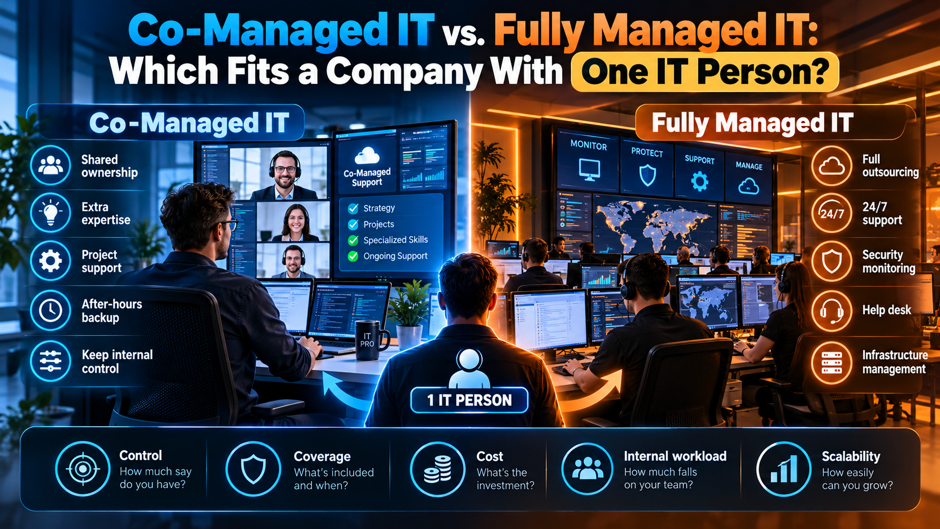
A 60-person professional services firm has 1 IT person who handles the help desk, the email tenant, the firewall and the backups. When she takes a week off, tickets wait. When a ransomware warning arrives on a Saturday, nobody sees it until Monday. The owner asks whether to add a co-managed provider alongside her or to hand the whole function to a fully managed provider, and the quotes that come back aren’t comparable.
This guide compares the 2 models for a company in that position. Pricing and definitions come from 6 vendor articles by Meriplex, Consilien, CyberDuo, Epic IT, 4BIS and Enhanced, all of which sell managed or co-managed IT, so treat every figure as a vendor estimate rather than market data. The scenarios are my illustrative assumptions and my arithmetic. Confirm all prices and contract terms with the providers you’re evaluating, and have counsel review the final agreement.
TL;DR
- Co-managed fits when your IT person is worth keeping. Co-managed IT keeps the internal employee and adds a provider for escalation and security monitoring, while fully managed IT replaces the internal function with the provider. Vendor sources put co-managed at $45 to $175 per user per month and fully managed at $100 to $250.
- A single IT person is a coverage problem before it’s a skill problem. Round-the-clock coverage takes about 4.2 full-time staff by simple arithmetic (8,760 hours divided by 2,080), so 1 person can’t watch alerts alone. In my 60-user scenario, mid-tier co-managed adds $61,200 to $93,600 a year, or 35% to 67% of a second hire.
- Fully managed saves money only if you can let the role go. For 60 users at $100 to $175, replacing the person costs $72,000 to $126,000 a year against $140,000 to $175,000 for the loaded salary, but out-of-scope fees can add 30% to 50%. Confirm every figure with written quotes.
What each model actually hands over
Co-managed IT. Consilien defines it as a partnership in which internal IT staff and an external provider share responsibility for operations and security. The provider supports the existing team rather than replacing it, and Consilien describes internal IT keeping onsite support, business applications and user relationships while the partner takes 24/7 monitoring, escalation support and security operations. Enhanced adds that the internal team keeps control of technology decisions and the roadmap. For a company with a single IT person, that person stays the face of IT, which is also the basic structure behind co-managed IT services.
Fully managed IT. CyberDuo describes a provider paid a flat monthly fee, usually per user, to act as the company’s complete IT and security department. Consilien’s phrasing is blunter: managed IT replaces internal IT, while co-managed IT supports and extends it. In practice, the provider owns the help desk and security monitoring, and your remaining role, if any, is a liaison who manages the vendor, approves changes and handles onsite needs.
The gray zone between them. Neither term has a standard definition, and vendors blur them. A “fully managed” contract may keep an onsite technician on a retainer, while a “co-managed” contract may quietly take over most of the work after a staff departure. Consilien says that if a provider can’t explain how work is divided, that’s a red flag. Ask every provider to put the split in writing before you compare prices, and compare the written splits side by side.
Responsibilities side by side
The table below shows how responsibilities typically split. The co-managed column draws on Consilien’s and CyberDuo’s descriptions, the fully managed column on CyberDuo’s, and the first column describes your current state with a single IT person. Individual contracts vary, so use the table as a checklist for what to ask rather than as a statement of what any provider includes. The rows that matter most for a small department are after-hours coverage, vacation cover and documentation.
| Function | Today (1 IT person) | Co-managed | Fully managed |
| Help desk | Internal, a single queue | Shared; internal keeps onsite and relationships | Provider |
| Escalation (Tier 2 and 3) | Self-taught or none | Provider engineers | Provider engineers |
| 24/7 monitoring | None | Provider | Provider |
| Security operations (EDR, SIEM) | Often limited | Provider, with internal oversight | Provider |
| Vacation and sick cover | None | Provider covers gaps | Provider |
| Strategic roadmap | Informal | Shared, often through a vCIO | Provider’s vCIO or account manager |
| Institutional knowledge | In 1 person’s head | Stays internal, documented jointly | Moves to the provider over time |
| Control of decisions | Internal | Internal | Shared or provider-led, per contract |
The rows for coverage and knowledge decide most cases. After-hours coverage and vacation cover are things a single employee can’t supply, since coverage across 8,760 hours a year takes about 4.2 full-time staff at 2,080 hours each. Adding IT helpdesk support is one way to cover those gaps without immediately replacing the internal role. Institutional knowledge is the opposite: a provider can’t replace what your IT person knows about your applications and users, and that knowledge transfers slowly. A company that values it leans co-managed, while a company where it has already walked out the door leans fully managed.
Why a single IT person changes the math
A single IT person is a coverage problem before it’s a skill problem. Even an excellent generalist works about 2,080 hours a year, while the company’s systems run 8,760. CyberDuo notes that a lone employee can’t cover overnight monitoring, and Epic IT asserts that replicating a managed provider’s depth would take 4 or 5 internal hires, though it doesn’t cost that claim. Neither source says the person is weak. They say the structure leaves gaps that no individual can close.
The second problem is key-person risk. The 4BIS article lists what goes missing when a sole IT person leaves: administrative passwords, vendor account information, network diagrams, firewall settings and backup configurations, often because the environment lives in memory rather than documentation. Enhanced describes the same fragility as a capacity problem that builds quietly, with annual leave hard to take and strategic projects stuck behind the daily queue. A provider offering managed detection and response can also take continuous threat monitoring off that person’s queue. Both authors sell co-managed IT, and neither offers statistics, so treat the point as a risk pattern rather than a measured rate.
Warning signs your IT person is overextended
- Documentation lives in a single head. The 4BIS article lists incomplete documentation among the warning signs of over-dependence. A quick test: ask for the firewall configuration, the backup schedule and the admin credentials list, and see how long it takes to assemble them. If the answer is “I’ll have to look,” a departure or illness would cost days of recovery time that no provider can shorten. Keep credentials in a shared password manager that the owner can also reach.
- Security projects keep slipping. The 4BIS article names delayed security projects as a symptom, Consilien says strategic projects such as ERP or cloud migrations keep getting delayed in overloaded teams, and Enhanced says strategic projects often rely on a single resource. If a multi-factor authentication rollout or a cloud migration has been on the list for more than a year, the daily queue is consuming the capacity. That’s a sign that added hands, including broader cybersecurity services, would help.
- Backups haven’t been tested. The 4BIS article names untested backups as a warning sign. A backup that has never been restored is a hope rather than a control. Ask when the last full restore test happened and who verified it. CISA also recommends organizations regularly test the availability and integrity of backups as part of ransomware preparation. If the answer is never, a provider’s backup oversight is likely worth more than any other part of the package, and it costs little relative to a failed recovery. Ask to see the restore log as well as the schedule.
- Time off is a risk event. Enhanced lists annual leave being hard to take as a symptom. If your IT person hasn’t taken a full week away in a year, or if tickets and alerts pile up when they do, you’re paying in burnout risk and fragility. In my view, burnout often precedes a resignation, and a resignation is the scenario that turns a quiet weakness into an outage. Ask the person how they actually feel about being on call.
Reported prices for each model
Every price in this guide comes from a vendor that sells the service, and none is independent market data. Meriplex and Consilien publish co-managed ranges, while CyberDuo, Epic IT and Meriplex publish fully managed ranges. The ranges overlap, which tells you that scope matters more than the label. Quotes under about $80 per user for fully managed service usually exclude important services, per CyberDuo, so a cheap quote is a prompt to ask what’s missing rather than a bargain.
| Model and scope | Per user per month | Source |
| Co-managed, escalation plus basic monitoring | $45 to $75 | Meriplex |
| Co-managed, escalation plus EDR and patching | $85 to $130 | Meriplex |
| Co-managed, full stack with SOC and SIEM | $130 to $175 | Meriplex |
| Co-managed, basic support / security stack / compliance-driven | $50 to $100 / $100 to $175 / $150 to $250 or more | Consilien |
| Fully managed, small business | $100 to $175 | CyberDuo |
| Fully managed, mid-sized company | $150 to $250 | CyberDuo |
| Fully managed, general range | $100 to $250 (Epic IT, Australia, currency unstated); $150 to $225 (Meriplex) | Epic IT, Meriplex |
The headline ranges are $45 to $175 for co-managed (Meriplex) and $100 to $250 for fully managed (CyberDuo and Epic IT). Meriplex’s own comparison puts co-managed at about $130 to $175 and full outsourcing at about $150 to $225, so at full-stack scope the gap narrows. Companies comparing those figures should also define which IT infrastructure and operations responsibilities sit inside the monthly fee. Meriplex also notes that co-managed costs rise once retained internal headcount is included: its example adds 2 IT staff at $180,000 a year combined, bringing a 150-user co-managed model to about $34,500 a month.
What the price range hides
CyberDuo says out-of-scope charges can add 30% to 50% to a fully managed bill. Apply that to 60 users at $100 to $175 per user and the base of $72,000 to $126,000 a year becomes $93,600 to $189,000. Meriplex lists the usual suspects outside the monthly rate: project work at $150 to $275 an hour or a fixed fee, vCIO planning time, after-hours emergency response, compliance deliverables and software pass-throughs. A 40-hour migration at those rates costs $6,000 to $11,000, and an 80-hour project costs $12,000 to $22,000.
The pricing unit matters too. Meriplex says a device-to-user ratio above 2 to 1 favors per-device pricing and gives benchmarks of $30 to $55 a month per workstation, $90 to $180 per server and $25 to $45 per network device. Its hybrid example for 150 users and 200 devices combines $9,000 per-user, $8,000 per-device and $2,500 security layers into $19,500 a month, about $130 per user. Ask each provider to quote per user and per device for your inventory, then compare the totals rather than the unit prices.
Costs outside the monthly fee
Project work. Meriplex puts project work such as migrations and major deployments at $150 to $275 an hour or a fixed fee. A company with a single IT person usually has a backlog of exactly this kind of work, so the monthly fee may buy coverage while the backlog stays untouched. Ask whether the agreement includes a block of project hours, and request a fixed-fee quote for the 2 or 3 projects you most want finished.
After-hours response. Meriplex says after-hours emergency response is often a paid add-on. If overnight coverage is the reason you’re hiring a provider, confirm in writing that monitoring includes a human response within a stated time, rather than an alert that waits until morning. Ask what counts as an emergency, who decides and how the provider reaches your IT person or the owner at night. Ask how the provider tests its escalation process.
Compliance deliverables. Meriplex lists HIPAA business associate agreements and risk assessments, SOC 2 and CMMC work as items that may be add-ons, and Consilien puts compliance-driven co-managed environments at $150 to $250 or more per user per month. Organizations dealing with defense work should check the current official CMMC program requirements rather than relying on a provider’s summary. If your customers or insurer ask for audit evidence, price that work separately and ask who produces the evidence, who stores it and how often it’s refreshed. Ask for a sample deliverable so you can judge the quality.
Software and hardware pass-throughs. Meriplex notes that endpoint protection and backup platforms may be billed at cost or with markup, and it gives no amounts. Ask whether the tools live in your tenant or the provider’s, who owns the licenses, and what happens to the data and history if you leave. The same ownership question applies when Microsoft 365 services are part of the provider’s package. Tools in the provider’s tenant can disappear with the contract. Ask for a licensing schedule that lists every tool and its renewal date.
Annual cost scenarios
To compare the models, here are 3 company sizes built from the published ranges. Every pick is my assumption. Co-managed uses Meriplex’s $85 to $130 per user tier for escalation, endpoint protection and patching, fully managed uses CyberDuo’s $100 to $175 small-business band, and the loaded cost of the IT person is CyberDuo’s $140,000 to $175,000 for a mid-level hire. The 120-user case stretches the small-business band, so treat it with caution.
| Annual cost (illustrative) | 30 users | 60 users | 120 users |
| Co-managed fee only | $30,600 to $46,800 | $61,200 to $93,600 | $122,400 to $187,200 |
| Co-managed fee plus the IT person | $170,600 to $221,800 | $201,200 to $268,600 | $262,400 to $362,200 |
| Co-managed fee as share of a loaded salary | 17% to 33% | 35% to 67% | 70% to 134% |
| Fully managed, IT role removed | $36,000 to $63,000 | $72,000 to $126,000 | $144,000 to $252,000 |
| Fully managed with 30% to 50% extras | $46,800 to $94,500 | $93,600 to $189,000 | $187,200 to $378,000 |
| Fully managed versus keeping only the IT person | Saves $77,000 to $139,000 | Saves $14,000 to $103,000 | Costs $112,000 more to saves $31,000 |
A few cautions apply. The last row compares a provider with full coverage against a lone employee with no overnight monitoring, so it isn’t an equal-coverage comparison. And the extras row shows how quickly a scope gap can erase the saving: at 60 users, the top of the fully managed range with extras, $189,000, exceeds the loaded salary alone. At small sizes the savings are large, and at 120 users they largely disappear.
Where the in-house break-even sits
CyberDuo says a mid-level hire costs about $140,000 to $175,000 a year once 25% to 30% is added for benefits and overhead, and puts break-even between in-house and managed service at roughly 150 to 200 employees. Epic IT, an Australian provider, says the lines cross on paper at about 80 staff but treats that as a practical rather than a cost crossover. The 2 vendors disagree by a factor of about 2, which is a reminder that these are rules of thumb, not measurements.
You can test the crossover yourself. Divide the loaded salary by 12 and then by the per-user fee. At $100 per user, a provider costs less than a $140,000 to $175,000 salary until about 117 to 146 users. At $150 it’s 78 to 97 users, at $175 it’s 67 to 83, and at $250 it’s 47 to 58. That arithmetic is mine, and it assumes the provider delivers coverage the person can’t, so a company of 60 sits near the middle of the range.
When co-managed fits
- Your IT person is capable and worth keeping. If the person knows your line-of-business applications, your users and your vendors, that knowledge is expensive to rebuild. Consilien describes internal IT keeping business applications and user relationships under co-managed arrangements, with the partner handling monitoring and escalation. Replacing a knowledgeable employee with a provider means paying to relearn what you already own, and the relearning period is when mistakes happen. Count that relearning cost before you decide.
- You need coverage rather than capability. If the gaps are nights and vacations, a provider fills them directly. In my 60-user scenario, the mid-tier co-managed fee of $61,200 to $93,600 a year is 35% to 67% of a loaded salary, a fraction of what a second hire would cost, and it adds more hours than a hire would. The employee stays, and the gaps close. Confirm the coverage hours and response times in writing before you sign.
- Projects keep getting delayed. Consilien lists delayed strategic projects such as ERP or cloud migrations as a common reason companies adopt co-managed IT. If your IT person spends the week on tickets and the migration slips every quarter, a provider can take the tickets or provide application support services around the systems consuming the team’s time. Decide which first, then write that split into the agreement so the work moves instead of the backlog. Without that split, both parties assume the other will handle the project.
- An audit or growth phase is coming. Consilien names NIST alignment and CMMC requirements as triggers, and Meriplex lists compliance obligations among its cost drivers. A growing company needs documentation and evidence that a lone IT person rarely has time to produce. A co-managed provider can supply a vCIO or vCISO function while the internal person keeps day-to-day operations, which suits a growth phase. Ask the provider which audit evidence it can produce.
When fully managed fits
The IT person is leaving or is entry-level. If a departure is planned, or the role is mostly basic help desk, co-managed buys a provider to supervise a seat you may soon refill. Fully managed avoids the recruiting cost and the gap, because the provider already has the staff. The trade-off is that you give up the internal knowledge, so get documentation completed before the person leaves, and ask the provider to run a structured handover.
A small company with a light environment. CyberDuo says fully managed suits companies under about 150 employees with no internal IT. Your company has an IT person, but at 30 users my scenario shows the savings can be $77,000 to $139,000 a year against the loaded salary, and a light environment of cloud applications and laptops needs little institutional knowledge. Verify that claim by listing your applications and asking which ones the person alone understands.
You want a single accountable vendor. Co-managed arrangements split responsibility, and splits create disputes about who owned a failure. Fully managed puts accountability with 1 party, which simplifies service reviews and contract remedies. The cost is dependence. The sources I read don’t discuss lock-in, so in my view you should demand documentation ownership, a defined exit process and the right to export your data and configurations. Ask to see the provider’s termination assistance policy in the draft contract.
Decision matrix by situation
The matrix below is my judgment, built from the sources above and labeled as such. It isn’t a rule from any vendor. “Better fit” names the model I’d price first, not a guarantee, and every row needs written quotes before you act. Use it to decide which quotes to request, and let the quotes and contract terms settle the choice. Revisit the matrix after 6 months, when you know how the arrangement works in practice.
| Situation | Better fit | Why (my judgment) |
| IT person is strong but overloaded | Co-managed | Adds coverage and capacity while keeping the knowledge |
| IT person is leaving within 6 months | Fully managed, or co-managed with a backfill plan | Avoids a gap; compare against recruiting a replacement |
| Under about 30 users, light applications | Fully managed | The saving versus a salary is largest at small sizes |
| Audit or compliance work is coming | Either, with compliance scope priced | Consilien’s compliance tier runs $150 to $250 or more per user |
| 100 or more users, heavy line-of-business applications | Co-managed | Internal knowledge becomes costly to replace |
| No documentation and untested backups | Either, starting with a documentation project | Project work is billed at $150 to $275 an hour |
Notice how often the answer turns on the person rather than the headcount. A capable employee shifts the answer toward co-managed even at small sizes, while a departing employee shifts it toward fully managed even at larger ones. That’s why the first step in the selection plan below is an honest assessment of the role. Do that assessment before you request quotes, so the providers price your real situation instead of a generic situation. Involve the IT person in it, because their view of the gaps is the most accurate.
Contract terms to require
- A written responsibility matrix. Consilien says that a provider that can’t explain how work is divided is a red flag. Require a table that names, for each function, who is responsible, who is accountable and who must be consulted. Include after-hours alerts, patching, backup testing, user onboarding and offboarding, vendor management and security incident response. Review the matrix at each quarterly meeting and update it when your IT person’s role changes.
- Response and escalation commitments. Ask for response and resolution times by severity, a named escalation path to senior engineers and credits when targets are missed. Meriplex says after-hours emergency response is often a paid add-on, so confirm it’s included if overnight coverage is your reason for buying. Ask how the provider measures response time, and request a monthly report so you can check the numbers. Include the process for reporting an outage outside business hours.
- Documentation and credential ownership. The 4BIS article stresses documentation of network diagrams, backups, vendor relationships and recovery processes. Require that all documentation and credentials belong to you, are stored where you can reach them and are delivered on request. A clause that gives you a complete export within a defined period costs little to ask for and is hard to obtain after a dispute. Test the export in the first quarter so you know it works.
- Term and exit. The sources I read don’t state typical contract lengths, so ask each provider directly. In my view, prefer a first-year commitment with a clear exit for cause, a reasonable notice period and a handover obligation. Ask about early-termination fees, price increases at renewal and what happens to tools and data. Have counsel review the agreement before you sign. Ask each provider for a sample agreement early, so the legal review doesn’t delay the start.
How to split the work in a co-managed agreement
Keep the relationships and the context. Let your IT person own user relationships, onsite needs, application knowledge and the vendor contacts for line-of-business systems. Consilien describes internal IT keeping those responsibilities. This protects the part of the job a provider can’t replicate and gives your employee a clearer, more sustainable role. Write it into the matrix so the provider doesn’t gradually take over the visible work and leave only the tedious tasks.
Hand over the night shift and the security stack. Give the provider 24/7 monitoring, escalation support, patching and security operations, which are the functions a single employee can’t cover. Meriplex’s mid-tier combines escalation, endpoint protection and patching at $85 to $130 per user per month. Providers using offshore outsourcing services can also extend coverage through teams working across time zones. Ask for a runbook that says who is called and what authority the provider has to isolate a device or lock an account at night.
Share the roadmap. A vCIO or similar planning role gives a lone IT person someone to test ideas with and a regular forum for budget and project decisions. Consilien lists a vCIO for roadmap and budgeting as a typical co-managed inclusion. Set a quarterly planning meeting, agree 3 priorities and track them. Without a forum, the roadmap tends to disappear behind the ticket queue. Review progress at each meeting and drop items that stall.
A 60-day plan for choosing and starting
In the first 2 weeks, assess the role honestly. List the systems your IT person alone understands, the tasks that wait when she’s away, and the work she’d drop if she could. Document the basics: credentials, network diagrams, backup schedules and vendor contacts. Then write a scope and a responsibility draft you can send to providers. Providers quote what you ask for, so a written scope produces comparable quotes where a verbal request produces marketing.
In weeks 3 and 4, request quotes for both models from at least 3 providers, itemized by service and project rate. Check references from companies with a similar size and an internal IT person. In weeks 5 through 8, negotiate the matrix, response commitments, documentation ownership and exit terms, run a restore test with the provider watching, and start with a 30-day onboarding period. Confirm every price in writing before the contract starts.
FAQs
What’s the difference between co-managed and fully managed IT?
Co-managed IT keeps your internal IT staff and adds an external provider that shares responsibility for support and security monitoring. Fully managed IT hands the function to the provider, which acts as your IT and security department. Consilien puts it as managed IT replaces internal IT while co-managed supports and extends it. The terms aren’t standardized, so ask each provider to document who does what in writing. The label matters less than the split of duties in the agreement.
Which is cheaper for a company with a single IT person?
It depends on the size and the scope. For 60 users, my scenario shows co-managed adding $61,200 to $93,600 a year on top of the salary, while fully managed at $100 to $175 per user costs $72,000 to $126,000 and removes the role. Fully managed looks cheaper only when you can let the person go, and out-of-scope fees of 30% to 50% can erase the saving. Compare written quotes with equal coverage.
How much does co-managed IT cost per user?
Meriplex reports $45 to $175 per user per month for mid-market organizations: $45 to $75 for escalation and basic monitoring, $85 to $130 with endpoint protection and patching, and $130 to $175 with a full security stack. Consilien reports $50 to $250 overall, with compliance-driven environments at $150 to $250 or more. Both sell co-managed IT, so treat the figures as estimates and confirm with quotes. Ask for a quote based on your actual user and device counts.
Can co-managed IT replace my IT person later?
It can, but plan for it. The provider can take over more of the work if your employee leaves, and some contracts allow you to expand scope. The risk is that knowledge walks out the door first, so document credentials and application details now. Ask any provider how it would handle a scope increase, what the price would be and how long a transition takes, and put the answers in the agreement.
What happens if my only IT person quits?
According to 4BIS, businesses often lack administrative passwords, vendor account information and documentation when the sole IT person leaves, which slows recovery and support. The article offers no figures. Reduce the risk before it happens: keep credentials in a shared password manager, maintain network diagrams and backup records, and test restores. A co-managed or fully managed provider can cover the gap, but it needs access and documentation to do so. Do this before any departure forces the issue.
Does co-managed IT include 24/7 monitoring?
Often, but not always. Consilien lists 24/7 monitoring, escalation support and security operations as typical provider responsibilities, while Meriplex says after-hours emergency response is frequently a paid add-on. Ask whether monitoring includes a human response at night, what the response time is and who authorizes actions such as isolating a device. Get the commitment in the contract, with credits if the provider misses it. Test the process once during onboarding, ideally with a simulated alert.
How many employees before in-house IT beats outsourcing?
Sources disagree. CyberDuo puts break-even at roughly 150 to 200 employees, while Epic IT, an Australian provider, says the lines cross on paper near 80 staff. My arithmetic, dividing a $140,000 to $175,000 salary by per-user fees of $100 to $250, gives a range of about 47 to 146 users. Treat it as a rule of thumb and test it with quotes. Whichever number you use, remember that the crossover compares salary against coverage, and that a provider covers hours the person can’t.
What should I ask a provider before signing?
Ask who does what in a written matrix, what response times apply by severity, whether after-hours response is included, what’s billed outside the monthly fee, and who owns the documentation and tools. Also ask for references from companies with a similar size and an internal IT person, and how the provider hands over if you leave. Have counsel review the contract, and confirm every price in writing. Ask for a trial period or a 30-day onboarding review.
