
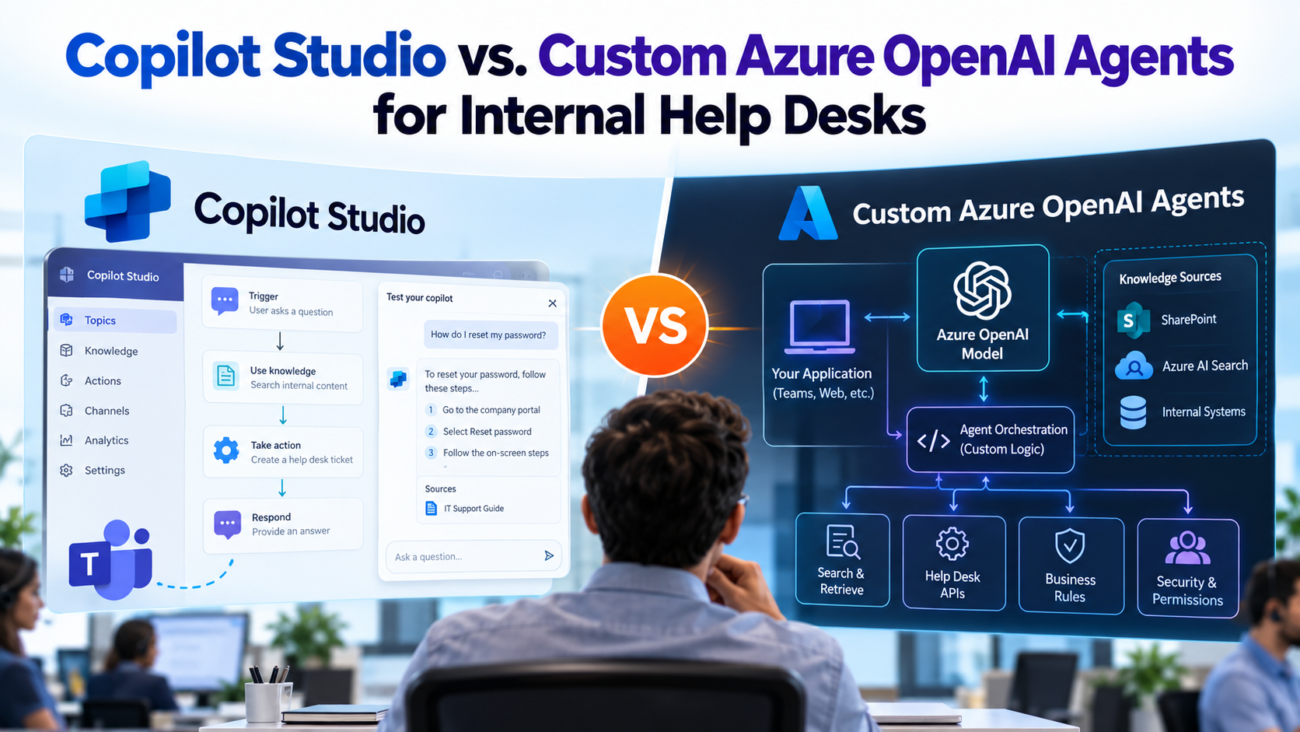
An employee can’t sign in after a laptop update. Another needs the current travel policy. A manager wants to know why a software request is still pending. These questions may all reach the same help desk, but they need different answers and different levels of access. An AI agent can reduce the time spent finding guidance and collecting ticket details. The platform behind that agent determines how much the IT team must build and maintain.
The Copilot Studio vs Azure OpenAI choice affects more than the first launch. It changes how the assistant searches private content, checks identity, calls ticketing systems, reports its mistakes, and charges for use. Microsoft also offers managed agent features through Microsoft Foundry, so building on Azure no longer means creating every runtime component yourself.
This guide compares both approaches for employee IT support, HR policy questions, access requests, and service desk workflows. It covers the hidden work behind a useful agent: clean source material, permission checks, controlled actions, human escalation, and a cost model based on actual usage.
TL;DR
In a Copilot Studio vs Azure OpenAI comparison, Copilot Studio is often quicker for a Microsoft 365-heavy organization with common employee questions. A custom Azure OpenAI design offers more control over retrieval, application logic, and connections to unusual internal systems, but the organization owns more engineering work. Neither route makes private content safe by default, and neither should perform sensitive account changes without strict checks. Compare the options using real help desk tickets, actual source permissions, and a measured pilot. A hybrid design can put a familiar chat experience in Teams while a separate Azure service handles complex tasks.
What Each Platform Actually Builds
The question in Copilot Studio vs Azure OpenAI starts with the product boundary. Copilot Studio is a low-code environment for creating agents, connecting approved sources, setting instructions, adding actions, and publishing to supported channels. Its value comes from the surrounding Microsoft platform. A team can spend more time on employee questions and less on writing the chat application itself.
A custom Azure OpenAI agent is an application built around model calls. Its developers decide how requests reach the model, what documents are retrieved, which tools can run, and how results appear to employees. The model provides language capabilities. Authentication, ticket access, search, storage, and most operational rules still need application design.
Microsoft Foundry adds an important middle ground. Its Agent Service overview describes managed prompt agents and hosted agents that run developer code. This means Azure OpenAI agents can use managed agent features without a team assembling every hosting feature from scratch. Foundry also supports model options beyond Azure OpenAI, depending on the agent type and deployment.
The comparison is therefore about the amount of control the team needs and the work it is prepared to own. Low-code doesn’t mean zero configuration. Custom code doesn’t always mean managing servers. Both approaches can produce a useful employee assistant when their access rules and support processes are designed well.
A buyer should also separate an employee-facing agent from Microsoft 365 Copilot itself. Licensing a Microsoft 365 Copilot user doesn’t automatically settle the cost or permissions for every independent agent and workflow. Usage location, identity, license terms, and agent features all matter.
The Internal Help Desk Work That Matters Most
A help desk request can be a knowledge question, a status lookup, or an action that changes a system. Treating these as one category is a common design mistake. For Copilot Studio vs Azure OpenAI, first sort tickets by the decision the agent must make and the risk of getting it wrong.
Knowledge questions ask for an approved answer: how to connect to the VPN, where to find the expense policy, or which device standard applies to contractors. These are good early targets for internal help desk AI because a grounded answer can cite the current source and end with a clear next step. The source document needs an owner and an update date, or the agent may repeat an old procedure.
Status questions are different. An employee asking about an open laptop request needs an authorized lookup against a live record. A language model can’t establish ticket status from a training document. The agent must verify who is asking, query the service platform, and show only records that person may see.
Action requests carry the most risk. Creating a routine ticket may be safe after the agent collects required fields. Granting access to payroll records is not. The second request may require manager approval, a privileged workflow, and an audit trail. Good AI help desk automation moves each request through the controls already used by the organization.
A practical scope review should answer 5 questions: Which topics generate repeat contacts? Which answers have trusted documents? Which records require live lookups? Which actions need approval? Where must a human take over? This exercise produces a better agent backlog than a broad promise to answer anything employees ask.
Copilot Studio Architecture for Employee Support
In Copilot Studio vs Azure OpenAI, the low-code route fits teams that store help articles in SharePoint and want employee questions in Teams. A typical setup uses Microsoft authentication, selected knowledge sources, agent instructions, approved tools, and a publishing channel. Makers configure these parts in the product rather than building a chat front end and orchestration layer from the ground up.
For document answers used by internal help desk AI, the SharePoint knowledge guidance explains that supported grounding uses the permissions of the employee asking the question. Someone without access to a SharePoint item should not get an answer from that item through this route. The team still has to inspect its library permissions, source selection, file restrictions, and authentication settings before release.
Where the Low-Code Route Fits
The strongest initial use cases are common policy questions, device setup instructions, and simple service requests. A service desk owner can review answers and update topics without waiting for a full application deployment. The product also provides ways to test and review agent conversations, subject to the organization’s settings.
Copilot Studio agents can be published into Teams after the team configures access and sharing. That matters for adoption because employees can ask for help in a tool they already use. Publishing alone doesn’t grant users permission to the underlying knowledge or connected systems.
There are limits to this convenience. A knowledge source may have format or search restrictions. A connector may not support the exact API operation a service desk uses. Detailed branching can become harder to manage when many exceptions build up. Copilot Studio is a strong choice when the required process fits its supported features and governance rules.
Custom Azure OpenAI Agent Architecture
For Copilot Studio vs Azure OpenAI, the custom route gives developers control over the request path. An employee signs in through an approved application. The backend checks identity and permissions, gathers relevant material, sends a limited context to the model, and returns an answer with supporting sources. If the request needs an action, the backend decides whether to invoke a tool and records the result.
A common architecture uses an application front end, Microsoft Entra ID, an orchestration service, Azure AI Search or another retrieval layer, the model endpoint, and narrowly scoped APIs to internal systems. Each component has its own permissions and monitoring needs. The developer also chooses how long conversation state is stored and which details appear in logs.
When teams need answers grounded in internal articles, the Azure RAG design guide describes how retrieval, document preparation, search methods, and evaluation influence the quality of answers grounded in private content. That work matters more than choosing a clever system prompt. Poorly indexed help articles can produce convincing but incorrect answers on either platform.
What the Engineering Team Owns
A custom team must define failure behavior. If search returns no approved article, the agent should say it couldn’t verify the answer. If a ticket API times out, it should avoid pretending the ticket was created. If a user requests an account change, the application should require the relevant authorization before executing an operation.
It must also maintain release processes for prompts, tools, search indexes, and application code. Foundry can manage agent runtime functions, but it doesn’t decide an organization’s access policy or whether a specific help desk action is safe. Those choices stay with the organization.
A custom architecture earns its cost when the help desk depends on unusual identity rules, custom ticketing logic, or several legacy systems that don’t fit standard connectors. Internal help desk AI becomes an application engineering problem in those environments. The added control is useful only if the internal help desk AI team can run the service after launch.
Side-by-Side Capability Comparison
Copilot Studio vs Azure OpenAI becomes clearer when the comparison follows support requirements rather than a generic feature list. Neither product has one permanent advantage in every category. A custom build may have better control in a specific workflow and still take longer to deliver.
| Decision Area | Copilot Studio | Custom Azure OpenAI Agent |
| Build approach | Low-code configuration with supported tools | Code-led application with chosen services |
| Teams entry point | Supported publishing path | Custom client or supported managed publishing route |
| Knowledge | Built-in supported sources and grounding | Chosen search pipeline and source processing |
| Identity | Microsoft authentication options and connectors | Application-defined identity and authorization flow |
| Ticket actions | Agent flows, connectors, and custom tools | Custom API calls and action policy |
| Interface control | Product channel options | Full control in a custom application |
| Testing | Built-in evaluation features | Team-defined tests or managed Azure evaluation tools |
| Operations | Platform functions plus agent administration | Application operations plus any managed service functions |
| Charging | Copilot Credit and license rules | Model tokens, search, hosting, and other services |
Knowledge Retrieval and Answer Quality
Answer quality begins before the model receives the question. A help article can be outdated, duplicated, limited to the wrong audience, or written for an earlier product version. An assistant that finds that article quickly still gives bad guidance. Both teams need a content owner and a way to withdraw incorrect instructions.
For Copilot Studio, check how the chosen knowledge source retrieves files, respects permission boundaries, and cites answers. Confirm whether the intended documents are supported under the actual tenant configuration. Microsoft notes in its generative answer limitations that model answers can be incorrect and may vary between similar questions. A polished response is not proof that the cited procedure is current.
For a custom system, retrieval choices are wider. The team can decide how to split large documents, combine keyword and vector search, rank results, and filter by department or device type. The Azure RAG documentation explains both classic retrieval and newer agentic retrieval paths. Some advanced capabilities remain in preview, so deployment status needs checking before a production decision.
Test the Answer, Not the Demo
Use real categories from closed tickets and approved knowledge articles. Ask a direct question, then a vague version of the same question. Include expired documents and conflicting instructions. Check whether the agent gives the correct policy date and refuses to guess when the source isn’t clear.
A reliable internal help desk AI pilot should record whether the answer is supported, whether the citation opens for that employee, and whether escalation was appropriate. It should also test follow-up questions, since earlier chat context can change what the model says. The score that matters is the share of valid employee requests resolved correctly, with failures visible for review.
Retrieval quality is a shared requirement in Copilot Studio vs Azure OpenAI. No amount of agent configuration can repair a knowledge base whose ownership and permissions are unclear.
Identity, Permissions, and Security
Security is a central issue in Copilot Studio vs Azure OpenAI because an internal assistant may encounter salary guidance, disciplinary records, security procedures, and employee account details. The core rule is simple: a person should receive only information and actions they already have permission to use. A model instruction saying “keep this private” does not enforce that rule.
Copilot Studio offers user authentication settings that vary by channel and sign-in method. Teams support can make the initial identity step easier, but actions may use different connections. For each tool, verify whether it runs under the employee’s identity or a service identity. A broad service connection can accidentally let ordinary users perform privileged operations.
Custom systems must enforce the same checks in their backend. If search uses Azure AI Search, the document access controls describe permission filtering options. Some identity-aware access features are in preview. A team shouldn’t assume that copying SharePoint files into a new index also copies every permission rule automatically. The index and the source must stay aligned as access changes.
Security also includes hostile text inside otherwise useful documents. A retrieved page may contain instructions that try to redirect the agent or expose secrets. The OWASP LLM risks highlight prompt injection and excessive agent authority. Treat retrieved content as data, validate every requested action in trusted code, and never let a document grant new permissions.
For data handling, Microsoft’s Foundry privacy terms state that prompts and completions for covered Azure model services aren’t used to train foundation models without permission or instruction. That policy doesn’t remove the need to examine logs, retention, regional processing, or connected tools. Organizations remain responsible for their own application data paths.
Enterprise AI agent security requires reviews by identity, platform, and help desk owners. Teams should test users from different departments, recently removed employees, and accounts with no access to the source. The goal is to prove permission boundaries with actual requests. That is the test for internal help desk AI security.
Integrations and Ticket Actions
For Copilot Studio vs Azure OpenAI, ticket actions expose the difference between a conversation and a controlled workflow. Reading a ticket is different from changing its status. Creating a software request is different from approving the purchase. These distinctions should appear in the agent’s tools and permissions, not only in its written instructions.
Copilot Studio can call agent flows as tools. A flow can gather required details and pass a request to an approved service. Connectors can reduce integration work when the ticket platform and operations already have supported actions. The team must still confirm connector licensing, failure responses, and the identity used for each operation.
Azure OpenAI agents can call the same kind of service through an API built for the help desk. The developer may create an action contract specifying permitted fields and required approval state. This approach is attractive when internal APIs contain business rules that don’t map cleanly to an available flow or connector.
Keep High-Risk Work Behind Approval
For ticket creation, the agent can ask for a device type, a location, and a short problem description, then display the details before submission. For access changes, the flow should verify the employee’s role and check the organization’s approval system before doing anything. Password resets and account recovery also need approved identity checks outside the chat model.
AI help desk automation should always return a clear receipt when it performs an action. Show the ticket identifier, the recorded request type, and what happens next. If the backend reports an error, the agent should say the action failed and offer a supported route to a person. An unconfirmed success message can leave an urgent request unhandled.
Pricing and Total Cost of Ownership
The Copilot Studio vs Azure OpenAI cost comparison starts with different billing units. Copilot Studio pricing needs a shared workload before anyone can judge which route costs less. Count the expected conversations, average response length, retrieval activity, actions, and percentage of cases that need escalation. Then calculate each design against its current service terms.
For usage-based estimates, Microsoft’s Copilot Credit rates vary by the activity an agent performs. Classic answers, generative answers, actions, and some grounding operations have different credit amounts. Eligible employee-facing use by authenticated Microsoft 365 Copilot license holders can receive special billing treatment. That doesn’t mean every interaction across every channel is free. Check the live licensing guide against the actual users and configuration.
Azure OpenAI agents generally incur charges tied to model input and output usage. A production application may also pay for search capacity, storage, networking, logs, and hosting. Foundry Agent Service has its own resource and tool charges depending on the chosen agent type. None of these costs can be determined reliably from the model price alone.
Compare the Whole Monthly Run Cost
For Copilot Studio, estimate monthly cost as the billed usage across answer types, retrieval features, and tool calls, plus any relevant subscription or integration charges. For custom Azure, estimate model input and output, retrieval infrastructure, application runtime, data storage, monitoring, and support labor. Include development time and the cost of keeping source permissions current on both sides.
| Cost Driver | Question to Ask |
| Employee volume | How many people will use the agent each month? |
| Request mix | What share needs documents, live lookups, or actions? |
| Model usage | How much context and output does a typical answer use? |
| Integration work | Which connectors or APIs require paid or custom work? |
| Support effort | Who fixes failures and reviews changes after release? |
| Growth | What happens when usage or document volume increases? |
For a worked example, assume an internal help desk handles 1,000 requests each month: 700 questions answered with generative responses and 300 requests completed through agent actions. Treat each request as 1 billable response or action and assume no extra graph grounding, reasoning, or agent-flow charges. Microsoft lists 2 Copilot Credits for a generative answer and 5 for an agent action. At the published US pay-as-you-go rate of $0.01 per credit, that is (700 x 2 + 300 x 5) = 2,900 credits, or $29 in Copilot usage for the month.
For the custom route, assume the same 1,000 requests use 3,500 input tokens and 500 output tokens each. That produces 3.5 million input tokens and 0.5 million output tokens. Using an illustrative GPT-4.1 Global Standard rate of $2 per million input tokens and $8 per million output tokens gives $7 + $4 = $11 in model charges. The other amounts below are explicit budgeting assumptions, not Microsoft quotes or observed industry averages.
| Monthly Cost Line | Copilot Studio Example | Custom Azure Example |
| Agent usage | 2,900 credits x $0.01 = $29 | 3.5M input x $2/M + 0.5M output x $8/M = $11 |
| Other services | $50 for integration services (assumed) | $150 for search, app hosting, and logs (assumed) |
| Ongoing staff time | 8 hours x $75 = $600 (assumed) | 18 hours x $75 = $1,350 (assumed) |
| Total per month | $679 | $1,511 |
Under these assumptions, the Copilot Studio route totals $679 per month and the custom Azure route totals $1,511. Neither is a guaranteed invoice. The Copilot route can also incur extra charges for other credit-consuming features, and Azure charges can vary by model, region, retrieval design, and deployment type. A team already paying for Microsoft 365 Copilot licenses might have different eligible agent billing, and either option might need more engineering during its first rollout. Use the calculation to test your own workload and rate card rather than to declare a permanent winner.
Copilot Studio pricing may be attractive for a focused Microsoft 365 deployment because less application code needs to be maintained. A custom route can be cost-effective when engineering capacity already exists and the workload requires functions the low-code route would handle awkwardly. A paid platform license or lower token rate, viewed alone, tells very little about total cost.
For Copilot Studio pricing and custom Azure costs, run the same tests and inspect billing and telemetry. Avoid treating a vendor calculator as a guaranteed invoice. The best estimate includes a range for demand and more expensive requests. Copilot Studio pricing should be checked again after the first billing period.
Implementation Steps for Each Route
Copilot Studio vs Azure OpenAI should be tested through the same acceptance criteria. The implementation work differs, but a fair pilot uses the same employee questions and the same source documents. A shared test set prevents the faster prototype from winning simply because it answered easier questions.
Building a Copilot Studio Pilot
Start with one help desk category, such as device setup guidance. Choose the approved knowledge site and check that employees have the intended access. Create the agent, set its scope, connect the source, and configure Microsoft authentication for the selected channel. Keep unverified answers out of the pilot by giving the agent a clear fallback path.
Next, add one controlled workflow that the help desk already understands. Ticket creation is a sensible candidate if the required fields and service API are stable. Test it with missing information, duplicate requests, and backend failures. Publish only to the pilot audience after admin review. Record unsuccessful answers for content repair rather than trying to hide them with a longer prompt.
The remaining work concerns ownership. Assign someone to edit the source guidance, someone to review failed interactions, and someone to approve new actions. For a small internal help desk AI project, those named roles matter more than an elaborate launch announcement.
Building a Custom Azure Pilot
Begin with an application and identity design. Decide where employees will chat and how the backend obtains a verified user context. Add a limited set of source documents to a retrieval index. Apply document permissions before snippets enter the model context. Confirm that users with different rights receive different eligible results.
Then connect a model endpoint, set a fixed list of permitted tools, and return citations with each document answer. Include timeouts and retries for external systems, but prevent retries from creating the same ticket twice. Choose a managed Foundry runtime or a separately hosted service based on the level of control needed and the team’s operating skills.
Only after the read-only experience passes should the team introduce an action. Require an explicit user confirmation and let server-side code enforce approvals. Keep model instructions separate from those authorization rules. Every action should generate a record the service desk can trace back to a request.
Both pilots need an exit condition. If a significant group of common questions lacks reliable source material, repair the articles before adding more model logic. If the selected ticket system doesn’t expose safe operations, restrict the agent to guidance and escalation until an approved API exists.
Testing, Operations, and Measurable Results
In Copilot Studio vs Azure OpenAI, a short demonstration cannot show what happens when articles change or an employee loses access. Operations need repeatable tests that run after changes. They also need a clear owner for incidents involving wrong answers, private information, or actions that didn’t finish.
Copilot Studio provides agent evaluation tools that can run test sets against expected responses and quality measures. A team can compare runs when it changes instructions or sources. Test credentials still matter because an answer available to an administrator may be forbidden to a typical employee.
Azure OpenAI agents need similar checks in their deployment process. Foundry agent tracing guidance covers the use of Application Insights to inspect model activity and tool behavior. Those traces can contain sensitive inputs. Restrict who can view them and set retention rules that match the organization’s policy.
Metrics Worth Tracking
Measure the rate of answers that reviewers confirm are correct and supported by approved sources. Track how often the agent escalates when it should. Record tool success separately from chat completion so a pleasant message doesn’t count as a finished ticket. Include permission-test failures as a release blocker rather than a score to improve gradually.
For day-to-day support, compare time to a verified answer and the number of tickets requiring human follow-up. Measure employee satisfaction only after checking that the task was actually resolved. An employee may rate a confident answer highly even when it points to the wrong procedure.
AI help desk automation needs routine maintenance. Retest after knowledge changes, connector updates, model changes, or policy revisions. Keep a version history and a way to turn off a faulty action without taking every knowledge answer offline. If the help desk can’t explain who fixes the agent on Monday morning, the service isn’t ready for general release.
When a Hybrid Design Makes Sense
A hybrid Copilot Studio vs Azure OpenAI design makes sense when employees need Teams but the help desk depends on custom systems. Copilot Studio can handle conversation and supported Microsoft 365 knowledge, while an Azure service enforces complex business rules behind a narrow API. The employee sees one assistant. Azure OpenAI agents can handle specialized requests while trusted backend code controls any sensitive work.
For AI help desk automation, divide responsibility by function. Use the conversation layer for questions and safe request collection. Put privileged lookups and account actions behind authenticated services. Send only the information required for each operation. Keep approval records in the system that owns the decision.
Hybrid AI help desk automation can reduce duplicate user interfaces, but it also creates boundaries that must be tested. A connector calling an Azure service may use an application identity with broad access. The receiving service must still check the requesting user and the operation requested. Otherwise, the secure custom backend becomes an unsafe shortcut.
A hybrid approach is worth considering when most questions are standard but a small number of workflows need special code. If every step depends on complex custom APIs, a direct custom application may be simpler to operate. If the use cases are routine, adding an Azure layer without a clear need only increases the number of places where errors can occur.
Final Recommendation
For most Microsoft 365-centered employee support teams, begin the Copilot Studio vs Azure OpenAI decision with the simplest approved use case. Copilot Studio is a practical first candidate when Teams is the preferred channel and the needed knowledge and ticket actions fit supported features. A custom Azure agent is more appropriate when source access rules, application behavior, or legacy systems require control beyond those features.
The deciding evidence should come from a pilot that covers correct answers, permission checks, failed actions, and operating costs. Include both common tickets and cases the assistant should refuse or send to a person. A system that declines an unsafe request is doing its job.
Choose the route your organization can maintain after the first release of AI help desk automation. Clear source ownership and strict action controls will matter more to employee trust than the platform label on the architecture diagram.
Frequently Asked Questions
Is Copilot Studio Better Than Azure OpenAI for a Help Desk?
Copilot Studio can be the better starting point for a help desk already using Microsoft 365 and supported connectors. A custom agent gives developers more control over unusual workflows and source processing. Compare both against the same real tickets and permission tests before selecting one.
Can Copilot Studio Answer Questions From SharePoint?
Yes. It can use supported SharePoint knowledge sources to ground responses, with access tied to the signed-in employee’s permissions under supported configurations. Administrators must still check source access, authentication, and file restrictions. The agent shouldn’t replace a SharePoint permissions review.
Can Custom Azure OpenAI Agents Work in Microsoft Teams?
Yes, provided the team creates or uses a supported integration and publishes it according to the chosen architecture. Microsoft Foundry offers managed publishing options for supported agent types. A custom application may instead use its own Teams integration and backend service. Verify current channel support before design approval.
Do Employees Need a Copilot License to Use an Agent?
Not every published Copilot Studio agent requires each employee to hold a separate agent license. Billing depends on the channel, license eligibility, and agent activity. Some authenticated employee use by Microsoft 365 Copilot license holders receives special billing treatment. Check the current licensing guide for the intended deployment.
How Does Copilot Studio Pricing Compare With Azure OpenAI?
Copilot Studio pricing is driven by applicable credits and license conditions. A custom Azure application pays for model use and other resources such as search and hosting. The cheaper route depends on actual request volume and action mix. Copilot Studio pricing also needs staffing costs in the comparison. A workload-based estimate is more useful than comparing a single published rate.
What Is the Main Risk With Internal Help Desk AI?
The biggest concerns are wrong guidance and unauthorized access or actions. A credible answer can still rely on an expired policy. Test permission boundaries in the source and tool layers, require approvals for sensitive changes, and give the employee a clear route to a human when verification fails.
Can an AI Agent Reset Passwords Automatically?
An agent can guide a user through an approved password reset process or start a controlled workflow. It shouldn’t treat a chat message as proof of identity. Account recovery must follow the organization’s identity verification rules, permission checks, and logging requirements before any reset occurs.
Is Azure AI Search Required for a Custom Agent?
No. A custom agent can use a different retrieval service or a managed tool suited to its documents. Azure AI Search is a common option when teams want control over indexing and ranking. Whatever service is chosen must support the required access rules and return evidence the agent can cite.
Can Both Platforms Create Service Desk Tickets?
Yes, when they can reach an approved ticketing API or connector. The agent should collect required fields, confirm the request, and report the actual result from the service. A failed API call must never be presented as a completed ticket. Use the existing ticket platform as the record of truth.
Does a Custom Azure Agent Keep Data Private Automatically?
No. Azure services provide controls and contractual protections, but the application’s identity flow and connected systems still need review. Search indexes and traces can hold sensitive material. Teams must set access rules, logging limits, retention policies, and operational checks for the specific design.
When Should a Help Desk Use a Hybrid Agent?
A hybrid setup fits an organization that wants a Teams-based conversation experience but needs custom code for selected workflows. It can keep common questions in Copilot Studio and route restricted actions to a secure Azure service. The API must check the employee’s authority on every request.
How Long Does It Take to Deploy a Help Desk Agent?
There isn’t a reliable standard timeline. Source quality, approval rules, identity design, and integration readiness change the amount of work. A narrow knowledge pilot usually needs fewer dependencies than an agent that changes accounts across several systems. Plan against defined acceptance tests instead of a vendor demonstration date.
How Should Teams Measure Answer Accuracy?
Build a test set from approved articles and real categories of support tickets. Review whether each answer is correct, supported by an accessible source, and safe for that user. Track refusal and escalation behavior too. Rerun the tests when documents, tools, or models change.
What Happens When the Agent Cannot Find an Answer?
It should say that it couldn’t verify the answer and offer an approved way to continue. Depending on the request, that may mean opening a ticket or handing the conversation to an employee. Guessing a policy or claiming an action succeeded creates more work and can cause harm.
Should a Company Replace Its Human Help Desk With Agents?
A complete replacement is a poor starting goal. Employees still need human support for identity disputes, unusual incidents, and requests requiring judgment or approval. AI help desk automation works best when it handles trusted guidance and routine collection while specialists take the cases that need their authority.
