
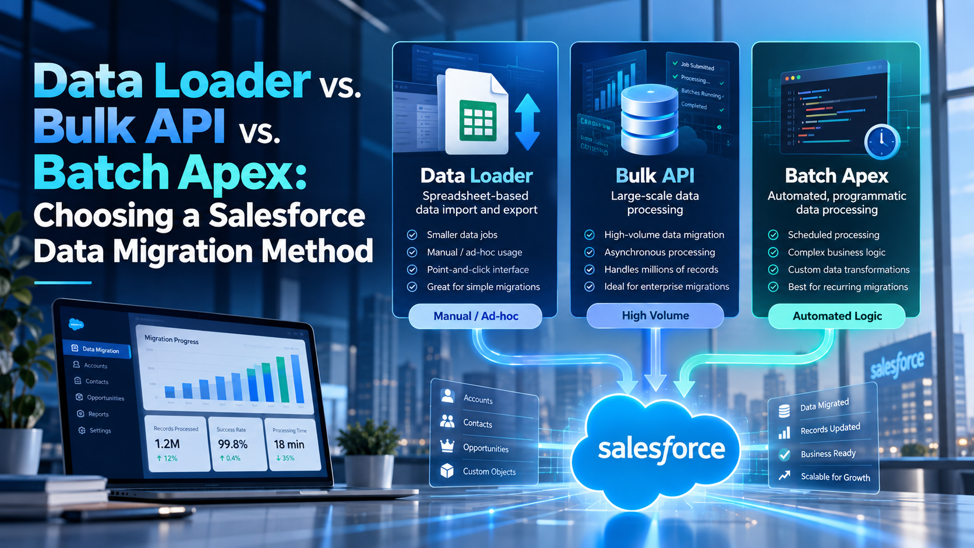
A team picks Data Loader for a 3-million-record migration because it’s the tool everyone already knows, watches the job crawl for hours, then discovers the real bottleneck was never the tool itself, it was a batch size setting nobody tuned for the trigger logic firing on every insert. A different team builds a custom Batch Apex class for what turns out to be a straightforward, one-time data load that Data Loader’s point-and-click interface would have handled in an afternoon, burning a week of development time on a problem that never needed custom code in the first place. Both mistakes trace back to the same root cause: treating Data Loader, Bulk API, and Batch Apex as interchangeable ways to move data, when they’re actually 3 genuinely different tools built to solve 3 genuinely different problems.
Choosing correctly among these 3 methods starts with understanding what each one fundamentally is, not just what it can technically do. Data Loader is a point-and-click desktop application built for people who need to move data without writing code. Bulk API is the underlying protocol that powers high-volume data movement, whether that’s Data Loader running under the hood, an integration platform like MuleSoft, or a custom script calling the API directly. Batch Apex is code that runs inside Salesforce itself, purpose-built for scenarios where business logic needs to execute as an integral part of the data operation, not just move records from one place to another. This guide works through what each tool actually does, the specific limits and behaviors that matter in 2026, and a practical framework for choosing correctly before a migration goes sideways.
TL;DR
| Dimension | Data Loader | Bulk API (2.0) | Batch Apex |
| What it fundamentally is | A free, GUI-based desktop application | The underlying high-volume API protocol | Code that runs inside Salesforce itself |
| Who typically uses it | Admins and business analysts, no coding required | Developers, integration platforms, and Data Loader itself under the hood | Developers building custom transformation or business logic |
| Typical batch size | Up to 10,000 records via the Bulk API path, 200 via the older REST or SOAP path | Automatically managed batching, no manual stitching required | Configurable scope size, commonly 200 records per execution |
| Best fit | One-time or occasional bulk loads and exports where no custom logic is needed | Ongoing, automated, or integration-driven high-volume data movement | Migrations requiring complex validation, transformation, or business rule execution during the load |
| Key 2026 constraint | OAuth Device Flow removed since September 2025; Web Server Flow with PKCE now required | A 5,000-batch ceiling in any rolling 24-hour window | Governor limits on CPU time, SOQL queries, and DML rows that don’t scale with data volume |
The core distinction underlying every row above: Data Loader answers “how do I move data without writing code,” Bulk API answers “how do I move a genuinely large volume of data efficiently,” and Batch Apex answers “how do I run real business logic as part of moving that data.” Picking based on data volume alone, without asking which of these 3 questions actually matters most for a specific migration, is where most tool-selection mistakes originate.
What Each Tool Actually Is, Beneath the Marketing Language
Before comparing limits and specifications in genuine detail, it’s worth being precise about what each of these 3 tools genuinely, fundamentally represents on its own terms, since the surface-level comparison of “which one handles more records” entirely misses the more important, underlying distinction that actually matters most in practice.
Data Loader Is an Application, Not a Protocol
Salesforce Data Loader is a native desktop application, free to use, built specifically for admins and business users who need to perform bulk data operations without writing any code. It’s a point-and-click, CSV-driven tool: map source fields to Salesforce fields, choose an operation, and let the application handle the rest. Underneath its interface, Data Loader itself calls either the Bulk API or the older REST and SOAP APIs depending on how it’s configured, which means Data Loader isn’t actually a separate technology competing with Bulk API; it’s a user-friendly wrapper that can use Bulk API as its actual transport mechanism.
Bulk API Is the Protocol, Not a Standalone Tool
Bulk API, now in its 2.0 generation, is the underlying REST-based API specifically designed for loading or querying large volumes of data efficiently. Its successor generation manages batching automatically, removing the older approach of manually stitching together individual batches that Bulk API 1.0 required. Because Bulk API is a protocol rather than an application with its own interface, it gets used in several different contexts: directly by developers writing custom integration code, indirectly through Data Loader when configured to use the Bulk API path, and extensively by third-party integration platforms like MuleSoft and Informatica PowerCenter that need high-throughput data movement between Salesforce and other systems.
Batch Apex Is Code That Runs Inside Salesforce
Batch Apex is fundamentally different from the other 2 in one critical respect: it’s actual Apex code, written and deployed into the Salesforce org itself, designed specifically to process large datasets in manageable chunks while operating within the platform’s governor limits. Unlike Data Loader and Bulk API, which move data into or out of Salesforce from an external vantage point, Batch Apex executes from inside the platform, giving it direct access to run arbitrarily complex business logic, validation, and transformation as a genuine part of the data processing itself, not as a separate step performed before or after the load.
Data Loader in Detail: What It’s Actually Built For
Understanding Data Loader’s genuine strengths and its real, practical constraints clarifies exactly when reaching for it is genuinely the right, sensible call, and precisely when it quietly becomes the wrong tool entirely for a job that’s already outgrown what it was originally designed to handle well.
Why Data Loader Remains the Default Choice for Many Admins
Data Loader’s core value proposition is accessibility: no coding knowledge required, a genuinely free tool, and a workflow familiar to anyone who’s ever worked with a spreadsheet. For a one-time data load, a periodic export, or a bulk update that doesn’t require any custom business logic beyond simple field mapping, Data Loader remains a genuinely appropriate, efficient choice that gets the job done without the overhead of writing and testing custom code.
The Batch Size Behavior That Trips Up Inexperienced Users
The specific batch size ceiling depends directly on which underlying API path Data Loader is actually using:
- When configured to use the Bulk API path, Data Loader supports batches of up to 10,000 records
- When using the older REST or SOAP API path instead, the standard maximum batch size drops considerably, to 200 records
- A larger batch size isn’t automatically the faster choice, since a batch that trips a timeout or a governor limit fails as an entire unit, meaning 10,000 isn’t the right setting by default for records carrying heavy trigger logic behind them
- Tuning batch size down for objects with substantial automation, rather than assuming maximum batch size always produces maximum speed, is a genuinely important practical adjustment many first-time users skip
The 2025 Security Changes Every Admin Needs to Know About
Salesforce made significant security updates affecting Data Loader authentication that took effect in late 2025. OAuth Device Flow, previously a common authentication method, was removed as of September 2025, meaning any existing setup relying on it needs to migrate to Web Server Flow with PKCE instead. Uninstalled connected apps now require explicit admin approval before they can authorize a connection, which means a fresh Data Loader setup may require an administrator to approve the connection before a user can actually authenticate for the first time. Password authentication, including command-line setups using encrypted passwords, remains unaffected by these specific changes, which matters for teams relying on scripted, unattended Data Loader operations that can’t practically involve an interactive browser-based login flow.
Bulk API 2.0 in Detail: What Changed and What Still Constrains It
Bulk API 2.0 represents a genuine, meaningful, and well-documented improvement over its earlier predecessor in several important ways genuinely worth knowing about in detail, but understanding its current, real limits matters just as much as understanding its considerably improved capabilities overall, across the entire board here.
What Actually Improved in the 2.0 Generation
Automatic batch management is the headline improvement: rather than manually splitting a dataset into individual batches the way Bulk API 1.0 required, Bulk API 2.0 handles this automatically, submitting a job and letting the platform manage the underlying batching itself. Throughput ceilings have also improved considerably compared to the original Bulk API, and query result handling specifically has gotten better recently, with expanded server-side cursor limits reducing a pagination bottleneck that used to affect large query jobs specifically.
The Genuinely Significant 2026 Addition: Apex Cursors
Salesforce’s Spring ’26 release introduced Apex Cursors as generally available, enabling server-side chunking of large datasets within a single transaction and removing what had previously been a 2,000-record limit for result sets, replaced now with a considerably higher hard cap of 50 million cursor rows. This represents a genuinely significant capability expansion for teams working with very large query results, since the previous 2,000-record ceiling forced considerably more complex pagination logic for anything beyond that threshold.
The Limits That Still Genuinely Constrain Bulk API Usage
| Limit | What it means in practice |
| 5,000-batch ceiling in any 24-hour window | A migration processing enough records to require more than 5,000 batches in a single day will hit this ceiling regardless of how efficiently each individual batch is structured |
| Daily API call limits | Migrations involving 2 to 3 million records can exhaust daily API call limits quickly if each record requires multiple separate API calls to fully process |
| Sandbox environments carry a fixed daily API call ceiling regardless of edition | Sandboxes don’t scale their API allowance with data volume the way production orgs do, meaning a bulk process that works comfortably in production can hit this ceiling unexpectedly during sandbox testing |
Monitoring Actual Usage Against These Limits
Salesforce provides 2 direct ways to monitor live API usage against these ceilings: the Sforce-Limit-Info response header returned with API calls, and the dedicated limits REST resource available at a specific versioned endpoint. Checking usage proactively through either mechanism, rather than discovering a limit has been hit mid-migration, is a straightforward practice that prevents a genuinely avoidable mid-process failure.
Batch Apex in Detail: When Business Logic Needs to Run During the Load
Batch Apex earns its genuine place in this specific comparison because certain migration scenarios genuinely require custom logic to execute as an integral, inseparable part of the data processing itself, something neither Data Loader nor raw Bulk API can ever provide entirely on their own, regardless of configuration.
The Specific Scenarios That Genuinely Justify Custom Code
Batch Apex becomes the right choice specifically when a migration requires:
- Complex, multi-step validation logic that can’t be expressed through simple field mapping or a standard validation rule alone
- Data transformation involving business rules too intricate for a straightforward source-to-target field mapping to handle
- Coordination with other systems or processes that need to happen as an integral part of processing each record or batch
- Recurring, scheduled data processing that needs to run repeatedly on an ongoing basis, rather than as a single one-time migration event
Why Governor Limits Shape Every Batch Apex Design Decision
Governor limits for Apex transactions, covering CPU time, DML row counts, and SOQL query counts, exist specifically to protect the multi-tenant stability of the broader platform, not to scale proportionally with any single customer’s actual data volume. This distinction matters enormously for Batch Apex design: the limits apply per execution context regardless of how much total data a job is ultimately processing, which is precisely why Batch Apex breaks work into scoped chunks rather than attempting to process an entire dataset within a single transaction.
The SOQL-in-a-Loop Mistake That Breaks at Scale
Salesforce enforces strict limits on SOQL queries within a single transaction: 100 queries in a synchronous context, 200 in an asynchronous context. Placing a SOQL query inside a loop means every single iteration executes its own separate query, and this pattern that might work fine against a small test dataset of 50 records fails outright once the same logic runs against a genuinely larger dataset, since the accumulated query count eventually exceeds the governor limit and throws a runtime exception partway through execution. Beyond simply hitting a hard limit, this pattern also creates real, measurable performance problems even when it doesn’t technically fail, since each individual query requires its own round trip to the database, considerably slower in aggregate than a single, properly bulkified query retrieving everything needed at once.
Preparing Data Before Any Tool Even Runs
Regardless of which of these 3 tools a team ultimately chooses to use for any given project, several preparation steps genuinely need to happen well before the actual load or migration ever begins, since skipping them undermines even an otherwise technically perfect tool choice made earlier on.
The Preparation Work That Applies Regardless of Which Tool Gets Used
The specific preparation steps worth completing before any migration tool actually runs:
- Define the exact object list, date ranges, and record statuses that genuinely qualify for migration in a written specification, ideally signed off by the relevant business stakeholders before any extraction work actually begins
- Audit source data for the specific quality issues most likely to break a migration: duplicate records, missing required field values, and formatting inconsistencies that a target system’s validation rules won’t tolerate
- Establish the correct object load order upfront, ensuring parent records genuinely load before the child records that depend on them, rather than discovering the dependency only after a batch of child records has already failed or landed with broken relationships
- Decide explicitly on the identifier strategy, whether relationships will be re-established using Salesforce’s own internal record IDs or through stable, human-readable external ID field values that persist reliably across systems
Why Scope Definition Specifically Prevents the Most Common Source of Delay
Scope creep, where the object list, date range, or qualifying record criteria for a migration keeps quietly expanding after work has already begun, is consistently cited as the leading cause of migration delays across teams regardless of which specific tool they ultimately chose to use. A written specification, agreed upon and signed off before extraction begins, gives the team a genuine reference point to push back against scope creep when it inevitably starts to creep in partway through the project.
Why the Identifier Strategy Decision Specifically Deserves Attention Upfront
Choosing to rely on Salesforce’s own internal record IDs to re-establish relationships across a migration, rather than deliberately using stable external ID field values instead, is a decision that’s genuinely difficult and expensive to reverse once a migration is already well underway. Human-readable external ID values persist reliably when data crosses between systems in a way internal record IDs simply don’t, and making this decision deliberately and explicitly before the migration begins, rather than defaulting to whatever happens to be convenient in the moment, prevents the specific orphaned-record problem covered later in this guide from ever becoming a genuine risk in the first place.
Head-to-Head: Matching Each Tool to the Right Scenario
With each tool’s genuine strengths and real constraints now firmly established individually across the board here in detail, the practical question that genuinely remains becomes matching a specific migration scenario correctly to the particular tool actually built and designed to handle it well from the very start.
When Data Loader Is Genuinely the Right Choice
A one-time data load or export, a bulk update involving straightforward field-level changes with no complex business logic attached, or a scenario where the person performing the operation isn’t a developer and shouldn’t need to become one, all point toward Data Loader as the appropriate, efficient choice. Its GUI-driven, no-code workflow is specifically built for exactly these situations, and reaching for a more complex tool when Data Loader would genuinely suffice adds unnecessary overhead without a corresponding benefit.
When Bulk API Directly, or Through an Integration Platform, Makes More Sense
Ongoing, automated, or recurring data synchronization between Salesforce and an external system, a migration volume large enough that Data Loader’s interface becomes cumbersome to manage manually, or an integration architecture already built around platforms like MuleSoft or Informatica PowerCenter, all point toward using Bulk API directly or through the integration tooling already in place rather than routing everything through Data Loader’s manual, interactive workflow.
When Batch Apex Is Genuinely Worth the Development Investment
A migration requiring complex validation or transformation logic that can’t be expressed through simple mapping, a scenario where the data operation needs to trigger coordinated actions across multiple related records or external systems, or a recurring, scheduled process that needs to run repeatedly over time rather than as a single event, all justify the additional development and testing effort Batch Apex requires compared to the other 2 options.
Why Combining Tools Is Often the Genuinely Correct Answer
A significant share of real-world migrations don’t cleanly fit into using exactly one of these 3 tools in isolation. A common, genuinely effective pattern involves using Bulk API, whether directly or through Data Loader, to move the bulk of straightforward data quickly, while a smaller, more targeted Batch Apex job handles the specific subset of records requiring genuine custom logic that the bulk load itself couldn’t accommodate. Treating this as a binary either-or decision, rather than recognizing that different portions of the same migration might genuinely call for different tools, is itself a common source of unnecessary complexity or unnecessary limitation.
Cost and Skill Requirements Across the 3 Tools
Beyond pure technical fit alone, the practical, real-world cost of actually using each individual tool, both in genuine licensing terms and in the real skill investment required, shapes which specific option genuinely makes the most sense for a given team’s actual capabilities and available budget overall.
What Each Tool Actually Requires From the Team Using It
| Factor | Data Loader | Bulk API (direct or via integration platform) | Batch Apex |
| Licensing cost | Free, included with Salesforce | Free as an API, though third-party integration platforms using it often carry their own separate licensing cost | Free; the cost sits entirely in development time, not licensing |
| Skill required to use it | Minimal; a business user comfortable with spreadsheets can learn it quickly | Moderate to significant, depending on whether it’s accessed directly through code or through a configured integration platform | Significant; requires genuine Apex development and testing skill |
| Setup and maintenance overhead | Low; largely a configuration and mapping exercise each time it’s used | Moderate; integration platforms require initial setup but then run largely unattended | Higher; requires writing, testing, deploying, and maintaining actual code |
| Time to first successful run | Typically hours, for a team already familiar with the tool | Varies considerably depending on whether an integration platform is already in place | Typically days, factoring in development and proper testing |
Why This Cost Dimension Often Decides the Choice More Than Technical Capability Alone
A smaller organization without dedicated Salesforce developers on staff will reasonably gravitate toward Data Loader for the large majority of its data needs, not because Data Loader is technically superior for every specific scenario, but because the alternative options carry a skill requirement the organization genuinely doesn’t have readily available in-house. A larger organization with an established development team and existing integration infrastructure, by contrast, may reasonably default toward Bulk API or Batch Apex more readily, since the skill and infrastructure investment those options require has already been made for other purposes and doesn’t represent new, incremental overhead specific to a single migration project.
Why Skill Availability Should Factor Directly Into the Decision, Not Just Theoretical Best Fit
A technically ideal tool that nobody on the team can actually use effectively produces worse real-world outcomes than a technically adequate tool the team genuinely knows how to operate well. Factoring in honest skill availability alongside pure technical fit, rather than defaulting to whichever tool a comparison chart theoretically ranks as best for a given scenario in isolation, produces a more realistic and ultimately more successful tool selection for the specific team actually running the migration.
The Recurring Failure Patterns That Cause Most Migration Problems
Beyond simply choosing the right tool for the job at hand, several specific, well-documented failure patterns consistently account for the large majority of genuine migration problems commonly encountered in real, day-to-day practice, regardless of which particular tool a team actually ends up using in the end.
Incomplete field mapping that only surfaces after go-live. Teams reliably map the obvious fields visible on a standard page layout, then discover after the migration is already complete that a legacy field, one relied on by a single team specifically for a specific report, was never included in the mapping at all.
Load order breaking parent-child relationships. Loading child records, contacts, for instance, before their parent accounts exist causes those child records to either fail outright or, more dangerously, land successfully with a blank relationship field, producing a working-looking org where a meaningful share of records are actually orphaned and disconnected from where they genuinely belong.
Row lock contention during parallel batch processing. When many child records share the same parent record, parallel batch processing can put 2 separate batches against that same parent simultaneously, causing lock contention that fails one or both batches. Sorting the input data by parent identifier so related records consistently land together in the same batch, and falling back to serial processing specifically where contention persists despite that sorting, resolves this failure mode directly.
Discarding success and error files instead of retaining them. The success file generated by a load operation holds the specific IDs of every record just created, and that file functions as the genuine rollback handle for the operation. Discarding it immediately after a load appears to succeed removes the team’s ability to cleanly reverse the operation later if a problem surfaces, rather than giving the team a reliable record to work from.
Orphaned records from unstable ID references across systems. Relying on Salesforce’s own internal record IDs to re-establish relationships across a migration, rather than using stable, human-readable external ID field values instead, produces exactly the kind of orphaned child record problem that surfaces only once an ID referenced during the migration no longer resolves to anything meaningful in the target system.
FAQs
Can Data Loader and Bulk API genuinely be used together in the same migration?
Yes, and in practice they frequently are, since Data Loader itself can be configured to use the Bulk API as its underlying transport mechanism rather than the older REST or SOAP path. Choosing Data Loader with the Bulk API path selected gives a non-developer the familiar, point-and-click interface while still benefiting from Bulk API’s higher batch size ceiling and automatic batch management underneath.
Is Batch Apex always the better choice for genuinely large data volumes, given its direct platform access?
Not necessarily, and data volume alone isn’t the right deciding factor. Batch Apex’s real advantage is executing custom business logic as part of the processing itself, not raw processing speed or volume capacity, and for a large migration with no complex logic requirement, Bulk API, whether used directly or through Data Loader, typically handles the volume just as effectively with considerably less development and testing overhead than writing, testing, and maintaining a custom Batch Apex class would require.
What’s the practical significance of the 5,000-batch daily ceiling for a typical migration project?
For most standard migrations, this ceiling is comfortably within reach, but for genuinely large-scale efforts, several million records processed through smaller batch sizes, the ceiling can become a real, practical constraint requiring the migration to be deliberately spread across multiple days rather than attempted in a single continuous run. Calculating the expected batch count in advance, based on total record volume and the chosen batch size, and comparing that figure against the daily ceiling before beginning, avoids discovering this constraint partway through an already-underway migration.
Why does a bulk data process that works fine in production sometimes fail in a sandbox during testing?
This happens because sandbox environments carry a fixed daily API call ceiling regardless of Salesforce edition, and unlike production, that ceiling doesn’t scale up alongside genuine data volume or organizational size. A bulk process comfortably within production’s API allowance can still exceed a sandbox’s considerably more limited daily ceiling, which is precisely why testing a migration’s actual API consumption pattern in a sandbox before running it in production is a genuinely worthwhile practice, provided the team accounts for this ceiling difference rather than assuming sandbox and production behave identically.
How should a team decide on the right batch size for a Data Loader or Bulk API operation?
The right batch size depends directly on how much trigger logic, validation, and other automation fires on the specific object being loaded, not simply on the maximum size the API technically allows. Objects carrying substantial automation genuinely benefit from a smaller batch size, since a failure anywhere within a batch fails the entire batch as one unit, and a smaller batch limits how many records get caught up in that failure. Objects with minimal automation can typically handle a considerably larger batch size without the same risk, making this a setting genuinely worth tuning per object rather than leaving at a single default across an entire migration.
Does the September 2025 removal of OAuth Device Flow affect existing, already-configured Data Loader setups?
Yes, any setup that was relying on OAuth Device Flow specifically needs to migrate to Web Server Flow with PKCE instead, since Device Flow authentication stopped being supported as of that date. Teams running scripted or automated Data Loader processes should confirm which authentication method their specific setup actually uses, since password-based authentication, including encrypted password setups used in command-line workflows, remains unaffected and continues working without requiring this particular migration.
Should a migration team always plan for a hybrid approach combining multiple tools, or is picking one tool cleaner?
Picking a single tool is genuinely cleaner and easier to manage when a migration’s actual requirements fit neatly within what one specific tool handles well, and forcing an unnecessarily hybrid approach onto a genuinely simple migration adds complexity without a corresponding benefit. A hybrid approach becomes the right call specifically when different portions of the same migration have genuinely different requirements, straightforward bulk data alongside a smaller subset needing custom logic, rather than being adopted reflexively as a default strategy regardless of whether the underlying migration actually calls for it.
