
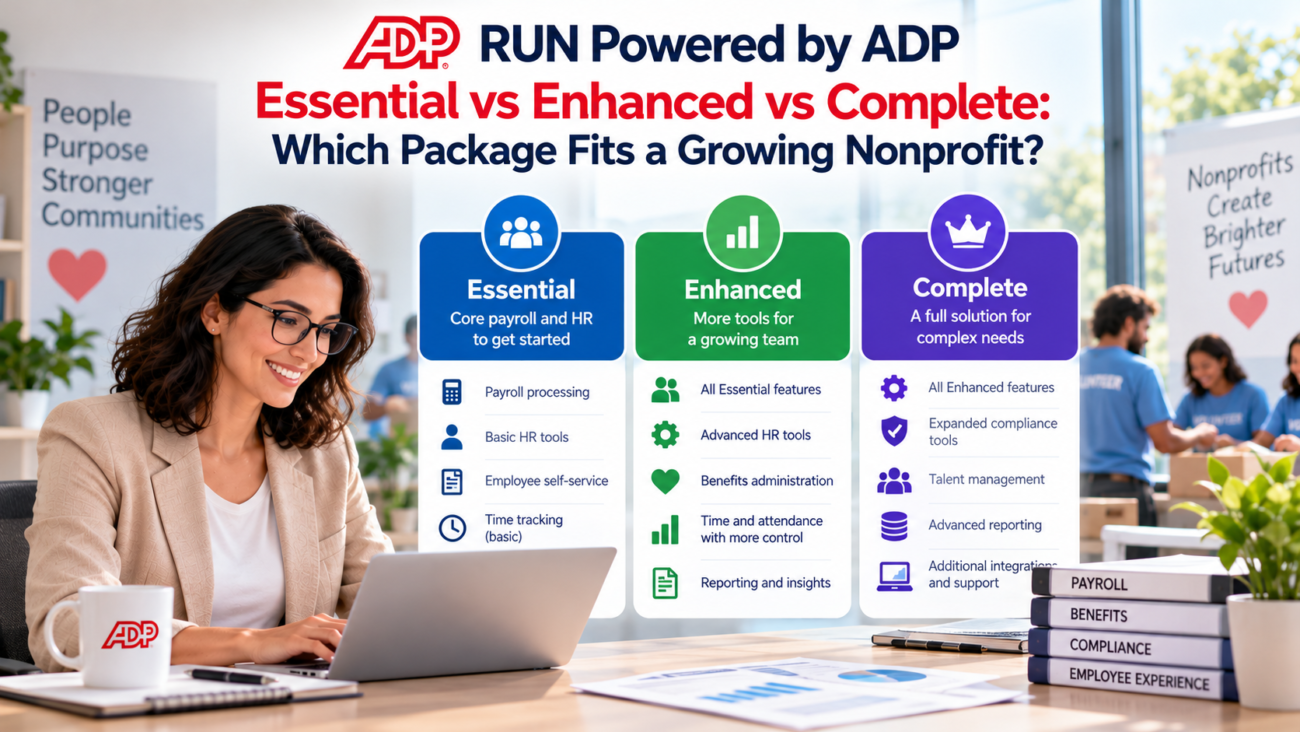
A growing nonprofit can outgrow a payroll setup before it outgrows its payroll headcount. New grants create labor-allocation questions. Hiring becomes more frequent. Managers need consistent policies. State unemployment rules can matter in ways that differ from a typical small business. That is why choosing among the RUN Powered by ADP packages takes more than comparing feature lists.
As of October 2026, ADP positions RUN Powered by ADP for small employers and offers Essential Payroll, Enhanced Payroll, Complete Payroll & HR Plus, and HR Pro Payroll & HR. This article focuses on the first 3 because they form the most common progression from payroll-only needs toward day-to-day HR support. ADP’s current payroll software features resource describes that same progression, while the live package matrix shows which features sit in each tier. For a nonprofit, comparing the RUN Powered by ADP packages starts with the work already handled well and the work starting to break under growth.
The short version is simple. RUN Powered by ADP Essential can fit a nonprofit with stable payroll and outside HR help. RUN Powered by ADP Enhanced makes more sense when unemployment administration, job costing, electronic I-9 workflow, or recurring hiring has become part of normal operations. RUN Powered by ADP Complete becomes the stronger fit when the executive director, finance lead, or office manager is spending too much time answering HR questions and maintaining policies without dedicated HR staff.
TL;DR
RUN Powered by ADP Essential covers the payroll core and can work well for a small nonprofit with steady staffing and established HR support outside the payroll system.
RUN Powered by ADP Enhanced adds operational tools that matter when hiring picks up or payroll has more moving parts, especially SUI management, job costing, labor law poster support, ZipRecruiter, and electronic Form I-9.
RUN Powered by ADP Complete adds a deeper HR layer, including HR HelpDesk, an employee handbook tool, HR forms, salary benchmarks, and training resources. It is usually the better fit when people management is becoming recurring work for leaders who aren’t HR specialists.
For a growing nonprofit, compare the RUN Powered by ADP packages by workload, not employee count alone. Choose by the work your team must perform every pay cycle and every time someone is hired, moved, disciplined, or separated.
The Short Answer: Which Package Fits Best?
The best of the RUN Powered by ADP packages is the one that removes a real operating burden without making the nonprofit pay for support it already has. Payroll accuracy is the baseline across all 3 tiers. The decision changes when the organization starts needing help around payroll, such as unemployment administration, labor cost tracking, hiring workflow, or HR guidance.
RUN Powered by ADP Essential is the leanest fit. It includes payroll processing, direct deposit, tax filing, new-hire reporting, employee access, onboarding, reporting, and a general ledger interface. The current ADP package page also lists multi-jurisdiction payroll and multi-company management in Essential. That means a nonprofit doesn’t have to move up a tier just to gain ordinary payroll processing or basic employee self-service.
RUN Powered by ADP Enhanced is the middle option for organizations whose payroll is becoming operationally harder to manage. It adds state unemployment insurance management, garnishment payment service, job costing, labor law poster support, ZipRecruiter, check signing, and electronic Form I-9. Those additions are meaningful when a nonprofit is hiring more often or allocating labor across programs.
RUN Powered by ADP Complete adds HR HelpDesk, an employee handbook wizard, HR forms and documents, salary benchmarks, and training toolkits. ADP’s detailed feature matrix lists HR Tracking in Essential, Enhanced, Complete, and HR Pro, while summary copy on the same page also groups HR Tracking with Complete. Buyers should confirm the quoted package. The clearer Complete difference is the HR support layer rather than another payroll engine.
If your nonprofit already has a capable HR adviser, employment counsel, and written people policies, Enhanced may be enough even during growth. If those resources are missing and people questions keep landing on the executive director or finance team, Complete can reduce a different kind of workload that Essential and Enhanced don’t address.
What Every RUN Package Already Covers
Every comparison should start with the shared base. Otherwise, it is easy to overpay for a higher package because a feature sounds advanced even though it is already included lower in the lineup. The current RUN matrix shows that core payroll is present in Essential, Enhanced, and Complete.
Across these RUN Powered by ADP packages, ADP lists online or mobile payroll, direct deposit, tax filing, payroll reporting, a general ledger interface, new-hire reporting, employee access, onboarding, and multi-jurisdiction payroll. The live feature table also lists ADP Assist tools for payroll questions, error flagging, and timesheet import across the packages.
That base matters for a tax-exempt employer because nonprofit status doesn’t remove ordinary employer tax duties. The IRS explains in its employment tax guidance that exempt organizations with employees generally must handle federal income tax withholding plus Social Security and Medicare taxes, subject to specific exceptions. A payroll platform can perform calculations and filings, but the nonprofit still needs to provide correct worker data, wage information, tax status, and organization details.
The general ledger interface also deserves more attention than it usually gets in small-business comparisons. Nonprofits often need payroll entries to land cleanly in accounting so finance can separate program costs from administration and fundraising. RUN can export journal entries to several named accounting systems or a generic output file. Before purchase, the finance lead should test the exact export fields and coding structure needed by the organization’s chart of accounts rather than assuming the interface will mirror its fund or program structure automatically.
One more point can prevent a costly tier decision: time and attendance, retirement, workers’ compensation, and health insurance are shown as add-ons across Essential, Enhanced, and Complete. They are not reasons by themselves to choose Complete over Enhanced. Ask for each add-on as a separate line in the quote so the package comparison stays clear.
When RUN Powered by ADP Essential Is Enough
RUN Powered by ADP Essential fits a nonprofit that needs dependable payroll administration but doesn’t need the higher tiers to carry recurring HR work. Among the RUN Powered by ADP packages, this fit is strongest when staffing is stable and an internal or outside adviser can answer employment questions.
The strongest case for Essential is operational simplicity. Payroll and tax filing are already in the base package. New-hire reporting and onboarding are there too. Employees can access pay information, and the finance team can use reporting plus the general ledger interface. If the main need is ADP payroll for nonprofits without an internal payroll department, Essential addresses the right problem.
A nonprofit should still test its unemployment setup before assuming Essential is enough. Section 501(c)(3) organizations are generally exempt from federal unemployment tax, and the IRS explains the FUTA exemption rules for qualifying organizations. That federal rule doesn’t automatically settle the state unemployment question. State law can create different contribution or reimbursement obligations.
Essential is also a reasonable choice when HR expertise already sits outside the payroll platform. A nonprofit with an employment attorney on call, a current handbook, established hiring documents, and a manager who owns employee relations may gain little from paying for Complete’s HR layer. The package decision should recognize work that is already covered instead of buying the same help twice.
The limits appear when growth creates more events that require judgment. More hires mean more I-9 work. More managers create policy questions. More grants can increase pressure to code labor correctly. More turnover can make unemployment claims a regular administrative task. Essential can continue running payroll through those changes, but it may leave too much surrounding work outside the system.
When RUN Powered by ADP Enhanced Earns Its Place
RUN Powered by ADP Enhanced becomes useful when the nonprofit’s payroll process is still manageable but the surrounding administration is getting heavier. The package adds SUI management, garnishment payment service, job costing, labor law poster support, recruiting access through ZipRecruiter, check-signing support, and electronic Form I-9. Within the RUN Powered by ADP packages, these are practical additions rather than a broad HR advisory layer.
State unemployment administration is a good example. Charitable nonprofits may have different state unemployment funding choices than ordinary for-profit employers. The National Council of Nonprofits explains unemployment insurance options that can include paying state unemployment contributions or operating as a reimbursing employer where state law allows it. That means SUI management can be valuable, but the nonprofit should ask ADP how the service handles its actual state election rather than assuming every employer is managed the same way.
Job costing can also move Enhanced ahead for grant-funded or program-heavy organizations. If payroll labor must be separated by project, location, contract, or internal cost center, a payroll-side coding tool can reduce manual rework before data reaches accounting. It is still important to test how many codes can be assigned and how those codes appear in reports and exports. The phrase “job costing” doesn’t automatically mean “grant accounting.”
Electronic Form I-9 is another clear difference. Essential includes onboarding, but ADP’s current detailed matrix places electronic Form I-9 in Enhanced and above. For an organization hiring regularly, moving that step into a defined workflow can reduce follow-up work and make the onboarding checklist easier to control.
Enhanced is therefore a strong fit when finance or administration can still own HR policy decisions, but payroll operations need more structure. For ADP payroll for nonprofits, it adds pay-process tools without moving into Complete’s HR support layer.
When RUN Powered by ADP Complete Becomes the Better Fit
RUN Powered by ADP Complete is designed for the point where people management itself is becoming a regular operating burden. It includes everything in Enhanced and adds HR HelpDesk, an employee handbook wizard, HR forms and documents, salary benchmarks, and HR training resources. ADP’s detailed matrix lists HR Tracking across all RUN tiers, although summary copy on the same page also groups it with Complete. Confirm HR Tracking in the quoted package.
That distinction across the RUN Powered by ADP packages matters for a growing nonprofit with no dedicated HR generalist. The executive director may be answering leave questions. A finance manager may be maintaining offer letters. Program leaders may be handling performance issues differently. The National Council of Nonprofits notes in its nonprofit HR guidance that nonprofits remain subject to employment laws and that access to knowledgeable HR or employment-law help can matter as staffing becomes more complex. Complete gives the organization a built-in HR resource for many routine questions, though it should not be treated as a substitute for legal counsel on high-risk matters.
The employee handbook tool is useful when policies have grown by email or individual manager practice. A standard handbook process can create a clearer baseline, but state and local requirements still need review, especially for a nonprofit with remote workers in multiple jurisdictions. For ADP payroll for nonprofits, the value is a maintained starting point and support process, not a promise that one template resolves every legal question.
Salary benchmarks can also help during hiring, but nonprofits need context. The National Council of Nonprofits’ compensation guidance recommends reviewing comparable compensation for executive pay using organizations of similar size and location, with documentation of the decision process. A benchmark inside a payroll system can inform the discussion, but a board should still use appropriate nonprofit comparables when setting executive compensation.
Complete is strongest when the nonprofit’s constraint has shifted from “we need payroll done” to “we need consistent HR decisions without hiring a full internal HR function yet.” That is a different problem, and Complete is the first of these 3 tiers built directly around it.
Side-By-Side Comparison For A Growing Nonprofit
The table below focuses on differences that can change the decision. It does not repeat every feature shared across the RUN Powered by ADP packages.
| Decision Area | Essential Payroll | Enhanced Payroll | Complete Payroll & HR Plus |
| Core payroll and tax filing | Included | Included | Included |
| General ledger interface | Included | Included | Included |
| Multi-jurisdiction payroll | Included | Included | Included |
| New-hire onboarding | Included | Included | Included |
| HR tracking (detailed matrix) | Included | Included | Included |
| Electronic Form I-9 | Not listed as included | Included | Included |
| SUI management | Not included | Included | Included |
| Garnishment payment service | Not included | Included | Included |
| Job costing | Not included | Included | Included |
| Labor law poster support | Not included | Included | Included |
| ZipRecruiter | Not included | Included | Included |
| HR HelpDesk | Not included | Not included | Included |
| Employee handbook wizard | Not included | Not included | Included |
| HR forms and documents | Not included | Not included | Included |
| Salary benchmarks | Not included | Not included | Included |
| HR training and toolkits | Not included | Not included | Included |
| Time and attendance | Add-on | Add-on | Add-on |
The key step is to compare the RUN Powered by ADP packages from the nonprofit’s workflow outward. If payroll is the only real problem, RUN Powered by ADP Essential covers the base. If unemployment administration or labor coding is creating repeat work, RUN Powered by ADP Enhanced is the logical jump. If managers need ongoing policy and employee-relations support, RUN Powered by ADP Complete is the first tier in this comparison that changes the HR support model.
One detail is worth confirming during a sales call. ADP’s current feature matrix lists background checks across the package columns, while some summary copy around Enhanced also highlights background checks. Don’t choose a higher tier only because of that feature. Ask what type, quantity, and pricing apply to your quote.
Nonprofit Payroll Rules That Change The Package Decision
Nonprofits face many of the same employment rules as other employers, with a few important tax and program differences. The right package should make those rules easier to administer, but software doesn’t change the underlying obligation.
Start with wage and hour coverage. The Department of Labor’s nonprofit FLSA guidance explains that nonprofit status alone doesn’t place every employee outside the Fair Labor Standards Act. Coverage can depend on the organization’s commercial activities or an employee’s own interstate work. Volunteers also have a separate legal framework. A nonprofit should therefore keep employee, contractor, and volunteer roles clearly defined before payroll setup.
Recordkeeping matters too. For covered nonexempt employees, the Department of Labor’s payroll recordkeeping rules call for accurate records of hours and wages, with payroll records generally retained for at least 3 years and wage-calculation records for 2 years. RUN’s time and attendance tool is an add-on across the packages, so a nonprofit with hourly program staff should include time capture in the buying decision even though it doesn’t decide Essential versus Enhanced versus Complete by itself.
Hiring creates a separate control point. USCIS states that employers must complete Form I-9 for new employees and has updated its current Form I-9 guidance for the edition employers should use from August 1, 2026. Since the detailed RUN matrix places electronic Form I-9 in Enhanced and above, organizations with frequent starts may see a real workflow benefit from moving past Essential.
Personnel files have their own retention rules. The EEOC’s employment record rules require covered private employers to preserve certain personnel and employment records, often for at least 1 year, with specific rules for records tied to employment actions. HR tracking can help create a more consistent process, and ADP’s detailed matrix lists it across the RUN tiers. Complete’s HR forms can support documentation, but the nonprofit still needs a defined retention policy that matches every law that applies to it.
These issues explain why the RUN Powered by ADP packages and ADP payroll for nonprofits should be evaluated as process choices rather than tax-exemption shortcuts. The platform can support the work, while the nonprofit remains responsible for classification, policy decisions, source data, and compliance choices.
Grant And Program Labor Tracking Can Push You Toward Enhanced
Grant-funded nonprofits should pay close attention to labor allocation before choosing among the RUN Powered by ADP packages. Payroll can be correct at the employee level and still create problems later if finance can’t support how wages were charged across programs or federal awards.
For organizations receiving federal awards, the current Uniform Guidance states that salary and wage charges must be based on records that accurately reflect the work performed. The federal grant rules also require those records to fit the recipient’s internal controls and support how compensation is distributed among activities or cost objectives. That makes labor coding and supporting records an accounting issue as much as a payroll issue.
Enhanced includes job costing, while Essential doesn’t. That can make Enhanced more useful when staff time needs to be assigned to projects or programs before payroll data reaches the ledger. Still, a nonprofit shouldn’t treat the presence of job costing as proof that its grant requirements are met. The finance team should test whether the system captures the right cost dimensions and whether supporting time records match the organization’s award terms.
A practical test is to take one real pay period before implementation and map every labor allocation the finance team currently makes. Include employees split across programs, temporary grant-funded positions, employees working in more than one state, and any allocation that requires manual journal entries. Then ask the vendor to show how the same pay period would flow through the proposed tier.
If the organization rarely allocates wages beyond a single department, Essential may still be enough. If labor distribution is a recurring part of close, Enhanced can remove a meaningful source of spreadsheet work. Complete doesn’t add more payroll-side job-costing capability over Enhanced, so the upgrade from Enhanced to Complete should be justified by HR needs instead.
Hiring Volume And HR Workload Are Separate Questions
Hiring more people doesn’t automatically mean a nonprofit needs Complete. It first means the organization needs a reliable hiring workflow. Enhanced already adds ZipRecruiter and electronic Form I-9 on top of the onboarding tools in Essential. If recruiting administration is the main new burden, Enhanced may solve the problem without paying for the HR support layer.
Worker classification should remain a separate review. Nonprofits often use consultants or temporary specialists around programs, events, fundraising, and grant work. The National Council of Nonprofits’ classification guidance notes that worker misclassification can lead to back wages, taxes, or penalties, and both federal and state rules may apply. A payroll package can’t decide whether someone should be a W-2 employee or independent contractor. That decision needs to happen before payroll setup.
HR workload is different from hiring volume. A nonprofit can hire only a few people a year and still have difficult leave, performance, handbook, pay, or termination questions. That is where Complete becomes more valuable. HR HelpDesk and the policy resources address recurring judgment and documentation work that Enhanced doesn’t include.
The best internal measure is time. Track how many hours each month senior staff spend on routine HR questions that don’t require an attorney. If that work is small and predictable, Enhanced may be enough. If it is taking time away from finance, fundraising, program oversight, or executive leadership, Complete deserves a closer look even if headcount remains modest.
Pricing: Compare The Quote Rather Than Guessing At A Monthly Number
ADP doesn’t publish fixed dollar list prices for the RUN Powered by ADP packages on its current comparison page. Each tier uses a “Get pricing” path. That means a responsible comparison shouldn’t invent a base fee or per-employee rate. It should compare the actual quote against the work the package removes.
Ask ADP to separate the quote into the base package and every optional service. The current package page states that W-2 and 1099 forms can carry an additional fee, and it lists time and attendance, retirement, workers’ compensation, and health insurance as add-ons across the 3 packages. If those items are mixed into a single total, it becomes hard to see what the tier upgrade itself costs.
A nonprofit evaluating ADP payroll for nonprofits should also price the internal work that remains. Essential may have the lowest quote, but it can be the more expensive operating choice if senior staff spend hours each month on unemployment correspondence or HR administration. Complete may cost more, but the added HR support has little value if the nonprofit already pays an outside HR firm for the same routine work.
When comparing quotes, ask the vendor to confirm what happens when headcount changes, how off-cycle payrolls are billed, what year-end forms cost, how many state or local tax jurisdictions are covered, and what fees apply to setup or data conversion. Those questions avoid false savings caused by comparing only the headline package price.
A Decision Framework For Growing Nonprofits
Use 3 questions to compare the RUN Powered by ADP packages. Start with the recurring work that sits outside the system today, then move only as far up the tiers as that work requires.
1. Is payroll the only recurring gap? If payroll, tax filing, onboarding, and basic employee access cover the current workload, price Essential first and confirm any add-ons separately.
2. Do SUI administration, job costing, electronic Form I-9, or recruiting steps create repeat work? If so, test those workflows in Enhanced and compare the time removed with the upgrade cost.
3. Are routine HR questions or policy tasks repeatedly landing on leaders because the nonprofit lacks an internal or outside HR resource? If so, compare Complete’s HR HelpDesk, handbook, forms, benchmarks, and training resources with the support already available.
Choose the lowest tier that resolves the recurring gaps you identified. If 2 tiers cover the same work, compare the remaining admin time and itemized service costs before deciding who will own payroll, HR, and employment-law decisions.
When RUN May No Longer Fit The Organization
A growing nonprofit should also plan for the point where choosing among the RUN Powered by ADP packages is no longer the right question. ADP positions RUN for small businesses in the 1 to 49 employee range and describes ADP Workforce Now for organizations with 50 or more employees. Its RUN versus Workforce Now comparison also shows that Workforce Now is built around a broader set of HR, benefits, time, talent, and reporting needs.
That product-sizing line should not be confused with the Affordable Care Act’s employer-size test. The IRS explains in its ALE status rules that an applicable large employer generally has at least 50 full-time employees including full-time equivalent employees on average during the prior year. A nonprofit can therefore approach ACA reporting obligations based on FTE math even while its simple employee headcount tells a different story.
Growth can also make HR Pro relevant before a platform change. HR Pro sits above Complete and adds items such as an applicant tracking system, learning management, enhanced HR support, and certain legal services. Still, if the organization is nearing ADP’s 50-employee RUN sizing boundary, compare a move to a larger platform before adding features to a system that may soon be replaced.
The trigger for reevaluation should be planned. Review platform fit when the nonprofit adds new states, when benefits administration becomes difficult, when managers need deeper talent workflows, or when reporting across departments becomes hard to maintain. Waiting until payroll week is failing leaves too little room for a clean migration.
Final Recommendation For A Growing Nonprofit
The right answer depends on what growth has changed. Essential remains a sound choice when payroll is the core need and the nonprofit already has HR questions covered. It gives the organization the payroll base without buying a larger HR support layer.
Enhanced is the strongest middle choice when growth is creating payroll-adjacent work. SUI management, job costing, electronic Form I-9, and recruiting tools can remove repeat administration while leaving HR policy ownership with the nonprofit or an outside adviser. For grant-funded organizations, job costing is the feature most likely to justify a serious Enhanced demo, provided the coding works with the finance team’s allocation process.
Complete is the better fit when managers need ongoing HR support and the nonprofit doesn’t yet have a dedicated HR function. The package adds resources around policy, forms, salary information, and routine HR questions. For many growing organizations, that is the point where the package decision stops being about payroll features and becomes a staffing decision.
For ADP payroll for nonprofits, the practical rule is to choose the lowest tier that fully covers recurring work. Don’t pay for Complete because it sounds safer. Don’t stay on Essential because payroll still runs. Pick the package that matches the work your nonprofit is doing now and the work it is likely to add before the next system review.
FAQs
Is RUN Powered by ADP Essential Enough For A Nonprofit?
Yes, if the nonprofit mainly needs payroll processing and tax filing and already has HR policies plus access to HR or legal help when needed. Essential includes the core payroll functions, employee access, onboarding, reporting, and a general ledger interface. It becomes less attractive when unemployment administration, job costing, or routine HR questions are creating regular work outside payroll.
What Does RUN Powered by ADP Enhanced Add Over Essential?
Enhanced adds several payroll-adjacent services, including SUI management, garnishment payment service, job costing, labor law poster support, ZipRecruiter, check-signing support, and electronic Form I-9. These features matter most when hiring is increasing or payroll data needs more project-level structure before it reaches accounting.
What Does RUN Powered by ADP Complete Add Over Enhanced?
Complete adds the HR layer. Its listed features include HR HelpDesk, an employee handbook wizard, HR forms and documents, salary benchmarks, and training resources. ADP’s detailed feature matrix lists HR Tracking across all RUN tiers, although summary copy on the same page also groups it with Complete. Confirm the quoted package before treating HR Tracking as a reason to upgrade.
Which RUN Package Is Best For A Nonprofit With No HR Manager?
Complete is usually the strongest of these 3 options when the nonprofit has no internal HR manager and routine employee questions are falling on the executive or finance team. Its HR HelpDesk and policy resources can support ordinary HR administration. Sensitive disputes, high-risk terminations, or legal questions may still require qualified counsel.
Is Enhanced Better For Grant-Funded Nonprofits?
It can be. Enhanced includes job costing, which may help separate labor by project or program before payroll entries move into accounting. The nonprofit should test whether the available coding matches its grant and cost-allocation method. Job costing inside payroll doesn’t by itself prove compliance with federal award requirements.
Does A 501(c)(3) Nonprofit Pay Federal Unemployment Tax?
A qualifying section 501(c)(3) organization is generally exempt from FUTA on wages covered by that rule. State unemployment obligations are separate and can vary. Because Enhanced includes SUI management, a nonprofit should confirm whether that service fits its state contribution or reimbursement method before treating it as a reason to upgrade.
Does Essential Include New-Hire Onboarding?
Yes. ADP’s current package matrix lists new-hire onboarding in Essential and the higher tiers. Electronic Form I-9 is listed separately in Enhanced and above. A nonprofit that hires only occasionally may be comfortable with Essential onboarding, while frequent hiring can make the more structured I-9 workflow in Enhanced more useful.
Is Time And Attendance Included In Complete?
ADP lists time and attendance as an available add-on across Essential, Enhanced, Complete, and HR Pro rather than as a feature that appears only in Complete. A nonprofit with hourly employees should price the time solution separately and test how hours move into payroll before comparing the package totals.
Does Complete Replace Employment Counsel?
No. Complete provides HR support and tools for routine people-management work, but it should not be treated as a replacement for legal advice when the organization faces litigation risk, a sensitive termination, a discrimination claim, or another matter that requires an attorney’s judgment.
Should A Small Nonprofit Choose A Package Based On Headcount?
Headcount is only one factor. A smaller nonprofit with several grants, multi-state staff, and frequent hiring may need Enhanced or Complete sooner than a larger but stable organization. The better measure is the amount of payroll and HR work that sits outside the system each month.
Does RUN Powered by ADP Publish Prices For These Packages?
ADP’s current comparison page uses a quote process rather than publishing fixed dollar prices for Essential, Enhanced, or Complete. Nonprofits should request an itemized quote that separates the package from add-ons and asks about year-end forms, off-cycle payrolls, implementation, and any jurisdiction-related charges.
Which Package Is Better For Multi-State Nonprofit Staff?
The current RUN matrix lists multi-jurisdiction payroll across the core packages, so multi-state payroll alone doesn’t require Enhanced or Complete. The decision changes if multi-state growth also creates heavier HR policy work or unemployment administration. In that case, the higher tier may solve the surrounding work rather than the tax calculation itself.
Can A Nonprofit Use RUN Powered by ADP For Independent Contractors?
RUN supports payments to 1099 independent contractors, but the software doesn’t determine whether a worker is legally an employee or contractor. The nonprofit must make that classification under the rules that apply to the relationship. Misclassification can create tax and wage liabilities even when payments were processed correctly.
What Happens When A Nonprofit Reaches 50 Employees?
ADP generally positions RUN for organizations with 1 to 49 employees and Workforce Now for organizations with 50 or more. The nonprofit should review platform fit before crossing that range. Separately, ACA applicable-large-employer status uses full-time and full-time-equivalent calculations, so its 50-worker test isn’t identical to a simple payroll headcount.
Which Package Would I Choose For A Growing Nonprofit Today?
Choose Essential if payroll is the clear need and HR is already covered elsewhere. Choose Enhanced if SUI management, job costing, electronic I-9, or recruiting workflow would remove repeat work. Choose Complete if routine HR questions and policy administration are already consuming leadership time and the nonprofit has no dedicated HR function.A growing nonprofit can outgrow a payroll setup before it outgrows its payroll headcount. New grants create labor-allocation questions. Hiring becomes more frequent. Managers need consistent policies. State unemployment rules can matter in ways that differ from a typical small business. That is why choosing among the RUN Powered by ADP packages takes more than comparing feature lists.
As of October 2026, ADP positions RUN Powered by ADP for small employers and offers Essential Payroll, Enhanced Payroll, Complete Payroll & HR Plus, and HR Pro Payroll & HR. This article focuses on the first 3 because they form the most common progression from payroll-only needs toward day-to-day HR support. ADP’s current payroll software features resource describes that same progression, while the live package matrix shows which features sit in each tier. For a nonprofit, comparing the RUN Powered by ADP packages starts with the work already handled well and the work starting to break under growth.
The short version is simple. RUN Powered by ADP Essential can fit a nonprofit with stable payroll and outside HR help. RUN Powered by ADP Enhanced makes more sense when unemployment administration, job costing, electronic I-9 workflow, or recurring hiring has become part of normal operations. RUN Powered by ADP Complete becomes the stronger fit when the executive director, finance lead, or office manager is spending too much time answering HR questions and maintaining policies without dedicated HR staff.
TL;DR
RUN Powered by ADP Essential covers the payroll core and can work well for a small nonprofit with steady staffing and established HR support outside the payroll system.
RUN Powered by ADP Enhanced adds operational tools that matter when hiring picks up or payroll has more moving parts, especially SUI management, job costing, labor law poster support, ZipRecruiter, and electronic Form I-9.
RUN Powered by ADP Complete adds a deeper HR layer, including HR HelpDesk, an employee handbook tool, HR forms, salary benchmarks, and training resources. It is usually the better fit when people management is becoming recurring work for leaders who aren’t HR specialists.
For a growing nonprofit, compare the RUN Powered by ADP packages by workload, not employee count alone. Choose by the work your team must perform every pay cycle and every time someone is hired, moved, disciplined, or separated.
The Short Answer: Which Package Fits Best?
The best of the RUN Powered by ADP packages is the one that removes a real operating burden without making the nonprofit pay for support it already has. Payroll accuracy is the baseline across all 3 tiers. The decision changes when the organization starts needing help around payroll, such as unemployment administration, labor cost tracking, hiring workflow, or HR guidance.
RUN Powered by ADP Essential is the leanest fit. It includes payroll processing, direct deposit, tax filing, new-hire reporting, employee access, onboarding, reporting, and a general ledger interface. The current ADP package page also lists multi-jurisdiction payroll and multi-company management in Essential. That means a nonprofit doesn’t have to move up a tier just to gain ordinary payroll processing or basic employee self-service.
RUN Powered by ADP Enhanced is the middle option for organizations whose payroll is becoming operationally harder to manage. It adds state unemployment insurance management, garnishment payment service, job costing, labor law poster support, ZipRecruiter, check signing, and electronic Form I-9. Those additions are meaningful when a nonprofit is hiring more often or allocating labor across programs.
RUN Powered by ADP Complete adds HR HelpDesk, an employee handbook wizard, HR forms and documents, salary benchmarks, and training toolkits. ADP’s detailed feature matrix lists HR Tracking in Essential, Enhanced, Complete, and HR Pro, while summary copy on the same page also groups HR Tracking with Complete. Buyers should confirm the quoted package. The clearer Complete difference is the HR support layer rather than another payroll engine.
If your nonprofit already has a capable HR adviser, employment counsel, and written people policies, Enhanced may be enough even during growth. If those resources are missing and people questions keep landing on the executive director or finance team, Complete can reduce a different kind of workload that Essential and Enhanced don’t address.
What Every RUN Package Already Covers
Every comparison should start with the shared base. Otherwise, it is easy to overpay for a higher package because a feature sounds advanced even though it is already included lower in the lineup. The current RUN matrix shows that core payroll is present in Essential, Enhanced, and Complete.
Across these RUN Powered by ADP packages, ADP lists online or mobile payroll, direct deposit, tax filing, payroll reporting, a general ledger interface, new-hire reporting, employee access, onboarding, and multi-jurisdiction payroll. The live feature table also lists ADP Assist tools for payroll questions, error flagging, and timesheet import across the packages.
That base matters for a tax-exempt employer because nonprofit status doesn’t remove ordinary employer tax duties. The IRS explains in its employment tax guidance that exempt organizations with employees generally must handle federal income tax withholding plus Social Security and Medicare taxes, subject to specific exceptions. A payroll platform can perform calculations and filings, but the nonprofit still needs to provide correct worker data, wage information, tax status, and organization details.
The general ledger interface also deserves more attention than it usually gets in small-business comparisons. Nonprofits often need payroll entries to land cleanly in accounting so finance can separate program costs from administration and fundraising. RUN can export journal entries to several named accounting systems or a generic output file. Before purchase, the finance lead should test the exact export fields and coding structure needed by the organization’s chart of accounts rather than assuming the interface will mirror its fund or program structure automatically.
One more point can prevent a costly tier decision: time and attendance, retirement, workers’ compensation, and health insurance are shown as add-ons across Essential, Enhanced, and Complete. They are not reasons by themselves to choose Complete over Enhanced. Ask for each add-on as a separate line in the quote so the package comparison stays clear.
When RUN Powered by ADP Essential Is Enough
RUN Powered by ADP Essential fits a nonprofit that needs dependable payroll administration but doesn’t need the higher tiers to carry recurring HR work. Among the RUN Powered by ADP packages, this fit is strongest when staffing is stable and an internal or outside adviser can answer employment questions.
The strongest case for Essential is operational simplicity. Payroll and tax filing are already in the base package. New-hire reporting and onboarding are there too. Employees can access pay information, and the finance team can use reporting plus the general ledger interface. If the main need is ADP payroll for nonprofits without an internal payroll department, Essential addresses the right problem.
A nonprofit should still test its unemployment setup before assuming Essential is enough. Section 501(c)(3) organizations are generally exempt from federal unemployment tax, and the IRS explains the FUTA exemption rules for qualifying organizations. That federal rule doesn’t automatically settle the state unemployment question. State law can create different contribution or reimbursement obligations.
Essential is also a reasonable choice when HR expertise already sits outside the payroll platform. A nonprofit with an employment attorney on call, a current handbook, established hiring documents, and a manager who owns employee relations may gain little from paying for Complete’s HR layer. The package decision should recognize work that is already covered instead of buying the same help twice.
The limits appear when growth creates more events that require judgment. More hires mean more I-9 work. More managers create policy questions. More grants can increase pressure to code labor correctly. More turnover can make unemployment claims a regular administrative task. Essential can continue running payroll through those changes, but it may leave too much surrounding work outside the system.
When RUN Powered by ADP Enhanced Earns Its Place
RUN Powered by ADP Enhanced becomes useful when the nonprofit’s payroll process is still manageable but the surrounding administration is getting heavier. The package adds SUI management, garnishment payment service, job costing, labor law poster support, recruiting access through ZipRecruiter, check-signing support, and electronic Form I-9. Within the RUN Powered by ADP packages, these are practical additions rather than a broad HR advisory layer.
State unemployment administration is a good example. Charitable nonprofits may have different state unemployment funding choices than ordinary for-profit employers. The National Council of Nonprofits explains unemployment insurance options that can include paying state unemployment contributions or operating as a reimbursing employer where state law allows it. That means SUI management can be valuable, but the nonprofit should ask ADP how the service handles its actual state election rather than assuming every employer is managed the same way.
Job costing can also move Enhanced ahead for grant-funded or program-heavy organizations. If payroll labor must be separated by project, location, contract, or internal cost center, a payroll-side coding tool can reduce manual rework before data reaches accounting. It is still important to test how many codes can be assigned and how those codes appear in reports and exports. The phrase “job costing” doesn’t automatically mean “grant accounting.”
Electronic Form I-9 is another clear difference. Essential includes onboarding, but ADP’s current detailed matrix places electronic Form I-9 in Enhanced and above. For an organization hiring regularly, moving that step into a defined workflow can reduce follow-up work and make the onboarding checklist easier to control.
Enhanced is therefore a strong fit when finance or administration can still own HR policy decisions, but payroll operations need more structure. For ADP payroll for nonprofits, it adds pay-process tools without moving into Complete’s HR support layer.
When RUN Powered by ADP Complete Becomes the Better Fit
RUN Powered by ADP Complete is designed for the point where people management itself is becoming a regular operating burden. It includes everything in Enhanced and adds HR HelpDesk, an employee handbook wizard, HR forms and documents, salary benchmarks, and HR training resources. ADP’s detailed matrix lists HR Tracking across all RUN tiers, although summary copy on the same page also groups it with Complete. Confirm HR Tracking in the quoted package.
That distinction across the RUN Powered by ADP packages matters for a growing nonprofit with no dedicated HR generalist. The executive director may be answering leave questions. A finance manager may be maintaining offer letters. Program leaders may be handling performance issues differently. The National Council of Nonprofits notes in its nonprofit HR guidance that nonprofits remain subject to employment laws and that access to knowledgeable HR or employment-law help can matter as staffing becomes more complex. Complete gives the organization a built-in HR resource for many routine questions, though it should not be treated as a substitute for legal counsel on high-risk matters.
The employee handbook tool is useful when policies have grown by email or individual manager practice. A standard handbook process can create a clearer baseline, but state and local requirements still need review, especially for a nonprofit with remote workers in multiple jurisdictions. For ADP payroll for nonprofits, the value is a maintained starting point and support process, not a promise that one template resolves every legal question.
Salary benchmarks can also help during hiring, but nonprofits need context. The National Council of Nonprofits’ compensation guidance recommends reviewing comparable compensation for executive pay using organizations of similar size and location, with documentation of the decision process. A benchmark inside a payroll system can inform the discussion, but a board should still use appropriate nonprofit comparables when setting executive compensation.
Complete is strongest when the nonprofit’s constraint has shifted from “we need payroll done” to “we need consistent HR decisions without hiring a full internal HR function yet.” That is a different problem, and Complete is the first of these 3 tiers built directly around it.
Side-By-Side Comparison For A Growing Nonprofit
The table below focuses on differences that can change the decision. It does not repeat every feature shared across the RUN Powered by ADP packages.
| Decision Area | Essential Payroll | Enhanced Payroll | Complete Payroll & HR Plus |
| Core payroll and tax filing | Included | Included | Included |
| General ledger interface | Included | Included | Included |
| Multi-jurisdiction payroll | Included | Included | Included |
| New-hire onboarding | Included | Included | Included |
| HR tracking (detailed matrix) | Included | Included | Included |
| Electronic Form I-9 | Not listed as included | Included | Included |
| SUI management | Not included | Included | Included |
| Garnishment payment service | Not included | Included | Included |
| Job costing | Not included | Included | Included |
| Labor law poster support | Not included | Included | Included |
| ZipRecruiter | Not included | Included | Included |
| HR HelpDesk | Not included | Not included | Included |
| Employee handbook wizard | Not included | Not included | Included |
| HR forms and documents | Not included | Not included | Included |
| Salary benchmarks | Not included | Not included | Included |
| HR training and toolkits | Not included | Not included | Included |
| Time and attendance | Add-on | Add-on | Add-on |
The key step is to compare the RUN Powered by ADP packages from the nonprofit’s workflow outward. If payroll is the only real problem, RUN Powered by ADP Essential covers the base. If unemployment administration or labor coding is creating repeat work, RUN Powered by ADP Enhanced is the logical jump. If managers need ongoing policy and employee-relations support, RUN Powered by ADP Complete is the first tier in this comparison that changes the HR support model.
One detail is worth confirming during a sales call. ADP’s current feature matrix lists background checks across the package columns, while some summary copy around Enhanced also highlights background checks. Don’t choose a higher tier only because of that feature. Ask what type, quantity, and pricing apply to your quote.
Nonprofit Payroll Rules That Change The Package Decision
Nonprofits face many of the same employment rules as other employers, with a few important tax and program differences. The right package should make those rules easier to administer, but software doesn’t change the underlying obligation.
Start with wage and hour coverage. The Department of Labor’s nonprofit FLSA guidance explains that nonprofit status alone doesn’t place every employee outside the Fair Labor Standards Act. Coverage can depend on the organization’s commercial activities or an employee’s own interstate work. Volunteers also have a separate legal framework. A nonprofit should therefore keep employee, contractor, and volunteer roles clearly defined before payroll setup.
Recordkeeping matters too. For covered nonexempt employees, the Department of Labor’s payroll recordkeeping rules call for accurate records of hours and wages, with payroll records generally retained for at least 3 years and wage-calculation records for 2 years. RUN’s time and attendance tool is an add-on across the packages, so a nonprofit with hourly program staff should include time capture in the buying decision even though it doesn’t decide Essential versus Enhanced versus Complete by itself.
Hiring creates a separate control point. USCIS states that employers must complete Form I-9 for new employees and has updated its current Form I-9 guidance for the edition employers should use from August 1, 2026. Since the detailed RUN matrix places electronic Form I-9 in Enhanced and above, organizations with frequent starts may see a real workflow benefit from moving past Essential.
Personnel files have their own retention rules. The EEOC’s employment record rules require covered private employers to preserve certain personnel and employment records, often for at least 1 year, with specific rules for records tied to employment actions. HR tracking can help create a more consistent process, and ADP’s detailed matrix lists it across the RUN tiers. Complete’s HR forms can support documentation, but the nonprofit still needs a defined retention policy that matches every law that applies to it.
These issues explain why the RUN Powered by ADP packages and ADP payroll for nonprofits should be evaluated as process choices rather than tax-exemption shortcuts. The platform can support the work, while the nonprofit remains responsible for classification, policy decisions, source data, and compliance choices.
Grant And Program Labor Tracking Can Push You Toward Enhanced
Grant-funded nonprofits should pay close attention to labor allocation before choosing among the RUN Powered by ADP packages. Payroll can be correct at the employee level and still create problems later if finance can’t support how wages were charged across programs or federal awards.
For organizations receiving federal awards, the current Uniform Guidance states that salary and wage charges must be based on records that accurately reflect the work performed. The federal grant rules also require those records to fit the recipient’s internal controls and support how compensation is distributed among activities or cost objectives. That makes labor coding and supporting records an accounting issue as much as a payroll issue.
Enhanced includes job costing, while Essential doesn’t. That can make Enhanced more useful when staff time needs to be assigned to projects or programs before payroll data reaches the ledger. Still, a nonprofit shouldn’t treat the presence of job costing as proof that its grant requirements are met. The finance team should test whether the system captures the right cost dimensions and whether supporting time records match the organization’s award terms.
A practical test is to take one real pay period before implementation and map every labor allocation the finance team currently makes. Include employees split across programs, temporary grant-funded positions, employees working in more than one state, and any allocation that requires manual journal entries. Then ask the vendor to show how the same pay period would flow through the proposed tier.
If the organization rarely allocates wages beyond a single department, Essential may still be enough. If labor distribution is a recurring part of close, Enhanced can remove a meaningful source of spreadsheet work. Complete doesn’t add more payroll-side job-costing capability over Enhanced, so the upgrade from Enhanced to Complete should be justified by HR needs instead.
Hiring Volume And HR Workload Are Separate Questions
Hiring more people doesn’t automatically mean a nonprofit needs Complete. It first means the organization needs a reliable hiring workflow. Enhanced already adds ZipRecruiter and electronic Form I-9 on top of the onboarding tools in Essential. If recruiting administration is the main new burden, Enhanced may solve the problem without paying for the HR support layer.
Worker classification should remain a separate review. Nonprofits often use consultants or temporary specialists around programs, events, fundraising, and grant work. The National Council of Nonprofits’ classification guidance notes that worker misclassification can lead to back wages, taxes, or penalties, and both federal and state rules may apply. A payroll package can’t decide whether someone should be a W-2 employee or independent contractor. That decision needs to happen before payroll setup.
HR workload is different from hiring volume. A nonprofit can hire only a few people a year and still have difficult leave, performance, handbook, pay, or termination questions. That is where Complete becomes more valuable. HR HelpDesk and the policy resources address recurring judgment and documentation work that Enhanced doesn’t include.
The best internal measure is time. Track how many hours each month senior staff spend on routine HR questions that don’t require an attorney. If that work is small and predictable, Enhanced may be enough. If it is taking time away from finance, fundraising, program oversight, or executive leadership, Complete deserves a closer look even if headcount remains modest.
Pricing: Compare The Quote Rather Than Guessing At A Monthly Number
ADP doesn’t publish fixed dollar list prices for the RUN Powered by ADP packages on its current comparison page. Each tier uses a “Get pricing” path. That means a responsible comparison shouldn’t invent a base fee or per-employee rate. It should compare the actual quote against the work the package removes.
Ask ADP to separate the quote into the base package and every optional service. The current package page states that W-2 and 1099 forms can carry an additional fee, and it lists time and attendance, retirement, workers’ compensation, and health insurance as add-ons across the 3 packages. If those items are mixed into a single total, it becomes hard to see what the tier upgrade itself costs.
A nonprofit evaluating ADP payroll for nonprofits should also price the internal work that remains. Essential may have the lowest quote, but it can be the more expensive operating choice if senior staff spend hours each month on unemployment correspondence or HR administration. Complete may cost more, but the added HR support has little value if the nonprofit already pays an outside HR firm for the same routine work.
When comparing quotes, ask the vendor to confirm what happens when headcount changes, how off-cycle payrolls are billed, what year-end forms cost, how many state or local tax jurisdictions are covered, and what fees apply to setup or data conversion. Those questions avoid false savings caused by comparing only the headline package price.
A Decision Framework For Growing Nonprofits
Use 3 questions to compare the RUN Powered by ADP packages. Start with the recurring work that sits outside the system today, then move only as far up the tiers as that work requires.
1. Is payroll the only recurring gap? If payroll, tax filing, onboarding, and basic employee access cover the current workload, price Essential first and confirm any add-ons separately.
2. Do SUI administration, job costing, electronic Form I-9, or recruiting steps create repeat work? If so, test those workflows in Enhanced and compare the time removed with the upgrade cost.
3. Are routine HR questions or policy tasks repeatedly landing on leaders because the nonprofit lacks an internal or outside HR resource? If so, compare Complete’s HR HelpDesk, handbook, forms, benchmarks, and training resources with the support already available.
Choose the lowest tier that resolves the recurring gaps you identified. If 2 tiers cover the same work, compare the remaining admin time and itemized service costs before deciding who will own payroll, HR, and employment-law decisions.
When RUN May No Longer Fit The Organization
A growing nonprofit should also plan for the point where choosing among the RUN Powered by ADP packages is no longer the right question. ADP positions RUN for small businesses in the 1 to 49 employee range and describes ADP Workforce Now for organizations with 50 or more employees. Its RUN versus Workforce Now comparison also shows that Workforce Now is built around a broader set of HR, benefits, time, talent, and reporting needs.
That product-sizing line should not be confused with the Affordable Care Act’s employer-size test. The IRS explains in its ALE status rules that an applicable large employer generally has at least 50 full-time employees including full-time equivalent employees on average during the prior year. A nonprofit can therefore approach ACA reporting obligations based on FTE math even while its simple employee headcount tells a different story.
Growth can also make HR Pro relevant before a platform change. HR Pro sits above Complete and adds items such as an applicant tracking system, learning management, enhanced HR support, and certain legal services. Still, if the organization is nearing ADP’s 50-employee RUN sizing boundary, compare a move to a larger platform before adding features to a system that may soon be replaced.
The trigger for reevaluation should be planned. Review platform fit when the nonprofit adds new states, when benefits administration becomes difficult, when managers need deeper talent workflows, or when reporting across departments becomes hard to maintain. Waiting until payroll week is failing leaves too little room for a clean migration.
Final Recommendation For A Growing Nonprofit
The right answer depends on what growth has changed. Essential remains a sound choice when payroll is the core need and the nonprofit already has HR questions covered. It gives the organization the payroll base without buying a larger HR support layer.
Enhanced is the strongest middle choice when growth is creating payroll-adjacent work. SUI management, job costing, electronic Form I-9, and recruiting tools can remove repeat administration while leaving HR policy ownership with the nonprofit or an outside adviser. For grant-funded organizations, job costing is the feature most likely to justify a serious Enhanced demo, provided the coding works with the finance team’s allocation process.
Complete is the better fit when managers need ongoing HR support and the nonprofit doesn’t yet have a dedicated HR function. The package adds resources around policy, forms, salary information, and routine HR questions. For many growing organizations, that is the point where the package decision stops being about payroll features and becomes a staffing decision.
For ADP payroll for nonprofits, the practical rule is to choose the lowest tier that fully covers recurring work. Don’t pay for Complete because it sounds safer. Don’t stay on Essential because payroll still runs. Pick the package that matches the work your nonprofit is doing now and the work it is likely to add before the next system review.
FAQs
Is RUN Powered by ADP Essential Enough For A Nonprofit?
Yes, if the nonprofit mainly needs payroll processing and tax filing and already has HR policies plus access to HR or legal help when needed. Essential includes the core payroll functions, employee access, onboarding, reporting, and a general ledger interface. It becomes less attractive when unemployment administration, job costing, or routine HR questions are creating regular work outside payroll.
What Does RUN Powered by ADP Enhanced Add Over Essential?
Enhanced adds several payroll-adjacent services, including SUI management, garnishment payment service, job costing, labor law poster support, ZipRecruiter, check-signing support, and electronic Form I-9. These features matter most when hiring is increasing or payroll data needs more project-level structure before it reaches accounting.
What Does RUN Powered by ADP Complete Add Over Enhanced?
Complete adds the HR layer. Its listed features include HR HelpDesk, an employee handbook wizard, HR forms and documents, salary benchmarks, and training resources. ADP’s detailed feature matrix lists HR Tracking across all RUN tiers, although summary copy on the same page also groups it with Complete. Confirm the quoted package before treating HR Tracking as a reason to upgrade.
Which RUN Package Is Best For A Nonprofit With No HR Manager?
Complete is usually the strongest of these 3 options when the nonprofit has no internal HR manager and routine employee questions are falling on the executive or finance team. Its HR HelpDesk and policy resources can support ordinary HR administration. Sensitive disputes, high-risk terminations, or legal questions may still require qualified counsel.
Is Enhanced Better For Grant-Funded Nonprofits?
It can be. Enhanced includes job costing, which may help separate labor by project or program before payroll entries move into accounting. The nonprofit should test whether the available coding matches its grant and cost-allocation method. Job costing inside payroll doesn’t by itself prove compliance with federal award requirements.
Does A 501(c)(3) Nonprofit Pay Federal Unemployment Tax?
A qualifying section 501(c)(3) organization is generally exempt from FUTA on wages covered by that rule. State unemployment obligations are separate and can vary. Because Enhanced includes SUI management, a nonprofit should confirm whether that service fits its state contribution or reimbursement method before treating it as a reason to upgrade.
Does Essential Include New-Hire Onboarding?
Yes. ADP’s current package matrix lists new-hire onboarding in Essential and the higher tiers. Electronic Form I-9 is listed separately in Enhanced and above. A nonprofit that hires only occasionally may be comfortable with Essential onboarding, while frequent hiring can make the more structured I-9 workflow in Enhanced more useful.
Is Time And Attendance Included In Complete?
ADP lists time and attendance as an available add-on across Essential, Enhanced, Complete, and HR Pro rather than as a feature that appears only in Complete. A nonprofit with hourly employees should price the time solution separately and test how hours move into payroll before comparing the package totals.
Does Complete Replace Employment Counsel?
No. Complete provides HR support and tools for routine people-management work, but it should not be treated as a replacement for legal advice when the organization faces litigation risk, a sensitive termination, a discrimination claim, or another matter that requires an attorney’s judgment.
Should A Small Nonprofit Choose A Package Based On Headcount?
Headcount is only one factor. A smaller nonprofit with several grants, multi-state staff, and frequent hiring may need Enhanced or Complete sooner than a larger but stable organization. The better measure is the amount of payroll and HR work that sits outside the system each month.
Does RUN Powered by ADP Publish Prices For These Packages?
ADP’s current comparison page uses a quote process rather than publishing fixed dollar prices for Essential, Enhanced, or Complete. Nonprofits should request an itemized quote that separates the package from add-ons and asks about year-end forms, off-cycle payrolls, implementation, and any jurisdiction-related charges.
Which Package Is Better For Multi-State Nonprofit Staff?
The current RUN matrix lists multi-jurisdiction payroll across the core packages, so multi-state payroll alone doesn’t require Enhanced or Complete. The decision changes if multi-state growth also creates heavier HR policy work or unemployment administration. In that case, the higher tier may solve the surrounding work rather than the tax calculation itself.
Can A Nonprofit Use RUN Powered by ADP For Independent Contractors?
RUN supports payments to 1099 independent contractors, but the software doesn’t determine whether a worker is legally an employee or contractor. The nonprofit must make that classification under the rules that apply to the relationship. Misclassification can create tax and wage liabilities even when payments were processed correctly.
What Happens When A Nonprofit Reaches 50 Employees?
ADP generally positions RUN for organizations with 1 to 49 employees and Workforce Now for organizations with 50 or more. The nonprofit should review platform fit before crossing that range. Separately, ACA applicable-large-employer status uses full-time and full-time-equivalent calculations, so its 50-worker test isn’t identical to a simple payroll headcount.
Which Package Would I Choose For A Growing Nonprofit Today?
Choose Essential if payroll is the clear need and HR is already covered elsewhere. Choose Enhanced if SUI management, job costing, electronic I-9, or recruiting workflow would remove repeat work. Choose Complete if routine HR questions and policy administration are already consuming leadership time and the nonprofit has no dedicated HR function.
