
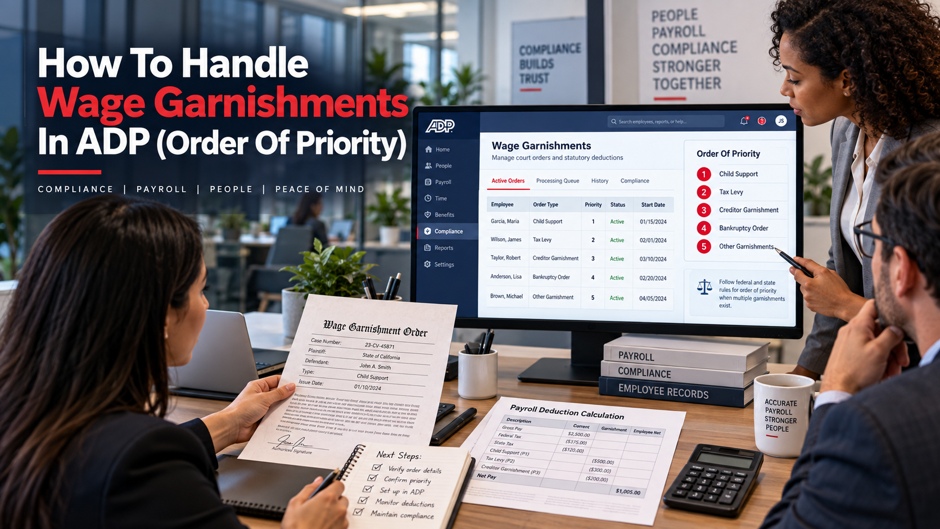
Wage garnishments look straightforward on paper: receive an order, deduct the amount, send the payment. In practice, the calculation is more layered than the court order implies, and the consequences of getting it wrong land on the employer, not the creditor or the employee. An employer who withholds too little is liable to the issuing agency. An employer who withholds too much violates federal consumer protection law. An employer who processes multiple garnishments in the wrong priority order faces potential contempt of court findings from one agency while complying with another.
ADP Workforce Now automates a significant portion of garnishment processing, but accurate Garnishments in ADP setup still depends on correct configuration from the payroll team. The platform applies the Consumer Credit Protection Act limits, calculates disposable earnings, and sequences deductions, but only if the garnishment types, priority levels, court-ordered amounts, and remittance details are entered correctly. This guide covers the federal priority framework, the disposable earnings calculation, how each garnishment type behaves in ADP, how to configure multiple concurrent orders, and what the common configuration errors look like in practice.
TL;DR
| Topic | What to know |
| Priority rules | The CCPA limits withholding for covered garnishments but doesn’t set one universal priority sequence. Apply the federal law governing each order and any applicable state priority rules. |
| Disposable earnings definition | Gross pay minus legally required deductions only (taxes, FICA, state-mandated contributions). Voluntary deductions like 401(k) and health insurance do not reduce disposable earnings |
| CCPA limits by type | Child support: 50% to 65% of disposable earnings; Federal tax levy: IRS Publication 1494 exempt amount table; Creditor garnishment: lesser of 25% of disposable earnings or the amount exceeding 30 times federal minimum wage |
| ADP priority setup | Determine legal priority outside the system first, then confirm how the employer’s current ADP configuration reflects that result. Don’t rely on an assumed default sequence. |
| Employer liability | Employers are legally obligated to comply with valid garnishment orders within the timeframes stated; failure to withhold or remit exposes the employer, not just the employee, to penalties |
| Multiple order rule | Apply the withholding limit and priority rule that governs each order. A support order can leave no amount available for an ordinary creditor garnishment, depending on the orders and applicable law. |
| ADP SmartCompliance | ADP’s garnishment module handles electronic income withholding orders (e-IWO) for child support and electronic levies (e-Levy) for state tax agencies, reducing manual entry and remittance risk |
When multiple garnishments are active at the same time, the payroll team must first determine the rule that governs each order. It should then apply the correct withholding limit and confirm the result before payment is sent. The CPA limits withholding for covered garnishments, but it doesn’t create one federal priority sequence.
What Wage Garnishment Actually Is in Payroll Terms
A wage garnishment is a legal instruction that requires the employer to withhold part of an employee’s pay and remit it to the agency or creditor named in the order. The employer is the party required to withhold and remit under the order. The payroll team must follow the order’s instructions and the federal and state rules that apply to it.
The Consumer Credit Protection Act (CPA), administered by the Department of Labor’s Wage and Hour Division, sets federal limits on the amount of earnings that may be garnished and protects employees from discharge because of garnishment for a single debt. It doesn’t control garnishment priority. The Department of Labor’s Consumer Credit Protection Act garnishment limits provide the federal baseline for covered withholding amounts. Priority questions come from other federal laws and applicable state law, together with the order itself. When state and federal limits differ for a covered garnishment, the law that results in the lower amount being garnished applies.
What constitutes earnings under the CPA:
The CPA defines earnings broadly as compensation paid or payable for personal services. Regular wages and salary are included. Commissions and bonuses can also be earnings, as can periodic payments from a pension or retirement program and employment-based disability plan payments. Severance and other lump-sum payments can be earnings when they’re paid for personal services. Payments unrelated to personal services may fall outside the CPA earnings definition. Reimbursements for legitimate business expenses and certain public benefits may also fall outside the definition. When a bonus or other lump-sum payment is made, payroll should apply the rule that governs that payment and the order.
The employer’s obligation upon receiving a garnishment order:
After receiving a valid garnishment order, the employer must follow the order’s instructions and the federal and state rules that apply to it. The response deadline and withholding start date can vary by order type or jurisdiction. Remittance timing can vary as well. Employee notice duties aren’t universal: in some states the employer provides the notice, while in others the creditor or issuing agency does. Payroll should confirm these requirements before the first affected payroll is processed.
How garnishment priority is determined
The CPA doesn’t create a universal priority sequence for multiple garnishments. The Department of Labor’s federal wage garnishment rules explain that priority is controlled by state law or other federal laws, depending on the orders involved. Employers should review the rule governing each order before deciding which withholding is funded first. The date an order was served can matter in some cases, but it isn’t a universal rule across every type of garnishment.
Family support orders
Federal law gives child support income withholding specific priority protections. Employers should follow the withholding notice and the federal rules that govern support withholding. Applicable state allocation rules also matter when more than one order affects the same pay. A support order can interact with tax levies or other garnishments, so payroll shouldn’t treat every competing order as though one fixed sequence applies.
Child support withholding limits under the CPA:
| Employee situation | Maximum withholding as percentage of disposable earnings |
| Supporting a current spouse or child (other than the subject of the order) and not in arrears | 50% of disposable earnings |
| Supporting a current spouse or child and in arrears for 12 or more weeks | 55% of disposable earnings |
| Not supporting a current spouse or child and not in arrears | 60% of disposable earnings |
| Not supporting a current spouse or child and in arrears for 12 or more weeks | 65% of disposable earnings |
These limits represent the CPA ceiling for child support. The amount withheld must also follow the support order and any applicable allocation rules.
Federal tax levies
Federal tax levies follow IRS rules rather than a fixed second position in a universal hierarchy. Form 668-W includes a Statement of Dependents and Filing Status that the employer gives to the employee. The employee has 3 days to complete and return it. The exempt amount is calculated using IRS Publication 1494, and the employer should follow the levy instructions when another withholding order is already in effect.
Unlike CPA-governed garnishments, federal tax levies are not percentage-based against disposable earnings. They are structured as a residual withholding, meaning the employee keeps the exempt amount and everything above it is levied. This produces very high effective withholding rates for employees with moderate wages and few exemptions.
Federal administrative wage garnishments
Federal administrative wage garnishments, including certain federal student loan orders, follow the federal law and agency rules that govern them. For Department of Education orders, family support withholding can take priority, and an earlier-served garnishment may reduce the amount available under the federal order. Employers should follow the order’s instructions rather than place these garnishments at a fixed level in a universal sequence. State-issued student loan garnishments follow the rules that apply in that jurisdiction.
Creditor and bankruptcy orders
Creditor garnishments cover consumer debts such as credit card judgments, medical bill judgments, personal loan defaults, and other civil money judgments. Their priority against competing orders depends on the law that governs those orders and the employee’s jurisdiction, so payroll shouldn’t assume one first-in-time rule applies everywhere. Ordinary creditor garnishments are subject to the CPA limit of the lesser of 25% of disposable earnings or the amount by which weekly disposable earnings exceed 30 times the federal minimum wage. Bankruptcy orders follow the Bankruptcy Code and the court’s instructions rather than this ordinary garnishment rule.
Disposable Earnings: The Calculation That Drives Everything
Every CPA garnishment calculation starts with disposable earnings. Disposable earnings is a legal term of art that does not mean take-home pay, and this distinction produces the most common payroll error in garnishment processing: using the employee’s net pay as the garnishment base instead of their disposable earnings.
What reduces gross pay to disposable earnings:
Only legally required deductions mandated by federal or state statute reduce gross pay to disposable earnings; deductions the employee elected voluntarily have no effect on the calculation regardless of how routine or long-standing they are.
- Federal income tax withholding based on W-4 elections
- FICA Social Security and Medicare contributions
- State income tax withholding
- State disability insurance where mandated by state law
- State unemployment insurance contributions where employees are required to contribute
What does not reduce gross pay to disposable earnings:
Voluntary deductions are excluded from the disposable earnings reduction regardless of how routine or significant they are to the employee’s actual take-home pay.
- Employee 401(k) or 403(b) contributions, including employer-matched portions elected by the employee
- Health, dental, and vision insurance premiums paid by the employee through payroll deduction
- Flexible spending account or health savings account contributions
- Union dues
- Voluntary life insurance premiums
- Charitable contribution payroll deductions
- Employee-elected supplemental insurance
The practical effect is that an employee contributing 8% to a 401(k) and paying $350 per month for family health coverage has a disposable earnings figure substantially larger than their actual take-home pay, and the garnishment percentage applies to the larger number. ADP calculates disposable earnings at the employee level each pay period before applying the CPA limits, and the system’s calculation depends on how each deduction code is classified in the payroll setup. If a mandatory deduction is discommoded as voluntary, or a voluntary deduction is discommoded as mandatory, the disposable earnings figure will be wrong for every pay period it runs.
The CPA floor protection:
No creditor garnishment can reduce an employee’s weekly disposable earnings below $217.50, which equals 30 times the $7.25 federal minimum wage. If an employee’s weekly disposable earnings are $217.50 or below, nothing can be garnished for ordinary consumer debts regardless of how many orders are active. Child support and tax levies are not subject to the same floor protection. State laws may set a higher floor that further restricts withholding.
Configuring Garnishments in ADP Workforce Now
ADP Workforce Now supports garnishment-related payroll processing, but the exact fields and system behavior can depend on the employer’s configuration and ADP services in use. Organizations using ADP payroll processing should verify each order and confirm current product behavior in their own setup or current ADP documentation before relying on a system default.
The configuration sequence for a new garnishment order:
Start by identifying the order type and mapping it to the garnishment or deduction setup used in the employer’s current ADP configuration. During an ADP Workforce Now implementation, teams should confirm the setup against the order and current ADP guidance before production processing begins. The legal treatment comes from the order and applicable law, so the payroll team shouldn’t assume a category name in the system determines the correct withholding rule by itself.
Enter the amount or rate required by the order using the pay-period treatment required by the order and applicable law. If an order states a monthly amount while payroll runs biweekly, confirm the correct conversion method in the order or current ADP guidance. Don’t assume the system will convert the amount automatically.
For employees with multiple active garnishments, determine legal priority under the rules that govern the orders before reflecting that result in ADP. The settings available for sequencing can depend on the employer’s current configuration or service setup. Confirm how the current setup handles competing deductions before the first affected payroll run.
Remittance details including the agency name, payment address or electronic payment destination, account reference numbers, and case identifiers must be entered accurately for each order. For child support orders processed through ADP SmartCompliance, electronic order features may reduce manual entry where supported by the employer’s service setup. For manually processed orders, errors in remittance details can cause payments to be returned or misapplied.
Enter the effective date and any other start or end information required by the order. Confirm how the employer’s current ADP setup handles late entry, backdating, and catch-up withholding before processing. These behaviors can depend on the configuration or service in use.
Multiple Concurrent Garnishments in ADP
Multiple garnishments on the same employee in the same pay period require the payroll team to determine which priority rule applies to each order and which withholding limits govern the pay. The team should then confirm that the current ADP setup reflects those rules before payroll is finalized.
How to handle multiple concurrent orders in ADP:
Start with the employee’s disposable earnings or other exempt amount required by the order. Then determine priority under the federal or state rule that governs each withholding. Before payroll is finalized, compare the configured result with the order and the applicable limit rather than assuming ADP will apply one universal sequence.
Suppose a child support order and an ordinary creditor garnishment are active at the same time. Payroll shouldn’t add the stated percentages or assume a universal stacking rule. The Department of Labor gives an example in which existing support withholding leaves no amount available for an ordinary consumer garnishment, even though that consumer order could otherwise allow withholding under the general CPA limit. The result still depends on the orders and the rules that govern them.
What the payroll team must verify when configuring concurrent garnishments:
Verify the type of each order and the rule that determines its priority. Check the service and effective dates where they matter. Teams can use ADP payroll audit reports together with a manual calculation to compare the configured result with the order before the first affected payroll run. Document the basis used for priority and the applicable withholding limit in the employee’s payroll record.
Employer Obligations and Liability
The employer’s legal position in a wage garnishment is materially different from their position in most other payroll deductions. In most deductions, an error is recoverable through a payroll correction. Regular payroll compliance and audits can help identify weaknesses in withholding, remittance, deduction setup, and documentation before those issues continue across multiple pay periods. In a garnishment, the employer can face direct legal liability for the withheld amount if processing errors occur.
Failure to withhold: If the employer receives a valid garnishment order and fails to begin withholding within the required time frame, the employer may become liable for the amount that should have been withheld. The creditor or agency can pursue the employer directly for the unpaid amount in some jurisdictions. For child support, the state child support enforcement agency can take action against the employer independently of the employee.
Over-withholding: Withholding more than the CPA ceiling, or more than the court-ordered amount, violates federal consumer protection law. The excess must be refunded to the employee. If the employee has already been over-withheld for multiple pay periods, the employer faces potential liability for the cumulative over-withholding.
Termination protections: The CPA prohibits terminating an employee because their wages are subject to garnishment for a single debt. Some states extend this protection to employees with garnishments for two or more debts. Violating these anti-retaliation provisions creates significant employer liability independently of the garnishment processing itself.
Response time frames: Most garnishment orders specify how quickly the employer must respond or begin withholding, and the exact requirement depends on the order. For an IRS wage levy, the employer gives the Statement of Dependents and Filing Status to the employee. The employee has 3 days to complete and return it. If the statement isn’t returned within 3 days, the employer calculates the exempt amount using the IRS default stated in the levy instructions. Other order types can have different response rules.
Common ADP Configuration Errors in Garnishment Processing
Use this section as a check for failures after the setup process. A structured year-end payroll review can help expose errors that have continued across pay periods, but the better correction is to fix each issue as soon as it’s found.
Entering the garnishment type incorrectly. Consequence: the wrong withholding treatment may be applied. Correction: compare the order with the current ADP setup and correct the classification before payroll is processed.
Using net pay instead of disposable earnings as the garnishment base. Consequence: the manual check can flag the wrong amount because voluntary deductions reduce take-home pay but don’t reduce CPA disposable earnings. Correction: use disposable earnings after legally required deductions when reviewing a covered garnishment calculation.
Converting monthly court orders to incorrect per-period amounts. Consequence: a monthly amount can be over-withheld or under-withheld when it’s converted for a different pay frequency. Correction: use the method required by the order or applicable guidance, then verify the per-pay-period amount before processing.
Assigning priority without checking the governing rule. Consequence: an order may be funded ahead of another order that has legal priority. Correction: determine priority under the federal or state rule that applies to the competing orders, then reflect that result in the employer’s current ADP setup.
Not updating the order when terms change. Consequence: payroll can continue using an outdated amount or release status. Correction: process the modification or release promptly, then confirm the current ADP record matches the updated order.
FAQs
Who is responsible for determining garnishment priority when multiple orders exist?
The employer is responsible for applying the priority rules that govern the orders it receives, but the CPA doesn’t create one universal sequence. Priority can come from other federal law or applicable state law, and the order’s own terms can matter. Payroll should follow the instructions for each order and seek legal guidance when competing rules aren’t clear.
Does ADP automatically calculate the disposable earnings correctly?
ADP can calculate disposable earnings based on configured deduction codes, but employers should confirm how required and voluntary deductions are classified in their current setup. Compare the system result with the rule that applies to the order. A misclassified deduction can produce the wrong garnishment base.
What happens if the court-ordered amount exceeds the CPA ceiling?
The employer must follow the order and the withholding limit that applies to it. If the stated amount can’t be fully withheld, payroll should follow any notice or arrears instructions that apply. Confirm how the employer’s current ADP setup handles a remaining balance or catch-up amount rather than assuming the system will carry it forward or drop it automatically.
What is ADP SmartCompliance Wage Garnishments and when does it add value?
ADP SmartCompliance is a garnishment management service that can support order receipt and remittance, with other functions depending on the services and configuration in use. Employers should confirm current features in their ADP documentation or service agreement before relying on a specific automated behavior. It may be useful for organizations with high garnishment volume or multi-state orders.
Can an employee be terminated because of a garnishment?
The CPA prohibits terminating an employee because their wages are garnished for any single debt. Multiple garnishments for the same debt type may or may not carry the same protection depending on state law. California, for example, extends the protection to employees with garnishments for any number of debts. Terminating an employee specifically to avoid processing a garnishment creates independent legal liability for the employer, separate from any failure to comply with the garnishment order itself.
How does ADP handle lump-sum payments like bonuses in garnishment calculations? Lump-sum payments such as bonuses and commissions can be earnings under the CPA when they’re paid for personal services. The rule that applies to the order still controls the withholding. Employers should confirm how their current ADP setup treats the payment and should also check any state reporting requirement that applies to child support or other orders.
What triggers the release of a garnishment in ADP?
A garnishment ends when the court or issuing agency provides the release or termination required for that order. After receiving it, the employer must update the payroll record under the order’s instructions and the employer’s current ADP process. Whether ADP closes an order automatically or requires a manual step can depend on configuration or service setup, so payroll should confirm the current behavior.
How often should garnishment configurations be audited in ADP?
At minimum once per quarter, and immediately whenever the employer receives a modification notice, release notice, or a new order for an employee who already has active garnishments. A quarterly review of active garnishment codes against the original orders catches accumulated drift from incorrect per-period amounts, outdated remittance addresses, and orders that should have been closed but weren’t. For organizations with high garnishment volume, a monthly review is more practical and reduces the window during which an error can compound.
