
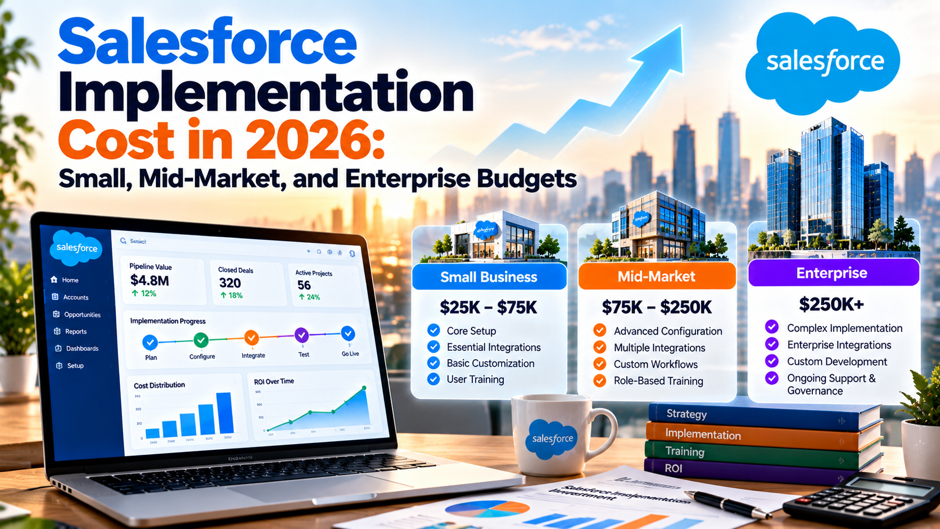
Imagine an illustrative 150-person services firm that collects 3 Salesforce proposals in a single week. The first quotes $38,000 for a standard build, the second quotes $140,000 for what looks like the same scope, and the third offers a time-and-materials estimate with a range wider than the first 2 combined. The finance director asks the question every buyer asks: which number is real? The honest answer is that all of them can be, because each vendor is pricing a different definition of done.
This article lays out what published sources say about Salesforce implementation cost in 2026 for small, mid-market and enterprise buyers, and it shows the arithmetic behind a first-year and 3-year budget. The cost ranges come from 3 consulting firms whose pages sell the services they price, so they’re estimates with an interest attached. License prices are partly reported by those same pages, and Salesforce’s own pricing page wouldn’t load during research, so confirm every figure with Salesforce and your implementation partner before you budget.
TL;DR
- Published ranges disagree, and the gaps matter. A consultancy puts mid-market builds at $75,000 to $150,000, another at $40,000 to $150,000, and a third quotes $25,000 to $40,000 for a 100-user build. Treat the spread as a measure of scope uncertainty, and force every proposal to define users, clouds, integrations, data volumes and training before you compare prices.
- Licenses often cost more than the build. At an illustrative 150 users on an Enterprise-level edition near $175 per user per month, licenses reach $315,000 a year, against a reported implementation of $75,000 to $150,000. Model 3 years of subscription, administration and enhancements, as well as the project invoice.
- Add a buffer and plan the run cost. A source recommends a 15 to 20 percent buffer on fixed-price work and reports change orders of 10 to 30 percent. Budget for an administrator, support and a maintenance reserve from the first day. Keep the totals in a single model.
The published ranges at a glance
| Buyer size | Folio3 (March 2026) | Cyntexa (2026) | Clientele (May 2026) |
| Small business | $10,000 to $25,000 | $3,500 to $5,500 for a simple build | $10,000 to $25,000 QuickStart |
| Mid-market | $75,000 to $150,000 | $40,000 to $150,000 typical; $25,000 to $40,000 for 100 users | $25,000 to $75,000 standard; $75,000 to $150,000 multi-cloud build |
| Enterprise | $150,000 to $500,000 or more | $250,000 to $500,000 or more | $150,000 to $300,000 or more |
| Complex or multi-cloud | $500,000 or more | Industry examples of $150,000 to $410,000 | $480,000 to $850,000 example for 1,200 users |
Every row is a vendor estimate. Folio3, Cyntexa and Clientell are consulting or services firms, and each page ends in a sales pitch. None of the pages shows methodology, and each contains internal inconsistencies that the authors haven’t reconciled. Read the table as 3 independent opinions about order of magnitude, not as benchmarks. The overlap, roughly $10,000 to $25,000 for a basic small build and $75,000 to $150,000 for a serious mid-market build, is the most defensible planning range.
Why the ranges conflict
Scope definitions differ more than prices do. A standard implementation at a single firm might mean configuring Sales Cloud with default objects and migrating a spreadsheet. At another it means custom objects, automation, 3 integrations and a training program. Cyntexa’s lowest figure of $3,500 to $5,500 describes a simple build, while its mid-market range stretches to $200,000 elsewhere. The difference is rarely the hourly rate. It’s the number of things the project is expected to do.
Delivery location changes the rate. Cyntexa lists US partner rates of $150 to $250 an hour, Europe at $100 to $180 and an India-based partner at $40 to $80. Clientell reports UK and Western Europe at 10 to 20 percent above its US baseline and India and Latin America 30 to 60 percent lower. On a 1,000-hour project, the gap between $150 and $40 an hour is $110,000. Offshore delivery can work, but ask who handles discovery, who is on calls and how requirements move between teams.
Each firm has a reason to frame the number. A boutique selling fixed-fee QuickStart packages wants buyers to see $10,000 to $25,000 as normal. A firm selling larger programs benefits when buyers expect $150,000 or more. A firm selling managed services or AI-assisted administration wants the post-launch gap to look large. None of that makes their numbers false, but it explains why the same project gets different prices. Collect at least 3 proposals and ask each to price the same written requirements.
What the license line includes
- Edition prices are the largest recurring item. Folio3’s page lists Starter at $25, Professional at $100, Enterprise at $175 and Unlimited at $330 to $350 per user per month, with CPQ add-ons starting around $75. Cyntexa lists Health Cloud Enterprise at $325 in its first mention and $350 in the second. These are third-party reports, so confirm current list prices and discounts with Salesforce, since negotiated pricing varies by volume and term.
- List prices moved in August 2025. Salesforce’s own announcement says list prices increased by an average of 6 percent effective August 1, 2025, for Enterprise and Unlimited editions of Sales Cloud, Service Cloud, Field Service and select Industries clouds. It says Foundations, Starter and Pro editions weren’t affected. If your last quote predates that change, an older number may understate renewal costs for Enterprise and Unlimited. Ask Salesforce for the renewal schedule too.
- Support tiers add cost. Folio3 says Premier Support may add about 30 percent to license fees, though the page doesn’t cite a source. On a $315,000 annual license bill, 30 percent is $94,500. Ask Salesforce which support level is included in your quote, what each upgrade costs and which response times it covers, then decide whether your internal administrator and partner cover the same need. Request the service levels in writing.
- Add-ons and clouds multiply the line. CPQ, Marketing Cloud, Data Cloud, industry clouds and Agentforce capabilities each carry separate pricing, and some require additional licensing minimums. Ask for a complete bill of materials showing every product, quantity and unit price for each year of the term. A quote that lists only the core edition leaves you to discover the rest during contracting. Check the contract term for each product, since renewal dates often differ.
License arithmetic by buyer size
| Scenario (illustrative) | Users | Assumed price per user per month | Annual licenses |
| Small business | 25 | $100 (Professional) | $30,000 |
| Mid-market | 150 | $175 (Enterprise) | $315,000 |
| Enterprise | 1,000 | $330 (Unlimited, low end of reported range) | $3,960,000 |
The prices are the figures Folio3 reports, not verified list prices, and they ignore discounts, which can be material at the enterprise level. A 6 percent change on the mid-market scenario is $18,900 a year, which is the scale of a small project. Compare the license line with the implementation range: for the small business, a $10,000 to $25,000 build equals 33 to 83 percent of a year of licenses, while for the mid-market case $75,000 to $150,000 equals 24 to 48 percent. For the enterprise case, $150,000 to $500,000 is 4 to 13 percent.
Those ratios contradict a rule of thumb on Folio3’s own page, which says implementation costs 2 to 3 times the annual license fee in an early passage and 1.5 to 3 times in a later passage. At $315,000 in licenses, even the 1.5 times figure would be $472,500, well above the same page’s $75,000 to $150,000 mid-market range. The sources can’t all be right at once. Use the rule of thumb with caution, and rely on a bottom-up estimate from your own requirements instead.
Small business budgets
A small business with fewer than 50 users can run a credible Salesforce implementation on a modest budget if it limits scope. Clientell’s QuickStart tier, covering Sales or Service Cloud with out-of-the-box configuration, runs $10,000 to $25,000 over 2 to 6 weeks, and Folio3 gives the same range for a basic Sales Cloud setup. Cyntexa’s lower figure of $3,500 to $5,500 describes a simple build. A case on Clientell’s page quotes a 50-user QuickStart at $12,000 to $35,000, which shows how a modest scope can still stretch.
The cheapest path is to configure rather than customize. Use standard objects, a short list of fields, a single sales process, a basic dashboard set and email integration. Migrate only clean, current data, and resist importing years of history that nobody uses. Train a champion thoroughly rather than every user lightly. Plan a second phase for automation and reporting after people have used the system for a quarter and know what they actually need.
Small buyers face a different budget risk: the lack of an administrator. A part-time admin, a fractional retainer or a partner support plan has to exist from the first week. Clientele reports that most organizations pay for a post-launch administration gap of $3,000 to $10,000 a month within 3 to 6 months of launch, though that page sells managed services and the figure is unsourced. Even if your number is lower, a system that nobody maintains decays quickly.
What drives mid-market cost
- Integrations are the largest swing factor. Folio3 puts integrations at $10,000 to $50,000 or more, with API and middleware work running up to $100,000, and Clientele notes integration surprises of about $10,000 to $50,000. ERP, billing, marketing automation and support systems each add interfaces to design, build and test. Legacy systems without APIs cost more. List every system that must connect, and ask partners to price each interface separately. Keep the inventory current.
- Data quality can outweigh data volume. Cyntexa says dirty data costs more than large data. Folio3 puts migration at $5,000 to $60,000. Duplicates, missing fields and inconsistent account hierarchies require cleanup decisions that business owners must make. Start profiling your data before you sign, and assign someone to decide which records survive. Late discovery of data problems is among the causes of overruns Cyntexa lists. Budget a cleanup sprint before migration begins.
- Process complexity and custom development raise the bill. Approval chains, pricing rules, territory logic and exceptions turn into flows and code. Folio3 puts customization at $100 to $200 an hour. Every custom component also adds long-term maintenance. Ask partners to show which requirements can be met with configuration and which need development, and challenge each custom item with the question of whether the process could change instead. Challenge each custom item twice.
- Timeline and compliance push costs up. Folio3 says compressed schedules add 10 to 25 percent and compliance requirements add 10 to 30 percent, with multi-region rollouts adding $10,000 to $50,000 or more. Those percentages are unsourced. They match the intuition that rushing and regulation both add work. Decide early whether a hard date is worth a premium, and what regulatory evidence the system must produce. Ask for both prices side by side.
- Training and change management are easy to cut and expensive to skip. Cyntexa assigns 5 to 10 percent of the budget to training and lists change management among hidden costs. Folio3 cites training at $500 to $5,000 per user, a range so wide it suggests different definitions. Budget for role-based sessions, recorded walkthroughs and a period of floor support after go-live. Adoption problems cost more than the sessions that would have prevented them.
Enterprise budgets
Multi-org and multi-cloud programs run into the hundreds of thousands. Folio3 puts enterprise work at $150,000 to $500,000 or more and complex multi-cloud at $500,000 or more. Cyntexa gives $250,000 to $500,000 or more for enterprises and industry examples between $150,000 and $410,000 for 100 users. Clientell’s example of a 1,200-user multi-cloud project is $480,000 to $850,000. The spread reflects scope, because enterprise projects combine several clouds, integrations, security reviews and multiple business units.
Governance consumes real budgets. Large programs need an architecture board, release management, test environments, security review and a data governance model. Cyntexa lists governance and org audits among hidden costs. Those activities rarely appear as a line item in a partner’s first proposal, but they decide whether the system stays healthy after the second and third releases. Ask who owns the roadmap, who approves changes and how many sandboxes and test cycles the quote assumes.
Licensing negotiations matter more than at a smaller scale. On an illustrative 1,000-user Unlimited deployment at $330 a user per month, annual licenses are $3,960,000, so a 10 percent discount is $396,000 a year. That’s several times the typical implementation budget. Treat licensing as a separate workstream with its own owner, benchmark, term negotiation and renewal strategy. Confirm list prices, discount structure, renewal caps and support terms in writing, and have counsel read the contract.
Consultant rates behind the numbers
| Role | Solo (Clientell) | Boutique agency | Big 4 or enterprise firm |
| Admin or business analyst | $80 to $130 | $100 to $175 | $150 to $250 |
| Developer | $130 to $200 | $150 to $225 | $200 to $350 |
| Senior consultant or lead | $150 to $225 | $175 to $275 | $225 to $400 |
| Architect | $200 to $300 | $225 to $350 | $300 to $500 or more |
| Specialist (CPQ, Marketing Cloud) | $175 to $275 | $200 to $325 | $275 to $450 |
All rates are hourly in US dollars and come from Clientell’s page, which cites several named sources I haven’t verified and which contains its own inconsistencies, such as differing figures for architect rates. Cyntexa reports US partner rates of $150 to $250 an hour, which sits inside the same bands. Clientell’s daily-rate range of $800 to $3,200 appears to assume 8-hour days, though the page doesn’t say so. For comparison, its example quote of 120 hours at a $150 blended rate is $18,000.
Use the rates to test proposals. If a fixed fee of $60,000 includes 400 hours, the implied rate is $150. If a quote shows a senior architect at $300 an hour for most of the project, ask why a junior consultant isn’t doing the configuration. Request a staffing plan with roles, hours and rates, plus the names of the people who’ll actually do the work. A smaller team of experienced people often costs less in total than a large team that needs supervision.
How the budget breaks down by phase
- Discovery and planning, 10 to 15 percent. Cyntexa assigns this share to workshops, requirements, process mapping and design. On a $100,000 project, that’s $10,000 to $15,000. Cutting discovery looks like a saving and usually becomes an overrun, because requirements discovered during build cost more to change. Insist on written deliverables, such as process maps, a data model and a prioritized backlog, before build begins. Keep the workshop notes for later phases.
- Configuration, 25 to 30 percent. This covers setting up objects, fields, page layouts, security, flows and reports using standard tools. On the same $100,000 project, it’s $25,000 to $30,000. Configuration is the cheapest way to meet a requirement, so push scope toward it. Ask partners to demonstrate against sample data early, rather than showing slides. Review configured work with real users every 2 weeks, so surprises appear while changes are cheap, and keep a short list of deferred requests for the next release.
- Custom development, 15 to 20 percent. Code and complex components take $15,000 to $20,000 on that example. Every custom element needs testing, documentation and long-term maintenance. Require the partner to explain why configuration can’t do the job, and ask for a short list of the riskiest components. Keep a record of custom items so future administrators know what exists. Set a hard limit on custom hours and require approval before the partner exceeds it.
- Integrations, 15 to 20 percent. Another $15,000 to $20,000 funds interfaces to other systems. This share rises quickly when systems lack modern APIs. Ask for an interface inventory that names each system, the direction of data flow, the volume and who owns the other side. Without the other team’s commitment, integration work stalls. Schedule joint testing with the owners of the other systems, and agree who fixes a defect that sits on the boundary between 2 teams before the work starts.
- Data migration, 10 to 15 percent. Mapping, cleansing and loading data cost $10,000 to $15,000 in the example. Plan at least 2 trial loads before the final load. Assign a business owner to approve rules for duplicates and ownership. A migration plan that mentions tooling but leaves out decisions is incomplete. Reserve time for users to review migrated records in the new system, because spotting missing accounts is easier on screen than in a spreadsheet.
- Training, then go-live support, at 5 to 10 percent each. Together that’s $10,000 to $20,000. Include recorded sessions, quick guides and a defined period of hypercare. Schedule training close to go-live so people remember it. Measure adoption in the first 30 days, and reserve hours to fix what usage reveals. Record every session for new hires, and keep a short list of the questions users ask most often so the guides improve over time.
Overruns and hidden costs
Cyntexa names scope creep, weak discovery, data problems found late and delayed decisions as the main causes of overruns, and its hidden-cost list includes change management, post-launch support, governance and enhancements cut from the original scope. Clientele reports change orders adding 10 to 30 percent of the original scope and recommends a 15 to 20 percent buffer on fixed-price work. On a $100,000 project, those ranges are $10,000 to $30,000 of change orders and $15,000 to $20,000 of buffer.
Most overruns come from decisions rather than technology. A stakeholder who approves requirements slowly, a business unit that changes its process mid-build or a data owner who can’t be found will each add weeks. Control them by naming a decision-maker with authority, setting response times for approvals and holding a weekly scope meeting that records every change request with its cost. A change that arrives with a price tag gets more thoughtful treatment than a change that arrives as a casual request.
Also budget for the items that fall between phases: sandbox refreshes, security reviews, regression testing for Salesforce’s seasonal releases, and the first round of enhancement requests that follow go-live. Cyntexa gives an example of a $30,000 initial build followed by $80,000 or more of post-launch augmentation. That’s a single vendor’s anecdote, which isn’t a rule, but it illustrates how a project’s first invoice can understate its total cost by a wide margin.
What it costs to run after go-live
An administrator is a fixed cost from the first day. Folio3 cites US administrator salaries of about $70,000 to $110,000 a year, attributed to a third-party site, and Clientell compares traditional ongoing administration at $120,000 to $240,000 a year without showing the calculation. Smaller firms may use a part-time role, a fractional administrator or a managed-service retainer. Clientele quotes its own managed services from $3,500 a month. Price all options on the same set of tasks.
Support and maintenance reserve. Folio3 lists support at $10,000 to $45,000 annually and recommends a 5 to 15 percent annual maintenance reserve for a 3 to 5 year view of total cost. Salesforce also ships major releases several times a year, so testing and adjusting automations is routine work. If you rely on a partner, ask for a support agreement with response times, included hours and a rate card for work beyond the included hours.
Enhancements are a budget line, not a surprise. After launch, users ask for new reports, fields and automations, and leadership asks for new integrations. Set aside a quarterly enhancement budget and a prioritization process, such as a monthly review where business owners rank requests. Without that process, the backlog grows, shadow tools appear and people start working around the system, which defeats the purpose of paying for it. Review the list quarterly.
First-year and 3-year totals
| Scenario (illustrative) | Annual licenses | Implementation with buffer | Administration | Year-1 total | 3-year total |
| Small, 25 users | $30,000 | $11,500 to $30,000 | Part-time, not priced | $41,500 to $60,000 | $101,500 to $120,000 |
| Mid-market, 150 users | $315,000 | $86,250 to $180,000 | $70,000 to $110,000 a year | $471,250 to $605,000 | $1,241,250 to $1,455,000 |
| Enterprise, 1,000 users | $3,960,000 | $172,500 to $600,000 | 3 administrators, $270,000 to $330,000 a year | $4,402,500 to $4,890,000 | $12,862,500 to $13,470,000 |
The totals add annual licenses, the low and high implementation ranges from Folio3 with a 15 percent buffer on the low case and a 20 percent buffer on the high case, and administration where priced. They exclude discounts, support upgrades, add-on products, enhancements and the maintenance reserve, so a real budget will be higher. For the mid-market case, an additional 30 percent for premium support would be $94,500 a year, and a 6 percent license change would be $18,900.
The pattern is the same across sizes: implementation is a minority of 3-year cost. For the mid-market case, the high-end implementation with a buffer is $180,000 against $945,000 of 3-year licenses and $210,000 to $330,000 of administration. That doesn’t make implementation unimportant. A poorly scoped build can force expensive rework and low adoption, which wastes the license spend. It means procurement effort should be proportional: negotiate licenses, scope the build carefully and fund the run.
Comparing proposals and spotting red flags
Ask every partner to respond to the same written requirements and to separate fixed from estimated items. A fixed fee for defined deliverables gives cost certainty, and time and materials gives flexibility at the price of variance. Require each proposal to state assumptions, such as the number of users, objects, integrations, data records, training sessions and test cycles, then compare the assumptions before the totals. A low price built on thin assumptions usually returns as a change order.
Look for specific red flags. A proposal with no discovery phase, no named team, no data migration plan or no post-launch support is incomplete. An hourly rate far below the market, as in the $40 to $80 band Cyntexa reports for India-based partners, can be legitimate but needs evidence of experience and a clear communication model. A partner who won’t provide references from similar projects, or who answers every question with “it depends,” is hard to hold accountable later.
Negotiate the contract as carefully as the price. Ask for milestone-based payments tied to accepted deliverables, a warranty period for defects after go-live, ownership of all configuration and documentation, a cap on change orders without written approval and a transition plan if you change partners. Check who holds administrative credentials. Have counsel review liability, intellectual property and termination language, and confirm all pricing in writing before you sign. Keep copies of all drafts.
Mistakes that inflate Salesforce budgets
- Buying more editions than the process needs. Teams sometimes choose the highest edition for features they never configure. Match the edition to specific requirements, such as advanced automation limits, sandboxes or industry features, and ask Salesforce to show where a lower tier would fail. You can usually upgrade later, while downgrading is harder and may be limited by contract terms. Document the reason for each edition choice in the decision log.
- Treating the build as the whole project. A budget that stops at go-live leaves nothing for adoption, support or enhancements. Include the administrator, training, release management and a quarterly improvement fund in the business case from the start. Finance leaders respond better to a complete 3-year picture than to a small project cost followed by a series of requests. Show the full 3-year picture in a single chart for leadership.
- Starting without clean data and a decision-maker. Data cleanup and decision speed determine cost more than any tool. Assign a business owner to the project, set approval deadlines and profile your data before the partner arrives. Cyntexa lists delayed approvals and late data problems among its overrun causes, which matches the experience of most implementation teams. Make the owner’s availability part of the contract schedule, with named backups for absences.
- Choosing on rate card alone. A low hourly rate with a large, junior team can cost more than a higher rate with a few experts. Compare total hours, staffing and relevant experience, and weigh reference checks heavily. The cheapest quote often leaves out discovery, migration or training, and the missing work returns as a change order. Ask each partner for the names, roles and tenure of the people on the team.
Ways to lower the cost without cutting corners
Phase the scope instead of trimming quality. Launch the processes that carry the most revenue or service risk first, then add automation and reporting once people have used the system for a quarter. Phasing defers cost, improves requirements because real users have opinions by then and keeps the first release small enough to finish on time. Ask partners to price phase 1 as a fixed fee and phase 2 as a capped estimate, with a decision point between them.
Fix data and decisions before the partner starts. Profile your data, remove duplicates you already know about and name a business owner who can approve rules the same week. Cyntexa’s list of overrun causes includes weak discovery, late data problems and delayed approvals, all of which sit on the buyer’s side of the table. Every day a partner waits for a decision is a day of billable time, so preparation is often the cheapest saving available.
Negotiate the pieces separately. Licenses, implementation, support and training are different purchases with different bargaining power. Compare at least 3 implementation proposals against the same written requirements, benchmark license discounts with Salesforce’s account team and price support on its own line. Splitting the decision stops a generous license discount from hiding an inflated services quote, and the reverse. Confirm each price in writing and ask counsel to review the final contract.
FAQs
How much does a Salesforce implementation cost in 2026?
Published estimates vary by firm. Folio3 gives $10,000 to $25,000 for a small business, $75,000 to $150,000 for mid-market and $150,000 to $500,000 or more for an enterprise. Cyntexa and Clientell give overlapping but different ranges. All are vendor estimates, so define your scope, collect at least 3 proposals and treat the overlap as a planning range rather than a quote. Ask each partner to show its assumptions beside the price.
Why do quotes for the same project differ so much?
Scope definitions, delivery location, staffing mix and assumptions differ. A proposal may include discovery, migration and training while another leaves them out. Hourly rates also vary by region and firm type, and Cyntexa reports US partners at $150 to $250 an hour against $40 to $80 for an India-based partner. Ask every partner to price the same written requirements and list assumptions explicitly. Keep the written requirements identical for all.
How much do Salesforce licenses cost per user?
Folio3’s page reports Starter at $25, Professional at $100, Enterprise at $175 and Unlimited at $330 to $350 per user per month. Those are third-party figures. Salesforce announced an average 6 percent list price increase effective August 1, 2025 for Enterprise and Unlimited editions of several clouds. Confirm current prices and your discount with Salesforce, because negotiated terms vary. Ask for a bill of materials covering every product and year.
Is implementation or licensing the bigger cost?
Over 3 years, licensing is usually larger. In the illustrative mid-market case, 150 users at $175 a month cost $315,000 a year, or $945,000 over 3 years, against an implementation of $75,000 to $150,000. Administration, support and enhancements add more. A poor implementation still wastes license spend, so fund both properly rather than minimizing either. Build a 3-year model with licenses, administration, support and enhancements in separate lines so each can be negotiated or challenged.
How long does a Salesforce implementation take?
Sources differ. Clientele lists 2 to 6 weeks for a QuickStart, 6 to 12 weeks for a standard build and 3 to 6 months for a mid-market multi-cloud build. Cyntexa lists 8 to 24 weeks for 50 to 200 users and 24 to 52 weeks or more for 200 or more users. Those are vendor estimates, and your timeline depends on integrations, data quality and decision speed. Plan some slack into the schedule.
What hidden costs should I plan for?
Plan for change management, post-launch support, governance, enhancements, sandbox and release testing and an administrator. Clientele reports change orders of 10 to 30 percent and suggests a 15 to 20 percent buffer on fixed-price work, though those figures are unsourced. Folio3 recommends a 5 to 15 percent annual maintenance reserve. Include them in the 3-year budget. Review the list with finance before you sign, so the totals include every item.
Should I choose a fixed-fee or time-and-materials contract?
Fixed fees suit well-defined scope and give cost certainty, provided the deliverables are written down and change orders require approval. Time and materials suit uncertain scope but need caps, weekly reporting and a clear definition of done. Many buyers use a fixed-fee discovery, then a fixed or capped build. Have counsel review payment milestones, warranty and ownership terms. Make sure acceptance criteria are written for each milestone and signed by a business owner.
How can I lower the cost without cutting corners?
Limit the first release to the processes that matter, configure rather than customize, clean data before migration, name a decision-maker with approval deadlines and train role by role. Compare staffing plans, as well as rates, and negotiate licenses as a separate workstream. Plan a second phase for features users request after real use, and confirm every price and term in writing. Track adoption for the first 30 days and adjust training accordingly.
