
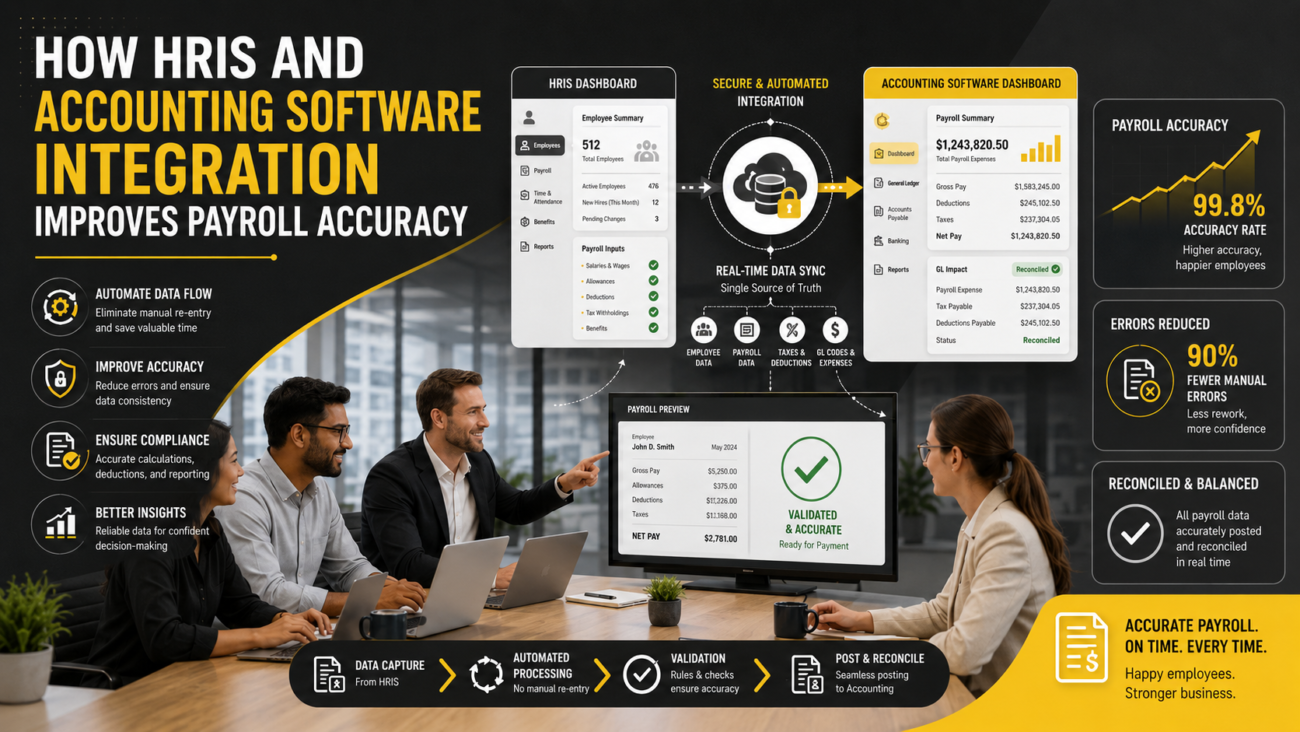
Payroll can be correct inside the HR system and still create trouble in the books. A department may have changed without the accounting cost center being updated. A new bonus code may calculate correctly in payroll but have no general ledger mapping. A journal can even balance perfectly while labor expense lands in the wrong department. These problems explain why integrating your HRIS with accounting software requires more than connecting 2 applications and confirming that data moved.
The working chain usually runs from an employee record through payroll and then into finance. HR maintains workforce information. Payroll turns that information into earnings, deductions, taxes, employer costs, and net pay. Finance then needs those results classified within its chart of accounts and financial reporting structure. The connection has to preserve the right values as information moves from one stage to the next.
That makes integrating your HRIS with accounting software an ownership and accounting exercise as much as a technical one. Teams have to agree on which system controls each field, how payroll codes map into the ledger, when information should move, how errors are handled, and how finance proves the resulting journal is correct. Those decisions matter whether the organization uses ADP Workforce Now, QuickBooks Online, Sage Intacct, NetSuite, or another combination of systems.
This guide follows the complete path. It starts with the basic system relationship, moves through mapping and implementation, and finishes with testing, reconciliation, security, and the maintenance work that keeps an HRIS accounting integration useful after the business changes.
TL;DR
Integrating your HRIS with accounting software works best when the company defines the financial process before configuring the connection. HR, payroll, finance, and IT should know which application owns each important value, which data needs to cross systems, and who approves mapping changes. A strong HRIS integration also accounts for new departments, new payroll codes, effective dates, off-cycle runs, reversals, and financial dimensions.
The connection method can be a native connector, API, middleware service, or scheduled file. The right choice depends on the workflow. What matters most is whether payroll results reach the correct accounts and dimensions, exceptions are visible, and finance can reconcile each posting. A payroll accounting integration should reduce repeated handling while preserving the checks needed to trust the books.
What happens when you integrate your HRIS with accounting software?
Integrating your HRIS with accounting software creates a controlled path between workforce information and financial records. The exact path depends on the products involved because an HRIS, payroll engine, and accounting application perform different jobs. Treating them as interchangeable is one of the first mistakes an implementation team can make.
The HRIS normally holds employee and organizational information. That may include employee IDs, departments, locations, job data, employment status, and other fields used elsewhere in the company. Payroll then applies pay rates, hours, earnings rules, deductions, taxes, benefits, and other inputs to calculate what happened during a pay period. The accounting system records the financial result after payroll is complete.
A payroll general ledger integration sits near the end of that chain. It translates payroll results into the account structure finance uses. ADP, for example, documents General Ledger Interface functionality that maps payroll information to a company’s chart of accounts and produces information for accounting import.ADP General Ledger Interface information
Some connections cover more than the journal. ADP’s documented Sage Intacct connection can push employee changes from ADP Workforce Now into Sage Intacct, send payroll journal entries into the general ledger, and pass standard or user-defined financial dimensions. It also supports defined time and expense flows.
This example shows why the word “sync” needs care. One field may move from HR into finance. Another may move from payroll into the ledger. Time information may travel in the opposite direction. A good HRIS accounting integration defines each flow instead of treating every exchange as one generic sync.
Why HR and accounting data fall out of sync
The most common failures begin with ordinary business changes. Integrating your HRIS with accounting software may work correctly on launch day and still become unreliable months later because the company changes around it.
Consider a department transfer. HR creates Department 410 and moves several employees into it. Payroll recognizes the new assignment, but finance still uses an older cost-center list. Payroll can calculate every employee correctly while the resulting journal either rejects the new department or sends those costs somewhere finance didn’t intend.
Payroll codes create another weak point. A company adds a new commission code for the sales team. The payroll calculation works because the earning exists in payroll. The payroll accounting integration can still fail if nobody defines where that new earning belongs in the chart of accounts. The same problem can affect deductions, employer contributions, benefits, taxes, or any other new code with a financial effect.
Timing matters too. An employee may move departments on September 15 while the change is entered on September 10. If one application uses the entry date and another uses the effective date, labor can appear under different departments even though both applications contain valid information.
Configuration drift makes these issues accumulate. Ignite HCM’s current discussion ofADP Workforce Now configuration cleanup points to old earnings codes, deductions, inactive departments, closed locations, outdated workflows, and aging permissions as examples of the records that can build up over time.
An HRIS integration therefore needs an operating owner after go-live. New codes and organizational changes have to trigger a review of downstream mappings. Without that discipline, the technical connection can remain online while the financial logic slowly stops matching the business.
What data should move between your HRIS and accounting software?
Integrating your HRIS with accounting software doesn’t mean copying the entire HR database into finance. The company should identify only the information required to produce, classify, verify, or report the financial result.
A useful starting point is to define the likely source and the reason the downstream system needs each value.
| Data | Likely source | Why it matters downstream |
|---|---|---|
| Employee ID | HRIS | Links the worker to payroll and related records |
| Legal entity | HRIS/payroll | Determines company-level financial treatment |
| Department or cost center | HRIS | Classifies labor expense |
| Location | HRIS | Supports payroll and financial reporting |
| Earnings and deductions | Payroll | Drives expense and liability treatment |
| Payroll result | Payroll | Provides the financial amounts to post |
| GL account and dimensions | Accounting | Controls financial classification |
This distinction introduces 2 separate decisions. The first is the system of record. Which application has the authority to change the value? The second is data direction. Where does that value need to go?
For example, HR may own an employee’s department assignment while finance owns the chart of accounts. A sound HRIS accounting integration doesn’t give both systems equal authority over both fields. It moves the department where needed while keeping the financial account structure under finance’s control.
ADP’s Sage Intacct documentation gives a practical example. The documented connection can send employee changes such as department and location information from ADP Workforce Now to Sage Intacct, while payroll journal information also moves into the Sage Intacct general ledger.
The broader lesson is useful even outside those products. An HRIS integration should transfer information because the receiving process needs it, not because an API happens to expose it. HR records can contain personal or employment information that has no purpose inside the ledger. Reducing unnecessary data movement also reduces the number of fields that teams must maintain, test, protect, and troubleshoot.
Ignite HCM has also discussed why closerHR and finance coordination matters when workforce decisions affect financial processes. The integration works better when those teams agree on the data model before someone begins technical configuration.
How payroll data becomes a general ledger entry
This is where integrating your HRIS with accounting software becomes an accounting problem rather than a simple data-transfer problem. Payroll and accounting describe the same financial activity in different ways. Payroll may think in earnings, deductions, employer taxes, garnishments, and net pay. Finance needs expense accounts, liability accounts, cash or clearing accounts, and financial dimensions.
A payroll general ledger integration translates between those 2 structures.
| Payroll item | Typical accounting treatment | Reason |
|---|---|---|
| Regular wages | Wage expense | Records compensation cost |
| Employer payroll tax | Payroll tax expense | Records employer tax cost |
| Employee withholding | Liability | Amount is owed to another party |
| Benefit deduction | Liability | Amount is held for later remittance |
| Employer benefit | Expense/liability | Records employer-funded cost |
| Net pay | Cash or payroll clearing | Represents employee payment |
| Payroll accrual | Expense/accrued liability | Places cost in the relevant period |
These are general examples rather than a chart of accounts for a specific company. Account treatment depends on the organization’s accounting policy, payroll configuration, and financial structure.
Consider an illustrative payroll. Employees earn $100,000 in gross wages. The employer incurs $8,000 of employer payroll taxes. Employees have $20,000 withheld for taxes and other deductions. Net pay after employee-side items is $80,000.
A journal wouldn’t normally classify the entire cash movement as wage expense. Wage expense reflects compensation earned. Employer payroll tax is a separate employer cost. Employee deductions represent amounts withheld and owed elsewhere. Net pay affects cash or a payroll clearing account. The detailed debit and credit structure has to reflect the organization’s actual accounting design.
That translation is whyIgnite HCM’s ADP General Ledger integration guide focuses on mapping pay components to real accounts from the current chart of accounts, keeping departments aligned with cost centers, and reconciling results after posting.
A payroll accounting integration should therefore be designed with finance at the table. Payroll knows what each earning and deduction represents. Finance knows how the transaction belongs in the books. Neither side has the full answer alone.
This also explains why accounting software can’t simply guess the correct treatment when a new payroll code arrives. A mapping has to define what the value means financially. When that mapping is missing, the safest outcome is usually a visible exception that someone can investigate, rather than a quiet default into an account that happens to accept the transaction.
Which HRIS-accounting integration method should you use?
There is no single technical method required for integrating your HRIS with accounting software. The connection should fit the business event, the application’s capabilities, and the level of control the company needs.
| Method | Good fit when | Main issue to own |
|---|---|---|
| Native connector | Vendors already support the required flow | Connector limits and vendor changes |
| Direct API | Custom logic or timing is required | Development and monitoring |
| Middleware/iPaaS | Several systems need coordinated flows | Another platform must be maintained |
| File or SFTP | Payroll posts on a controlled schedule | File validation and exception handling |
| Manual import | Volume is low or temporary | Human handling and duplicate risk |
| Suite connection | HR and finance share one ecosystem | Configuration still needs ownership |
| Hybrid model | Different data needs different methods | More than one control path |
A direct API can provide flexible field-level logic, but it also creates technical ownership. Someone has to manage authentication, error handling, vendor changes, retries, logging, and testing. An API isn’t automatically the right answer merely because it sounds more modern.
A scheduled file can make sense for payroll accounting integration because payroll journals usually follow a completed pay run. ADP’s own GL model supports accounting-ready output after payroll processing, which demonstrates that a controlled batch process can still be a valid financial workflow.
Middleware can help when native connections don’t cover the required path or several applications need to exchange information. Workato, for example, documents connectors for ADP Workforce Now and other business applications. The point isn’t that every company needs middleware. It provides another design option when a direct connection doesn’t fit.
Timing should also follow the type of information. Employee master-data changes may need to reach another system quickly. A payroll general ledger integration usually has no reason to create a final payroll journal before payroll has been completed and approved. Accounting accruals may follow the finance close instead of the payroll transfer schedule.
A strong HRIS integration can therefore use more than one timing pattern. The goal is predictable movement and clear ownership, rather than making every exchange real time.
How to prepare your systems before connecting them
The preparation phase determines whether integrating your HRIS with accounting software creates a cleaner process or moves existing problems faster. Technical configuration should begin only after HR, payroll, and finance agree on what the connection is supposed to do.
- Document the existing workflow. Follow a typical employee change from HR through payroll and into finance. Record every manual file, spreadsheet, approval, journal, adjustment, and reconciliation currently used. This exposes the work the integration needs to replace or preserve.
- Define the business result. Decide whether the project aims to remove manual payroll journals, improve department reporting, connect employee master data, support project costing, or solve another defined problem. A vague goal produces vague acceptance criteria.
- Assign owners. Give HRIS, payroll, finance, and the technical connection named owners. Also decide who approves mapping changes and who investigates failed transactions.
- Document the system of record. Identify the authoritative source for employee IDs, departments, locations, entities, payroll codes, chart-of-account values, and financial dimensions. This becomes the foundation of the HRIS accounting integration.
- Export the current chart of accounts. Finance should review active accounts before mapping begins. Don’t build a payroll general ledger integration against an old spreadsheet that no longer reflects the books.
- Inventory payroll codes. Review active earnings, deductions, employer contributions, tax-related codes, and other items that can affect accounting. Duplicate or obsolete codes increase mapping work and create avoidable exceptions.
- Review organizational dimensions. Departments, cost centers, locations, projects, classes, entities, and similar values should match the reporting structure finance actually uses.
Ignite HCM’s guidance onADP Workforce Now implementation emphasizes defining goals, roles, risks, responsibilities, and ongoing ownership during implementation. Its configuration-cleanup material also shows why inventorying old codes and organizational values matters before adding another process on top of them.
The last preparation step is to define acceptance criteria. Teams should know what a successful HRIS integration looks like before testing begins. “The file imported” is too weak. Success should include correct accounts, correct dimensions, visible exceptions, balanced journals, and agreement with the payroll source.
How to map payroll codes, accounts, and cost centers
Mapping is the heart of integrating your HRIS with accounting software because this is where payroll information acquires financial meaning. The connection can transmit every value correctly and still produce poor reporting if the mapping logic is wrong.
The working model is straightforward:
Payroll code → GL account → financial dimension → posting rule
The payroll code identifies the item. It might represent regular wages, overtime, commission, employer tax, medical deduction, retirement contribution, or another payroll component. The GL account determines the financial classification. The financial dimension assigns context such as department, location, project, class, entity, or cost center. The posting rule determines when and how the resulting entry reaches accounting software.
ADP’s GL functionality provides a concrete example. Its documented QuickBooks Online features can work with chart-of-account information plus class and location values for mapping. The documented Sage Intacct connection can send payroll journals with standard and user-defined dimensions.
This matters because a journal can be mathematically correct while its reporting is wrong. Suppose a payroll creates $200,000 of wage expense and the credit side also totals $200,000. Debits equal credits. Finance may still have a problem if $30,000 of operations labor was assigned to sales.
That difference between balance and classification is central to payroll accounting integration. Reconciliation has to ask both questions: did the money tie, and did it land where the business expected?
Mapping maintenance also needs a process. Finance may create another account. HR may open a department. Payroll may add an earning. A location may close. The company may establish another legal entity. Employees may split labor between cost centers. Each change can alter the downstream logic.
A payroll general ledger integration should therefore have change ownership. Someone needs authority to approve the financial mapping, someone needs to configure it, and someone should verify the result. In smaller teams the same people may hold several roles, but responsibilities should still be understood.
HRIS accounting integration becomes much easier to maintain when mappings are documented outside individual memory. A future payroll administrator or controller should be able to understand why a code points to an account and which business event requires that mapping to change.
How to test the integration before go-live
Testing integrating your HRIS with accounting software requires more than proving that credentials work. Connectivity testing answers whether information can move. Accounting testing answers whether the right information arrives in the right place and produces the intended financial result.
Start with a standard payroll scenario. Process representative earnings, deductions, employer taxes, and organizational dimensions. Confirm that the payroll accounting integration produces the expected accounts and amounts.
Then test changes that put more pressure on the design. A new hire checks whether required employee and organizational data reaches downstream systems. A department transfer checks effective dates and dimension mapping. A new earning tests what happens when the system receives a payroll code that doesn’t yet have accounting treatment.
Off-cycle payroll deserves its own test because it may follow a different operational path from the normal run. Reversals should also be tested. The connection needs to undo the original financial effect correctly rather than simply sending another positive journal.
Failure scenarios are equally important. Give the payroll general ledger integration an inactive account or a missing financial dimension in a controlled test environment. The team should know whether the transaction stops, creates a visible exception, defaults somewhere else, or disappears from the workflow.
Parallel validation can strengthen confidence before go-live. Compare the new output against a trusted prior method for representative payrolls. Investigate differences instead of assuming the new connection is right because it is automated.
The final acceptance test should cover 4 outcomes: amounts, accounts, dimensions, and exceptions. If those are correct, the HRIS integration is much closer to being operationally ready. If only the data transfer works, testing isn’t finished.
How to reconcile payroll with accounting after every run
Reconciliation remains necessary after integrating your HRIS with accounting software. Automation reduces repeated handling, but finance still needs evidence that the payroll source and resulting books agree.
A practical reconciliation starts with the payroll register. Confirm the final payroll amounts for the run. Then compare those figures with the GL output produced by the payroll general ledger integration. The journal should balance, but balance is only the first check.
Next, confirm that the expected journal entered accounting software once. A failed import followed by a retry can create a duplicate if the process doesn’t recognize that an earlier transaction already posted. Finance should know how to identify and resolve that condition.
Liability accounts deserve attention because payroll creates obligations that are often settled later. Employee tax withholding, benefit deductions, retirement deductions, and similar items may create liability balances before payment or remittance occurs. A balance that doesn’t clear when expected calls for investigation, although the existence of a balance by itself doesn’t prove an error.
Cash or payroll clearing should also tie to the expected payment process. Department, location, project, or other dimension totals should be reviewed when those classifications matter to management reporting.
Ignite HCM’sADP General Ledger integration article discusses tying ledger payroll expense back to the payroll register and reviewing liability behavior. ItsADP payroll audit reports guide also describes payroll registers, payroll summaries, deduction detail, change history, and reconciliation evidence that can support review work.
A good HRIS accounting integration makes this process easier because the same mapping logic is used repeatedly. Finance can spend more time reviewing exceptions and less time rebuilding the journal manually.
How to protect HR and financial data across the connection
Security for integrating your HRIS with accounting software should focus on what the connection can read, change, create, and expose. HRIS and payroll records can contain sensitive employee information, while the accounting side can affect financial reporting.
Start with the integration account. NIST defines least privilege as limiting a user or process to the minimum access needed to perform its assigned function.NIST least privilege definition If an HRIS integration only needs to read department information, it shouldn’t automatically receive broad write access to unrelated employee fields.
The same principle applies to mappings. A person who can create a new payroll code doesn’t necessarily need authority to change the financial account behind it. Teams should decide who can modify mapping logic and how material changes are reviewed.
Ignite HCM’sADP Workforce Now security roles guide discusses role-based access, unnecessary permissions, separation of duties, and periodic access review within Workforce Now. Those ideas apply directly when an integration account or administrator can reach payroll data.
Logging matters too. A payroll accounting integration should provide enough information to determine whether a transfer ran, which records failed, why they failed, and whether a retry occurred. Logs should support investigation without becoming an uncontrolled archive of sensitive employee data.
Recordkeeping requirements add another consideration. The IRS says employers should keep employment-tax records for at least 4 years.IRS employment tax recordkeeping guidance Department of Labor guidance states that covered payroll records generally must be preserved for at least 3 years, while records used to calculate wages generally require 2 years.
Those are federal examples, not a complete retention policy. An organization should confirm the requirements that apply to its records and circumstances.
Why HRIS-accounting integrations break after launch
The difficult part of integrating your HRIS with accounting software often begins after the implementation project closes. The business keeps changing, so a mapping designed around today’s organization can become stale.
A journal that suddenly fails may indicate that an account or required dimension was closed. Payroll that begins posting to an old department may point to an organizational change that never reached the accounting mapping. A new earning that lands in the wrong account may have been created without corresponding financial setup.
Credentials can also change. A service account may expire, lose permissions, or be modified during a security review. Software vendors can change authentication requirements or connector behavior. An HRIS integration therefore needs monitoring that reveals a failure instead of waiting for finance to discover missing payroll expense during close.
Duplicate posting is another operational risk. A transfer appears to fail, someone retries it, and the original transaction had actually reached the destination. The second attempt can create a duplicate journal unless the workflow has a way to identify previously processed transactions.
Effective dates and retroactive changes create subtler problems. An employee’s department may be changed after payroll was already processed. A retro payment may relate to an earlier period. A reversal may need to undo the account treatment used when the original entry posted. These situations should be defined before they happen.
Ignite HCM’s current discussion of configuration drift explains how old earnings codes, deductions, departments, locations, workflows, reports, and access can accumulate inside ADP Workforce Now. ItsADP system maintenance services also include third-party integration, system audits, reconfiguration, data cleanup, and maintenance.
That maintenance discipline matters for payroll general ledger integration because organizational and financial changes are part of normal business. A useful connection has to accommodate them without losing the original accounting logic.
When specialist ADP integration support makes sense
Organizations don’t always need outside help with integrating your HRIS with accounting software, but specialist support can make sense when the problem crosses payroll, ADP configuration, finance mappings, and internal ownership.
One common case is an inherited setup. The employees who built the original payroll accounting integration have left, documentation is limited, and finance no longer understands why certain earnings or departments point to specific accounts. Another is an accounting-system change where payroll remains on ADP Workforce Now but the destination chart of accounts and financial dimensions are being redesigned.
Repeated failures are another signal. If payroll and finance spend every pay period repairing journals, reopening closed accounts, changing cost-center allocations, or tracking unexplained differences, the connection deserves a structured review rather than another manual patch.
Ignite HCM focuses on ADP-related work and states that its team brings more than 400 years of combined ADP experience. ItsADP payroll processing services include a General Ledger Interface, while its other services cover implementation, third-party connections, system reviews, and ongoing maintenance.
For an ADP Workforce Now user, Ignite HCM can therefore help review the payroll-to-accounting path from the source configuration through mapping, testing, and recurring support. That keeps the engagement tied to a specific operating problem instead of replacing the company’s accounting judgment.
If your ADP payroll and accounting records repeatedly disagree, or a new accounting platform requires a fresh mapping, Ignite HCM can review the current setup and help define a cleaner path forward.
Frequently asked questions about HRIS-accounting integration
Can an HRIS integrate directly with accounting software?
Yes. Integrating your HRIS with accounting software can use a vendor connector, direct API, middleware platform, scheduled file, or another supported method. The right approach depends on which data needs to move, how often it moves, and which system owns each value. Some connections send employee information directly, while payroll financial output may follow a separate route after the payroll run is complete.
What data should move from an HRIS into accounting software?
An HRIS accounting integration may include employee identifiers, legal entities, departments, locations, cost centers, projects, or similar organizational values. Payroll then supplies financial amounts such as wages, employer taxes, deductions, liabilities, and net pay. The receiving system doesn’t need every HR field. Only information required for financial processing or reporting should cross the connection.
Should payroll post directly to the general ledger?
It can. A payroll general ledger integration can produce accounting-ready journal information once payroll is completed. Whether the journal posts automatically or passes through a review step depends on the company’s financial controls. Finance should still reconcile payroll source totals, account treatment, dimensions, and the resulting journal instead of assuming an automated posting is correct.
Do you need an API to connect HRIS and accounting systems?
No. An HRIS integration can use a direct API, native connector, middleware, scheduled file, or controlled import process. API access can provide flexible automation, but file-based payroll journals remain valid in many environments. The best method is the one that supports the required information, timing, exception handling, access controls, and maintenance responsibility.
How often should payroll accounting data transfer?
A payroll accounting integration should follow the business event. Employee master-data changes may need to move soon after approval, while final payroll journals normally follow a completed pay run. Month-end accruals may follow the accounting calendar instead. Using one transfer schedule for every data type can create unnecessary complexity.
How do you test an HRIS-accounting integration?
Test ordinary payroll first, then changes and exceptions. Confirm accounts, dimensions, totals, off-cycle processing, reversals, new codes, inactive accounts, and missing values. A good HRIS accounting integration should also show failures clearly. A successful technical transmission only proves that information moved. It doesn’t prove the financial classification is correct.
Why does payroll stop matching the general ledger?
Differences can come from mapping changes, duplicate entries, manual adjustments, new payroll codes, closed GL accounts, department changes, effective-date differences, off-cycle payroll, or reversals. Reviewing the payroll register against journal output is usually the starting point. A payroll general ledger integration also needs periodic review because organizational structures and accounting requirements change over time.
Can ADP Workforce Now connect with accounting software?
Yes. ADP documents General Ledger Interface capabilities for translating payroll information into accounting output, and it documents specific connections such as Sage Intacct. The Sage Intacct connection can send payroll journal entries and financial dimensions, along with defined employee and time-related information flows. For organizations using ADP Workforce Now, integrating your HRIS with accounting software should still include mapping ownership, testing, reconciliation, and ongoing maintenance rather than relying on the connector alone.
