
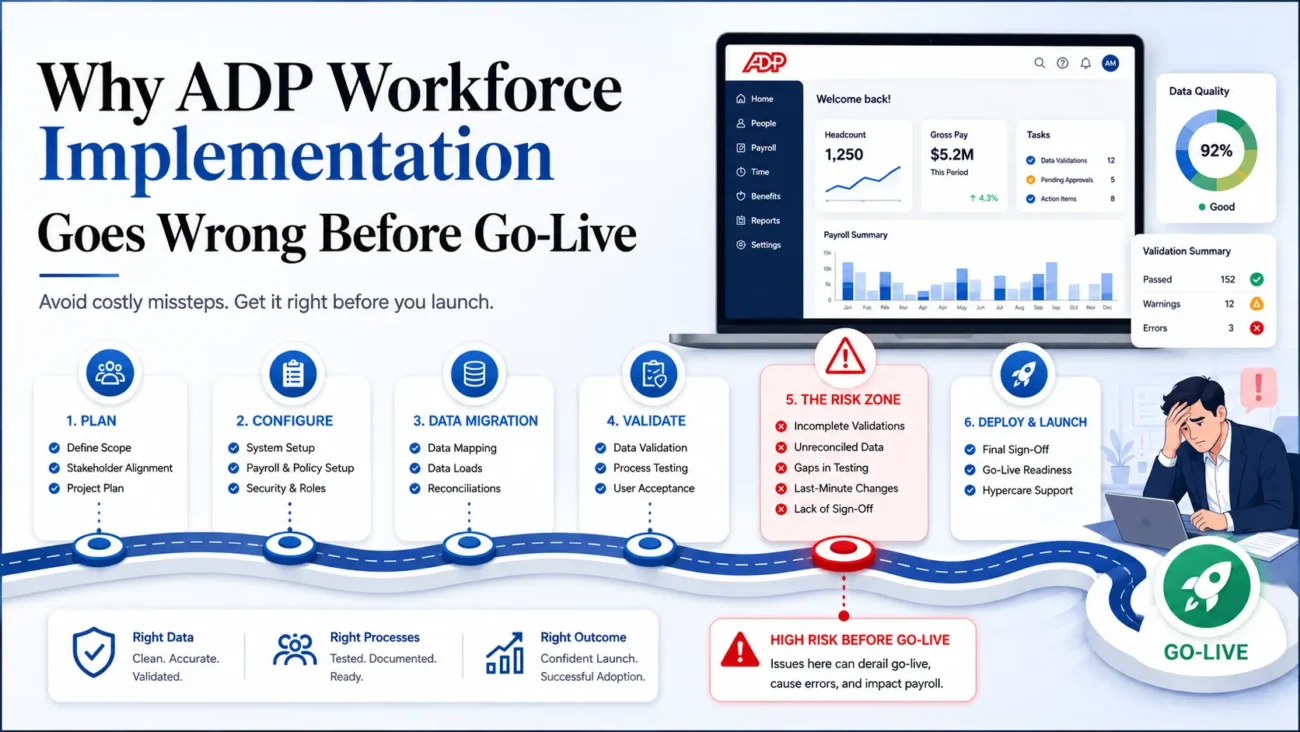
HRIS implementation problems usually appear long before anyone presses the go-live button. A 2024 SHRM review of the Sapient Insights Group HR Systems Survey found that 32% of respondents said implementations fell short on user training, 28% cited weak knowledge transfer, 25% reported missed timelines, and 23% said resource issues hurt implementation quality. Only 13% believed their implementation exceeded expectations in any area. ThoseSHRM implementation findings point to a recurring problem: software can be technically configured while the organization around it remains unprepared.
The practical risk is larger with an HRIS because payroll, employee records, benefits, time tracking, reporting, security permissions, and third-party connections can all depend on the same implementation decisions. A wrong field mapping can surface later in payroll. An unresolved workflow can delay approvals. Weak testing can allow a configuration problem to reach hundreds or thousands of employee records before anyone sees the pattern.
The safest approach treats implementation as an operating-model change with software at its center. That means assigning ownership early, preparing source data before conversion, settling process decisions before configuration, testing real business scenarios, and preparing users before launch. Those 5 failure points account for much of the avoidable rework that appears near go-live.
TL;DR
HRIS implementation problems usually begin before go-live. Weak ownership, poor source data, unresolved process decisions, late testing, and weak user preparation can create delays or force teams to carry unfinished work into production. A strong implementation plan controls these issues early by defining responsibilities, closing decisions before configuration, validating migrated data, testing real business scenarios, and preparing users before launch.
The article also shows that implementation success depends on more than completing configuration. Project teams need clear decision rights, reliable data controls, tested integrations, documented acceptance criteria, and a defined go-live process. Post-launch reviews should then measure whether payroll, workflows, reporting, system access, and user behavior are working as intended.
- Set clear ownership early: Give each workstream a named owner and create an escalation path for decisions that affect HR, payroll, IT, finance, or integrations.
- Clean and reconcile data before migration: Decide what moves, what stays archived, what needs correction, and how converted records will be checked against approved totals.
- Close process decisions before configuration: Confirm workflows, system-of-record rules, integration ownership, security roles, and reporting responsibilities before the build becomes difficult to change.
- Test against real operating scenarios: Include configuration, integration, security, payroll, negative, regression, and user acceptance testing with documented expected results.
- Prepare users before go-live: Build role-based training, administrator knowledge transfer, support procedures, and post-launch monitoring into the project from the start.
A controlled go-live should leave the organization capable of running the new HRIS without depending on temporary fixes or constant project support. Success becomes visible when payroll is accurate, integrations are stable, users follow the intended processes, and recurring manual work starts to decline.
What current research says about HRIS implementation failure
Implementation pressure builds because the work has to coexist with normal HR and payroll deadlines. The service model behindADP Workforce Implementation notes that software implementation can run for roughly 8 to 16 weeks, a period that can easily cross payroll cycles, benefits activity, month-end work, or other fixed obligations. That overlap explains why resource problems become serious even when the project plan originally looked reasonable.
ADP’s ownADP implementation guide identifies process analysis, data preparation, stakeholder support, infrastructure readiness, change management, project management, and training as implementation concerns. The important pattern is that these activities depend on one another. Poor process decisions weaken configuration, weak configuration makes testing harder, and weak testing gives training teams an unstable system to teach.
| Research Finding | What It Signals | Implementation Consequence |
|---|---|---|
| 32% reported shortcomings in user training | Training receives too little attention before launch | Users enter production without enough practice |
| 28% reported weak knowledge transfer | Internal administrators inherit too little system knowledge | Dependence on outside support continues after go-live |
| 25% reported timeline shortfalls | Project plans underestimate dependencies and review cycles | Testing or training gets compressed |
| 23% cited resource problems | Implementation work competes with normal HR duties | Decisions, validation, and fixes are delayed |
| Only 13% said implementation exceeded expectations in any area | Finished configuration and business value are separate milestones | Success measures must extend beyond the launch date |
These findings make implementation failure easier to diagnose. Small unresolved issues accumulate until the schedule has no room left to absorb them, which is how most projects fail rather than through one dramatic event. Prevention therefore starts with removing uncertainty early.
Failure 1: Ownership is split and decisions stall
A project loses control when responsibility is distributed but decision authority isn’t defined. HR may own employee policies, payroll may control pay rules, IT may own integrations, finance may govern the general ledger, and the software vendor may control configuration tasks. Each group can complete its assigned work while an important cross-functional decision remains unresolved. The delay appears later when one configuration choice depends on another team’s answer.
StrongImplementation Project Management gives the client side a person who owns the complete sequence rather than a collection of unrelated task lists. That owner tracks dependencies, documents decisions, identifies overdue inputs, and knows who can approve a change when teams disagree. The project manager also protects the schedule from silent delay, which occurs when a task appears open for several days because nobody knows whose answer is final.
PMI’sPMI project success research reinforces the need to define success beyond task completion. Its research involved about 10,000 project professionals and 150 in-depth interviews, and 74% of participants associated success with delivering on time, within budget, and with a valuable outcome. For an HRIS project, the valuable outcome includes usable workflows, accurate records, working integrations, prepared users, and controlled payroll operations after launch.
| Decision Area | Primary Owner | Required Contributors | Exit Condition |
|---|---|---|---|
| Payroll configuration | Payroll lead | HR and finance | Calculation rules and outputs are approved |
| Employee data | HR data owner | Payroll and IT | Source fields and conversion rules are signed off |
| Integrations | IT or integration owner | HR, payroll, vendor | Inputs, outputs, timing, and error handling are defined |
| Benefits setup | Benefits owner | Payroll and broker where applicable | Eligibility and deduction logic are confirmed |
| Security roles | System owner | HR, IT, compliance | Access follows approved job responsibilities |
| Go-live decision | Executive sponsor or steering group | Project manager and workstream leads | Required tests and readiness checks have passed |
Ownership has to include escalation. A decision that can’t be resolved at the working-team level needs an agreed path to someone with authority. Without that path, teams often protect their own priorities while the project absorbs the delay.
Failure 2: Bad data moves into the new HRIS
Data migration fails when teams treat conversion as a file-transfer exercise. Legacy HR and payroll records usually contain years of local conventions, inactive codes, duplicate values, old organizational structures, manual corrections, and fields whose original purpose is no longer obvious. Moving all of that into a new HRIS preserves the old problems inside a new structure. Data preparation therefore needs business review before technical conversion begins.
Retention requirements make this work more important because employers can’t simply discard historical payroll information that looks inconvenient to migrate. The U.S. Department of Labor’sDOL recordkeeping rules state that covered employers generally must preserve payroll records for at least 3 years, while records supporting wage calculations should generally be retained for 2 years. The rule also requires accurate information about hours and wages for covered workers. Migration and archival decisions therefore need a documented basis, which is separate from the question of whether every historical field belongs in the new HRIS.
A sound migration plan separates 4 questions that teams often mix together:
- What must move? Define the employee, payroll, benefits, time, organizational, and configuration records required for current operations.
- What must remain accessible? Identify historical information that can stay in a secure archive instead of occupying active production fields.
- What needs correction first? Resolve duplicates, invalid values, incomplete records, inconsistent naming, and outdated codes before loading them.
- How will accuracy be proved? Establish record counts, control totals, exception reports, and owner sign-off for each conversion cycle.
ExperiencedADP Implementation Services can help keep the data work connected to configuration and business requirements instead of treating conversion as an isolated technical task. The implementation page emphasizes interdepartmental needs, documented goals, risk assessment, defined roles, and client-side project responsibility. Those controls matter because the person who understands the source data isn’t always the person configuring the destination field.
Migration should finish with reconciliation. Employee counts should tie back to the approved population, payroll totals should be compared at an agreed level, effective dates need review, and exception records need owners. A screen that looks right provides very little assurance when thousands of values sit behind it.
Failure 3: Process and integration decisions stay open
Configuration becomes unstable when the future process hasn’t been settled. Teams sometimes begin building the new HRIS while still debating approval routing, employee classifications, organizational structures, payroll cutoffs, timekeeping rules, benefit eligibility, or reporting ownership. The software then becomes a place where unresolved business questions are temporarily encoded. Every later decision creates rework because earlier configuration was built on assumptions.
Integration decisions create the same problem across system boundaries. ADP’s currentADP migration guidance identifies poor departmental coordination, stakeholder misalignment, limited technical resources, unavailable exchange methods, budget constraints, and security as common migration concerns. It also notes that system differences may require APIs, automated files, or manual file transfers depending on available exchange options.
| Decision That Must Be Closed | Questions To Resolve Before Build |
|---|---|
| System of record | Which platform owns each employee attribute after go-live? |
| Approval workflow | Who initiates, approves, rejects, and escalates each transaction? |
| Integration direction | Which system sends the record, and which one receives it? |
| Transfer frequency | Is information exchanged in real time, daily, per payroll cycle, or on another schedule? |
| Error ownership | Who sees failed transactions and who corrects them? |
| Effective dating | Which date controls changes across connected systems? |
| Reporting ownership | Which platform becomes the accepted source for each business report? |
The best time to question an old workflow is before it becomes new configuration. A relatedsystem maintenance support page focuses on reviewing workflows, roles, reporting needs, risks, third-party connections, and system upkeep after implementation. The same thinking belongs earlier in the project because a copied legacy process can carry unnecessary manual work into the new environment.
A design decision should therefore leave a record. The project team needs to know what was decided, who approved it, what systems it affects, and whether the decision changes testing or training. That decision history becomes valuable after launch when administrators need to understand why a field, workflow, or integration works the way it does.
Failure 4: Testing starts too late
Late testing turns configuration mistakes into schedule problems. When user acceptance testing begins only after the system appears “finished,” every defect competes with training, cutover preparation, data conversion, and final approvals for the same remaining days. A serious defect can then force an uncomfortable choice between fixing the problem and keeping the announced go-live date. Earlier test design gives the project more room to correct problems without compressing everything that follows.
Testing should trace back to approved requirements. The U.S. Government Accountability Office’sGAO testing guidance describes acceptance criteria and a defined state of completion as part of disciplined system delivery. Its Agile Assessment Guide also describes testing, documentation, training material, and product-owner acceptance as activities that may be required before work is considered ready for release. The principle applies directly to HRIS projects: a configuration item needs a testable condition that proves it performs the intended business task.
A useful HRIS test library should cover more than ideal transactions:
| Test Type | Example HRIS Scenario | What The Team Is Proving |
|---|---|---|
| Configuration test | New hire enters the correct eligibility group | Rules create the expected result |
| Integration test | Approved employee change reaches payroll | Connected systems exchange the right values |
| Negative test | Invalid or incomplete information is submitted | The system blocks or flags the transaction correctly |
| Security test | Manager attempts to view restricted records | Permissions limit access as designed |
| Payroll comparison | Representative payroll scenarios are processed | Earnings, deductions, taxes, and totals behave as expected |
| User acceptance test | HR or payroll performs an actual work sequence | The process supports day-to-day work |
| Regression test | A corrected configuration is retested | The fix hasn’t damaged a previously working function |
Testing needs named owners and evidence. A tester should know the starting conditions, expected result, actual result, defect severity, retest status, and approval requirement. That record prevents a common late-stage problem in which everyone remembers testing “something similar” but nobody can prove whether the exact condition was checked.
Failure 5: Training and change management start after the build
User adoption weakens when communication begins near launch. SHRM’s 2024 findings showed that 32% of respondents believed implementation fell short in user training, while 28% reported problems with knowledge transfer. The same research found that 28% of respondents had no change-management budget in their HR technology plans. Those numbers suggest that people-related work is still being treated as optional project overhead even though users determine whether the new process works after the implementation team leaves.
Training should be role-based and tied to real work. Payroll administrators need practice with payroll controls and exceptions. Managers need the workflows they approve or initiate. Employees need the self-service actions they will actually use. System administrators need deeper configuration knowledge, troubleshooting procedures, and documentation because they inherit the platform after project closure.
Useful preparation usually includes:
- Start stakeholder communication while process decisions are still being made, so affected teams understand what will change and why.
- Build training from approved workflows rather than generic feature tours.
- Give system administrators enough configuration context to understand dependencies and common failure points.
- Provide managers with the exact tasks they will perform after go-live.
- Give employees concise instructions for the transactions that move to self-service.
- Keep a place for implementation decisions, process documents, support instructions, and known issues after launch.
Ongoingongoing ADP support can also reduce the knowledge gap after the formal project closes. The support model described on the site includes project assistance and recurring reviews as business priorities, staff, and software change. That continuity matters because system knowledge can disappear quickly when the people who participated in implementation change roles or leave the organization.
Adoption should be measured through behavior. Login activity says little about whether a workflow is working. A better review asks whether managers use the intended process, employees complete self-service tasks correctly, administrators can resolve routine issues, and manual workarounds are declining instead of multiplying.
How to build a prevention-first implementation plan
A prevention-first plan starts with dependencies rather than dates. The project schedule still needs milestones, but each milestone should have entry conditions, exit conditions, an owner, and a defined decision path. That structure exposes problems earlier because a workstream can’t quietly advance while a required input remains unresolved.
The plan can be built around the following sequence:
- Define the operating outcome. State what payroll, HR, manager, employee, reporting, and integration processes should look like after implementation.
- Assign owners and decision rights. Identify who performs each task and who has authority when a cross-functional decision stalls.
- Map source data and future processes. Finish the major data, workflow, security, and interface decisions before configuration becomes difficult to reverse.
- Build testing alongside requirements. Each material requirement should have an expected result that can later be tested.
- Prepare users during the build. Communication and training development should follow approved processes as they become stable.
- Set go-live gates. Define the defects, reconciliations, approvals, training completion, and operational checks required before production use.
A publishedclient-side implementation case provides a useful example of the client-side role. In the Cast & Crew case, the HR director acted as project manager while a specialist supported ADP configuration, process work, and training, and the published case reports that the go-live deadline was met. A vendor-produced case study illustrates how client-side project ownership can work in practice, with the caveat that it is not independent evidence of a repeatable outcome.
Planning also needs protected capacity. A payroll lead asked to manage conversion testing during payroll processing week has the same number of hours the project plan assumed away. Workload should be assessed against normal operating deadlines before milestone dates are approved.
What strong implementation project management looks like week to week
Implementation control depends on a repeatable operating rhythm. Weekly status calls are useful only when they lead to decisions, ownership, and updated dependencies. The project manager should arrive knowing what changed since the previous review, which decisions are blocking work, which defects threaten milestones, and which teams are approaching a capacity problem.
A practical weekly control view can look like this:
| Control Area | Weekly Question | Required Evidence |
|---|---|---|
| Scope | Did any new requirement enter the project? | Approved change or documented rejection |
| Schedule | Which milestone has lost time? | Updated dependency and recovery action |
| Decisions | What remains unresolved? | Named owner and due date |
| Data | Did conversion results reconcile? | Counts, totals, and exception log |
| Configuration | Which items reached approval? | Build status and owner sign-off |
| Testing | What failed and what was retested? | Defect log and test evidence |
| Training | Which user groups are ready? | Materials, attendance, or readiness status |
| Cutover | What could stop go-live? | Open-risk and readiness register |
BroaderADP consulting services can be useful when the internal team lacks enough platform knowledge or available capacity to own every workstream. The wider service model covers implementation, training, continuing support, payroll work, and system review, which can help preserve context as the organization moves from project work into normal operations.
Good project management also controls changes after approval. A late change to an earnings rule, security role, eligibility condition, interface mapping, or reporting requirement can affect several downstream items. The project manager needs to identify what must be rebuilt, retested, redocumented, or retrained before accepting the change.
What to validate before go-live
Go-live readiness should be proved through evidence rather than confidence. A team that has worked on an implementation for several months can become accustomed to open issues, workarounds, and “we’ll fix it later” decisions. A formal readiness review forces the project to separate acceptable post-launch work from defects that could affect payroll, security, employee access, integrations, or required reporting.
The review should cover these areas:
- Production data has been reconciled to approved source totals, and conversion exceptions have owners.
- Payroll calculations have been tested with representative employee cases and approved by the payroll owner.
- Integrations have completed full-cycle tests, including error handling and recovery procedures.
- Security roles have been tested against actual job responsibilities and sensitive information.
- Required workflows have passed user acceptance tests with representative end users.
- High-severity defects are closed, while accepted lower-severity issues have documented workarounds and target dates.
- System administrators have access, documentation, vendor contacts, and support procedures.
- Managers and employees have received the communication or training required for their first production tasks.
- Cutover responsibilities are assigned by time and owner rather than left as a shared team obligation.
- A rollback, contingency, or manual operating procedure exists for functions that can’t tolerate interruption.
A readiness review should end with an explicit decision and recorded conditions. “Everyone feels good” makes a poor control, because different teams hold different definitions of ready. Approval should mean the agreed go-live criteria have been met or that an authorized sponsor has consciously accepted the remaining risk.
How to protect payroll and HR operations during cutover
Cutover deserves its own plan because implementation work changes character once production activity begins. Before go-live, a configuration problem is a project defect. After go-live, the same problem can affect a paycheck, an employee record, an eligibility decision, an accounting entry, or access to personal information. The response process therefore needs tighter ownership during the first production cycles.
A cutover plan should distinguish routine implementation tasks from operational events:
| Cutover Area | Control Before Launch | Control After Launch |
|---|---|---|
| Payroll | Validate representative calculations and interfaces | Reconcile the first production results before release |
| Employee records | Confirm conversion totals and effective dates | Review high-risk changes and conversion exceptions |
| Integrations | Complete end-to-end tests | Monitor failed or delayed transactions |
| Security | Test role-based access | Review unexpected access or permission requests |
| Benefits | Confirm eligibility and deduction logic | Check enrollment and deduction exceptions |
| Reporting | Approve key operational reports | Compare production output with expected totals |
| Support | Publish escalation routes | Track issues by severity and owner |
Success also needs to be measured beyond delivery of the technical project. A 2024 Gartner study reported by SHRM found that only 24% of surveyed HR leaders believed their function was getting maximum value from HR technology, while 35% were confident their technology approach was helping business objectives. At the same time, 48% expected to increase HR technology budgets. TheHR tech value findings show why an implementation needs operational measures after the system becomes available: spending and launch completion leave the question of business result open.
The first few production cycles should therefore be treated as controlled stabilization. Teams need rapid defect triage, known escalation paths, reconciliation routines, and a record of recurring user problems. Patterns found during stabilization often reveal configuration gaps or training needs that weren’t visible during testing.
A controlled go-live defines success after launch
A successful HRIS implementation leaves the organization able to operate the system without permanent project-mode behavior. Payroll should run through documented controls. HR administrators should understand the processes they own. Managers and employees should know where their responsibilities begin, while support teams should know how to handle exceptions that fall outside normal workflows.
Post-launch review should compare actual results with the outcomes defined before implementation. Useful measures can include payroll corrections, failed integration transactions, unresolved defects, support volume, workflow completion, user adoption, manual workarounds, reporting accuracy, and time required for common administrative tasks. The point is to find where the operating model still depends on temporary effort.
The 5 failure patterns connect directly. Weak ownership delays decisions. Poor data weakens configuration. Open process questions create rework. Late testing hides defects until the schedule becomes tight. Weak adoption planning moves project problems into production. Controlling those dependencies early gives an HRIS project a much better chance of reaching go-live with a system that people can actually run.
Frequently asked questions
What is the most common reason HRIS implementation goes wrong?
HRIS projects often run into trouble because ownership, decisions, and dependencies aren’t controlled as one project. HR, payroll, IT, finance, and the software team may each complete separate tasks while a shared issue remains open. Those unresolved decisions later affect configuration or testing. A single client-side owner with authority and a documented escalation process reduces that risk.
Who should own an HRIS implementation?
A named project manager should own the full implementation sequence, while business specialists retain authority over their subject areas. Payroll should approve payroll rules, HR should approve people processes, and IT should own relevant technical dependencies. The project manager connects those workstreams and tracks decisions that cross boundaries. Executive sponsorship is also important when scope, resources, or go-live decisions require higher authority.
How should HRIS data be prepared before migration?
Data preparation should begin with a source inventory and an agreed definition of what must move into production. Teams should clean invalid records, resolve duplicates, document field mappings, and decide which historical information belongs in an archive. Conversion results then need reconciliation against counts and agreed control totals. Each exception should have an owner before the migration cycle is accepted.
Why do HRIS integrations create implementation delays?
Integration work depends on decisions from more than one system and often more than one team. The project has to define the system of record, transfer method, field mapping, schedule, error handling, and owner for failed transactions. A delay in any of those decisions can block configuration or testing. Full-cycle testing is also required because each endpoint can work independently while the combined process still fails.
What should user acceptance testing cover?
User acceptance testing should reproduce the real work users will perform after launch. Test cases need expected results, representative data, and defined acceptance conditions so reviewers can tell whether the process actually passed. Teams should include normal transactions, exceptions, permissions, and connected-system behavior where relevant. Failed cases should be corrected and retested before approval.
When should HRIS training begin?
Training preparation should begin while stable workflows are being approved rather than after configuration is finished. This timing lets the training team build materials around the actual process users will follow. Administrators usually need deeper instruction than managers or employees because they will support the system after project closure. Practice should occur close enough to go-live that users can retain what they’ve learned.
Should an HRIS project use parallel payroll testing?
Parallel or comparative payroll testing can be useful when payroll is part of the implementation because it gives the team a controlled way to compare expected calculations with new-system results. The scope should be based on project risk and the organization’s payroll complexity. Differences need investigation before anyone writes them off as rounding or timing. Payroll owners should approve the comparison method before testing begins.
How can scope creep be controlled during HRIS implementation?
Scope control starts with a written baseline that identifies the processes, modules, integrations, reports, and outcomes included in the implementation. New requests should be assessed for their impact on configuration, data, testing, training, cost, and timing before approval. Lower-priority changes can move to a post-launch backlog where that is the safer call. The decision and its owner should remain documented.
When does a client-side implementation specialist make sense?
Outside client-side support can help when internal HR or payroll leaders lack enough project capacity, platform experience, or cross-functional coordination time. It can also help when the software vendor owns its implementation tasks but the employer still needs someone managing client responsibilities and dependencies. The role should have a defined scope and decision relationship with the internal team. Internal owners should still retain enough knowledge to operate the system after launch.
How should HRIS implementation success be measured?
Success should be measured against the operating outcomes defined before configuration began. The review can examine payroll accuracy, defect trends, integration reliability, workflow completion, support demand, user behavior, reporting results, and the amount of manual work that remains. Measures should be checked after the first production cycles and again after the system has stabilized. A project has delivered its intended result when the organization can run the new processes reliably on its own.
