
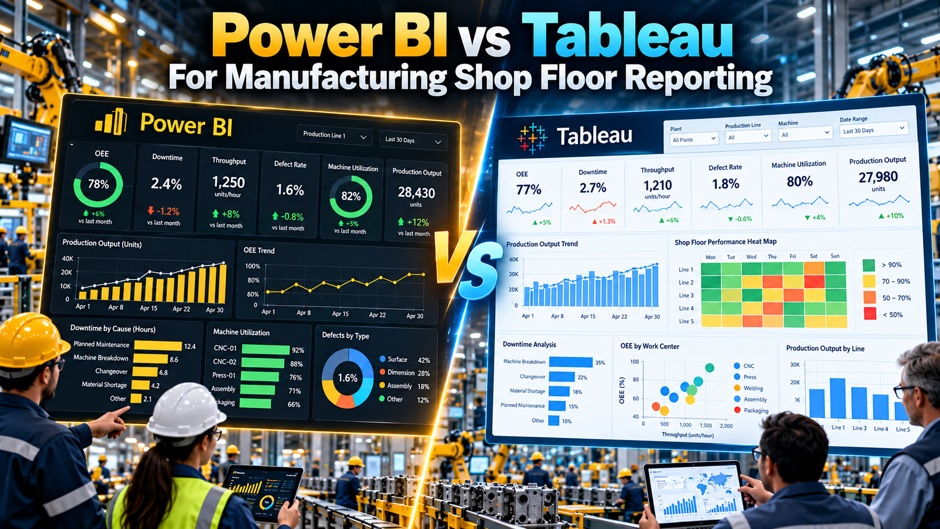
A 300-employee metal fabricator recently ran this exact comparison for real. They deployed Power BI on Azure SQL and Fabric capacity, gave production floor viewers free access through Teams embeds, and put 8 engineers into Pro licenses for authoring. Total monthly cost: $312. Running the same deployment on Tableau would have cost roughly $1,400 a month, driven almost entirely by per-seat Creator and Explorer licensing across a workforce where most people only ever need to look at a dashboard, never build one. That single number captures most of what actually separates these 2 platforms once the conversation moves from a corporate analytics team to an actual shop floor.
Comparing Power BI and Tableau for manufacturing reporting isn’t quite the same exercise as comparing them for sales analytics or financial planning, because a shop floor introduces constraints neither platform was originally built around: real-time machine data locked behind PLCs and historians, dozens or hundreds of floor viewers who’ll never author a single report, and a genuine architectural gap between where operational technology data lives and where either BI tool actually operates. This guide works through how the 2 platforms actually compare once shop floor reality gets factored in, covering pricing at realistic viewer-heavy scale, how each tool actually connects to OT data, where a purpose-built industrial tool beats both of them, and a practical framework for making the actual decision.
TL;DR
| Dimension | What shop floor reporting specifically changes |
|---|---|
| Licensing economics | Power BI’s free-viewer model through Teams embeds creates a dramatic cost advantage once dozens of floor viewers, not analysts, are counted |
| OT data connectivity | Neither tool connects directly to PLCs; both depend on an intermediary historian or industrial data platform bridging the OT-to-IT gap |
| Real-time performance | What counts as “real-time” in a BI tool’s marketing rarely matches the sub-second responsiveness a control-room display genuinely requires |
| Purpose-built alternatives | Tools like Ignition and Grafana, built specifically for plant-floor visualization, often outperform either general BI platform for pure machine monitoring |
| Ecosystem alignment | A Microsoft-heavy manufacturing IT stack favors Power BI structurally; a Salesforce-aligned commercial organization favors Tableau |
| Deployment reality | Wall-mounted kiosk displays and ruggedized shop floor screens introduce hardware and licensing questions a typical office BI rollout never has to answer |
The throughline across every row: the right choice for shop floor reporting depends considerably less on which tool has genuinely prettier charts and considerably more on how well each specifically fits the architecture, viewer economics, and real-time demands a manufacturing floor actually presents day to day.
Why This Comparison Looks Different on the Shop Floor Than in a Boardroom
Before working through the specific dimensions in genuine, careful detail, it’s genuinely worth taking a moment here to understand exactly why manufacturing shop floor reporting changes the underlying calculus so meaningfully compared to a typical corporate BI deployment elsewhere in the broader business context and setting.
The Structural Gap Neither Tool Was Originally Built to Close
The specific architectural reality that shapes every subsequent comparison point in this guide:
- Operational technology data, machine status, cycle times, sensor readings, originates at the lowest levels of a manufacturing environment’s technology stack, on PLCs, SCADA systems, and field devices physically sitting on the plant floor
- Both Power BI and Tableau operate considerably higher up that same stack, in the enterprise and cloud domain where business reporting and analytics traditionally live
- Moving data reliably between these 2 layers requires a structured intermediary, commonly referred to as the Industrial DMZ, where an industrial data platform collects information using native plant-floor protocols before exposing it to standard IT tools
- Neither Power BI nor Tableau natively performs this bridging function, meaning the actual shop floor connectivity question is less about which BI tool is better and more about which industrial data platform sits underneath either one
Why This Matters More Than It Might Initially Seem
A manufacturer evaluating Power BI against Tableau purely on visualization features or dashboard aesthetics is answering the wrong question first, since the harder, more consequential decision involves how OT data actually reaches whichever BI tool gets selected, a question both platforms answer in remarkably similar ways once the underlying industrial data platform is accounted for.
Why Current Manufacturing Data Maturity Makes This Gap Especially Relevant
A recent Manufacturing Leadership Council survey found that 79% of manufacturers still include manually entered data somewhere in their analytics supply chain, and 78% rely on Excel as their primary analytics tool, meaning the leap from where most manufacturers currently stand to genuine, automated real-time reporting is considerably larger than the difference between Power BI and Tableau themselves.
The Core Pricing Comparison at Shop Floor Scale
With the architectural context now genuinely established and clearly understood at this particular point, the actual licensing economics deserve genuinely close attention, since shop floor deployments involve a viewer-to-author ratio dramatically different from a typical corporate analytics team elsewhere in the broader organization overall and beyond.
Current Published Pricing
| License type | Power BI | Tableau |
| Entry-level author seat | Pro at $14 per user per month | Creator at $75 per user per month |
| Higher-tier capability | Premium per user at $24 per user per month | Creator remains the primary authoring tier |
| Viewer-only access | Free through Teams embeds for many organizational scenarios | Explorer or Viewer licensing typically still carries a per-seat cost |
| Enterprise governed capacity | Premium capacity commonly starting around $5,000 per month | Tableau Cloud enterprise pricing scales with total seat count |
Why the Viewer Economics Specifically Favor Power BI on a Shop Floor
A shop floor deployment typically involves a small number of engineers or analysts actually building dashboards alongside a considerably larger population of floor supervisors, operators, and shift leads who only ever need to view them, and Power BI’s ability to deliver that viewing experience through free Teams embeds creates a dramatic cost advantage once that viewer population reaches dozens or hundreds of people, exactly the ratio a genuine plant floor produces.
Why the Documented Fabricator Example Illustrates This So Clearly
The 300-employee fabricator example referenced at the start of this guide, 8 Pro-licensed engineers authoring dashboards while production floor viewers access everything through free Teams embeds, produced a total monthly cost of $312 against an estimated $1,400 for the equivalent Tableau deployment, a gap driven almost entirely by how each platform prices the viewer population specifically, not by any difference in the actual dashboards themselves.
How Each Tool Actually Connects to Shop Floor Data
The specific technical path OT data typically travels before it ever reaches either Power BI or Tableau:
- Machine-level data gets captured at the source through protocols like OPC UA subscription or MQTT Sparkplug B publish, with native drivers required for major PLC vendors including Rockwell, Siemens, Beckhoff, and Mitsubishi
- A historian, purpose-built for time-series industrial data, typically serves as the primary data source both BI platforms actually connect to, rather than either tool querying PLCs or SCADA systems directly
- An industrial data platform sitting in the Industrial DMZ normalizes and structures this data before exposing it through standard interfaces, commonly REST APIs, SQL databases, or direct cloud connectors, that both Power BI and Tableau can genuinely consume
- Neither platform requires fundamentally different underlying infrastructure to receive this data, meaning the connectivity question comes down more to which cloud and database ecosystem an organization has already standardized on
Why Power BI’s Azure Alignment Offers a Genuine Practical Advantage Here
Organizations already running Azure SQL, Azure Data Factory, or Microsoft Fabric as their broader data infrastructure find Power BI’s connectivity to that same ecosystem considerably more straightforward than routing shop floor data through a separate pipeline specifically to feed Tableau, since the industrial data platform bridging OT and IT commonly needs to output into whatever cloud environment already anchors the rest of the organization’s data strategy.
Why This Doesn’t Automatically Disqualify Tableau From Shop Floor Use
Tableau connects just as capably to the same standard interfaces, REST APIs, SQL databases, and cloud connectors, an industrial data platform exposes, meaning organizations already committed to Tableau elsewhere in the business, particularly Salesforce-aligned manufacturers, can genuinely extend that same platform to shop floor reporting without a fundamentally weaker technical connection, simply a different cloud and licensing path to get there.
What “Real-Time” Actually Means for Each Platform
| Claim | What it genuinely delivers on a shop floor |
| Power BI’s DirectLake mode | Delivers sub-second query performance specifically against data already sitting in a Microsoft Fabric data lake, a genuine speed advantage when the underlying architecture supports it |
| Tableau’s live connection mode | Queries the underlying data source directly rather than a cached extract, delivering genuinely current data at the cost of query performance depending on source system responsiveness |
| What control-room displays actually need | Sub-second refresh comparable to what purpose-built industrial visualization tools deliver natively, a bar neither general BI platform was originally designed to clear |
| The realistic expectation | Both platforms deliver genuinely useful near-real-time reporting, refreshed in seconds to low minutes, rather than the sub-second responsiveness a true control-room alarm display requires |
Why This Distinction Matters for Choosing the Right Layer of Visualization
A shop floor reporting strategy genuinely benefits from separating 2 distinct needs: near-real-time operational reporting, trend lines, shift summaries, OEE calculations, genuinely well-served by either Power BI or Tableau, and true control-room alarm and status monitoring, better served by a purpose-built industrial visualization tool operating closer to the OT layer itself.
Why Neither Platform Should Be Expected to Replace Genuine Control-Room Tooling
Attempting to force either Power BI or Tableau into serving as a genuine, sub-second control-room alarm display typically produces a frustrating result for both the implementation team and the operators depending on it, since both platforms were architected primarily for business intelligence and reporting rather than the millisecond-level responsiveness genuine process control requires.
When a Purpose-Built Industrial Tool Beats Either BI Platform
The specific scenarios where a tool built specifically for plant-floor visualization genuinely outperforms both Power BI and Tableau:
- Pure machine status, alarm, and downtime monitoring, where platforms like Ignition connect directly and natively to SCADA, PLCs, historians, and MES architectures without requiring the same intermediary data platform layer
- Open-source, highly customizable real-time OEE monitoring, where Grafana’s deep integration with time-series databases like InfluxDB provides genuinely purpose-built industrial visualization at a considerably lower licensing cost
- Situations demanding bidirectional control-room interaction, where an operator needs to acknowledge alarms or trigger responses directly from the display, a capability neither Power BI nor Tableau was built to provide
- Environments where OT data genuinely cannot leave the plant network for security or continuity reasons, favoring a self-hosted, on-premises industrial platform over either BI tool’s cloud-oriented architecture
Why This Doesn’t Mean Power BI or Tableau Have No Role on the Shop Floor
Purpose-built industrial tools excel specifically at real-time machine-level monitoring but typically lack the broader business intelligence depth, cross-functional reporting, and executive-facing analytics capability either Power BI or Tableau genuinely delivers, meaning many manufacturers ultimately run both categories of tool together rather than choosing one exclusively over the other.
Why the Active Versus Passive Distinction Clarifies This Choice
A genuinely useful framework distinguishes active dashboards, which trigger a response when conditions change, from passive ones that simply display data, and this distinction matters directly here since purpose-built industrial tools more commonly support genuine active response, while Power BI and Tableau remain fundamentally passive reporting layers regardless of how quickly their underlying data refreshes.
Ease of Use and Who Actually Builds These Dashboards
| Consideration | Power BI | Tableau |
| Initial learning curve | Keeps the surface simple, guiding users through panels and steps, though deeper modeling and DAX formulas take genuine time to master | Presents a wide-open canvas from the start, offering freeform layout flexibility that itself demands more upfront design skill |
| Who typically builds shop floor dashboards well | Analysts and engineers already comfortable with Excel-style logic, since Power BI’s modeling approach shares meaningful conceptual overlap | Analysts with genuine visualization design experience, since Tableau’s flexibility rewards deliberate, considered layout choices |
| Training investment required | Lower for basic dashboard consumption, higher for advanced DAX-based modeling specific to manufacturing KPIs like OEE calculations | Higher across the board given the platform’s open-canvas approach, though this investment often pays off in visualization sophistication |
Why This Skill Question Matters Specifically for Manufacturing IT Teams
Manufacturing IT and operations teams frequently include people with strong Excel backgrounds but limited formal data visualization training, making Power BI’s more guided, panel-driven approach a genuinely easier starting point for a team building its first shop floor dashboards without dedicated business intelligence specialists on staff.
Why Tableau’s Learning Curve Can Still Pay Off in the Right Manufacturing Context
Organizations with a dedicated analytics or continuous improvement team genuinely comfortable investing in Tableau’s steeper learning curve often produce meaningfully more sophisticated visualizations, particularly useful for investigating root causes across downtime, shift performance, quality defects, and throughput variation, the kind of exploratory analysis Tableau’s associative, flexible canvas genuinely supports well.
Real Manufacturing Deployments Worth Learning From
How several documented manufacturing organizations have actually approached this choice:
- A major agricultural sciences manufacturer migrated 8,000 internal users from Tableau Server to Power BI Premium as part of a broader Microsoft Fabric standardization effort, citing per-user license savings of roughly 45% as a primary driver
- A large industrial automation and controls company continues running Tableau Server specifically for industrial IoT analytics across its own manufacturing plants, processing several billion sensor records daily into Tableau’s Hyper extract engine
- A major global automotive manufacturer deployed Tableau across its worldwide manufacturing operations, pairing it with Salesforce Data Cloud specifically to unify dealer, vehicle, and service analytics into a single connected platform
- A mid-sized fabricator, the example referenced throughout this guide, chose Power BI specifically for the licensing economics its heavily viewer-weighted shop floor population produced
Why These Examples Point Toward Ecosystem Fit Rather Than Universal Superiority
None of these organizations chose their platform purely because one tool is objectively better than the other; each decision traces back to existing ecosystem alignment, Microsoft Fabric standardization in one case, deep existing Salesforce and Tableau infrastructure in another, confirming that the genuine deciding factor for most manufacturers is fit with what already exists, not an abstract feature comparison.
Why Scale and Data Volume Shaped These Specific Choices Differently
The industrial IoT deployment processing billions of daily sensor records specifically leaned on Tableau’s Hyper extract engine for that particular workload, while the license-cost-driven migration specifically prioritized Power BI’s Fabric-aligned economics at genuinely large user scale, illustrating how the right answer can genuinely differ even among large, sophisticated manufacturing organizations facing superficially similar decisions.
The Cost of Getting Shop Floor Visibility Wrong
Beyond the platform comparison itself already covered above throughout this entire guide, it’s genuinely worth grounding this decision in exactly what’s genuinely at stake operationally and financially, since the cost of poor shop floor visibility considerably exceeds the licensing difference between these 2 specific tools alone entirely.
The Financial Stakes Behind This Decision
| Metric | What the data shows |
| Average cost of unplanned downtime across manufacturing | Roughly $260,000 per hour, according to widely cited industry research |
| Automotive-specific downtime cost | Can exceed $2 million per hour given the tightly coupled nature of automotive production lines |
| Aggregate impact across large manufacturers | Estimated at roughly $1.5 trillion annually across Fortune Global 500 manufacturing firms combined |
| Current manual data reliance | 79% of manufacturers still include manually entered data somewhere in their analytics supply chain |
Why This Context Should Shape How Manufacturers Weigh the Platform Decision
Given the sheer scale of downtime cost relative to the licensing gap between Power BI and Tableau, even a modest improvement in how quickly a manufacturer detects and responds to a developing issue, made possible by genuinely reliable shop floor visibility, delivers a return that dwarfs whatever a few hundred dollars a month in licensing differences might otherwise suggest as the primary consideration.
Why This Reframes the Real Question Worth Asking First
Rather than starting the evaluation purely from a features-and-pricing comparison, manufacturers genuinely well served by this decision typically start by asking which platform, combined with whichever industrial data platform bridges their specific OT environment, gets genuinely reliable visibility into shop floor conditions in front of the right people fastest, treating licensing cost as an important but secondary consideration once that core requirement is satisfied.
A Practical Decision Framework for Shop Floor Reporting
The specific questions worth working through, in sequence, before committing to either platform for a manufacturing shop floor deployment:
- Does the organization’s broader IT infrastructure already lean Microsoft or Salesforce, since this existing ecosystem alignment typically outweighs any standalone feature comparison between the 2 platforms
- How many genuine viewers, floor supervisors and operators who’ll only ever consume dashboards, does the deployment need to support relative to the number of people actually authoring reports
- Does the specific use case require true control-room, sub-second responsiveness, in which case a purpose-built industrial tool likely belongs in the stack alongside whichever BI platform gets chosen
- What does the existing OT-to-IT data pipeline already look like, and does an industrial data platform already exist that could feed either tool with comparable ease
- Does the team building and maintaining these dashboards have existing skill leaning toward Excel-style logic or toward more open-ended visualization design
Why Viewer Ratio Deserves the Heaviest Weight in a Genuine Shop Floor Context
Given how dramatically the licensing economics shift once viewer count climbs into the dozens or hundreds, as the fabricator example demonstrates clearly, this specific factor deserves genuinely heavier weight in a shop floor decision than it typically receives in a standard corporate BI evaluation, where author and viewer populations tend to be considerably more balanced.
Why This Framework Still Allows for a Hybrid Outcome
Nothing about this framework requires choosing exclusively between Power BI and Tableau for every reporting need across an entire manufacturing organization; many manufacturers genuinely run one platform for shop floor operational reporting specifically while maintaining the other for a different function elsewhere in the business where existing infrastructure already favors it.
Building OEE Dashboards Specifically in Each Platform
Overall Equipment Effectiveness genuinely sits at the very center of most manufacturing shop floor reporting efforts overall, and how each individual platform genuinely handles this specific, foundational metric on its own deserves direct, focused attention beyond the general comparison already covered above throughout this entire guide.
What Genuine OEE Reporting Requires From Either Platform
The specific data and modeling requirements a genuine OEE dashboard depends on, regardless of which BI tool ultimately builds it:
- Scheduled versus actual runtime data feeding the availability component, typically pulled from the same historian or industrial data platform bridging OT and IT covered earlier in this guide
- Ideal versus actual cycle time data feeding the performance component, requiring accurate, machine-specific baseline data established and maintained over time
- Good parts versus total output data feeding the quality component, often requiring integration with a separate quality management or MES system beyond raw machine data alone
- A consistent, well-modeled calculation combining these 3 components into a single, genuinely trustworthy OEE figure that stands up to scrutiny from both the shop floor and executive leadership
Why Power BI’s Modeling Approach Suits OEE Calculations Reasonably Well
Power BI’s DAX-based modeling, while carrying a genuine learning curve, maps reasonably naturally onto the kind of layered, multi-component calculation OEE represents, and teams already comfortable with Excel-style formula logic often find building a properly modeled OEE calculation in Power BI a more familiar exercise than the equivalent build in Tableau’s calculated field approach.
Why Tableau’s Visualization Strength Shows Up Specifically in OEE Root-Cause Analysis
Where Tableau’s open canvas and associative analytics approach genuinely shines is in the exploratory work that typically follows an OEE calculation itself, investigating why availability dropped on a specific shift, correlating quality defects against specific product runs, or comparing performance variation across multiple lines, the kind of flexible, visual root-cause investigation Tableau’s design philosophy was specifically built to support well.
Why Purpose-Built MES Dashboards Sometimes Outperform Either General BI Tool Here Specifically
Manufacturing execution systems with native OEE dashboard capability sometimes deliver a more turnkey, pre-built experience than either general BI platform provides out of the box, since these tools were designed from the ground up specifically around the availability, performance, and quality framework, though they typically lack the broader, cross-functional reporting flexibility either Power BI or Tableau brings once shop floor data needs to connect with business context beyond pure equipment performance.
Common Mistakes When Choosing a Shop Floor Reporting Platform
Beyond the specific comparison points already covered throughout this entire guide, several recurring, genuinely predictable mistakes show up consistently among manufacturers evaluating these 2 platforms for shop floor use, and avoiding these specific mistakes meaningfully improves the odds of a genuinely successful deployment overall in the end.
Evaluating the tools purely on visualization features without accounting for viewer licensing economics. As the fabricator example demonstrates clearly, the actual cost difference at genuine shop floor scale often has far less to do with chart quality and far more to do with how each platform prices a large, view-only population.
Expecting either platform to natively connect to PLCs or SCADA systems directly. Both tools depend on an intermediary historian or industrial data platform to bridge the OT-to-IT gap, and underestimating this middleware requirement leads to unrealistic implementation timelines and budgets.
Assuming either BI tool can replace genuine control-room alarm and response tooling. Neither Power BI nor Tableau was architected for the millisecond-level responsiveness and bidirectional control genuine process control requires, and forcing either into that role produces frustration for the operators depending on it.
Choosing a platform in isolation from the organization’s existing IT ecosystem. As the real deployment examples throughout this guide show, ecosystem alignment with existing Microsoft or Salesforce infrastructure consistently outweighs abstract feature comparisons in how sophisticated manufacturers actually make this decision.
Overlooking data security requirements specific to OT environments. Some manufacturing environments genuinely cannot allow MES, SCADA, or historian data to leave the plant network for security and continuity reasons, a constraint that deserves resolution before committing to either platform’s typical cloud-oriented deployment model.
Treating the platform decision as permanent rather than revisiting it as the deployment scales. A platform choice that made genuine sense for an initial pilot covering one production line may no longer fit as well once a manufacturer scales reporting across multiple plants, and organizations that never revisit the decision as scale changes risk carrying forward a licensing structure or architecture no longer well matched to their actual current footprint.
FAQs
Can Power BI or Tableau connect directly to a PLC without any intermediary system? Generally not in a way most manufacturers would genuinely want to rely on; both platforms are built to consume data from standard interfaces like REST APIs, SQL databases, or cloud connectors, meaning a historian or industrial data platform normalizing and exposing PLC data through one of these standard interfaces remains the practical, genuinely reliable path for either tool.
Is Power BI always the cheaper choice for manufacturing shop floor reporting?
It’s frequently cheaper specifically because of how it prices viewer-only access, but the actual gap depends heavily on the organization’s genuine viewer-to-author ratio and existing cloud infrastructure; an organization with a smaller floor viewer population or already-committed Tableau and Salesforce infrastructure may find the cost difference considerably less decisive than the fabricator example suggests.
Should a manufacturer choose Ignition or Grafana instead of Power BI or Tableau entirely?
This depends on the specific use case; purpose-built industrial tools genuinely excel at real-time machine monitoring and control-room visibility, but they typically lack the broader business intelligence and executive-facing reporting depth either Power BI or Tableau provides, meaning many manufacturers run both categories together rather than choosing exclusively.
How long does it typically take to get shop floor data flowing into either Power BI or Tableau?
This depends far more on whether an industrial data platform already exists to bridge OT and IT than on which BI tool ultimately gets selected, since that middleware layer, not the BI platform itself, represents the more time-consuming and technically demanding part of a genuine shop floor reporting implementation.
Does Tableau’s higher per-seat cost ever make sense for a manufacturing shop floor deployment?
Yes, particularly for manufacturers already running Salesforce and Tableau elsewhere in the business, where the integration savings and reduced vendor sprawl can genuinely offset the higher per-seat licensing cost, echoing the same logic that led one major automotive manufacturer to standardize on Tableau alongside Salesforce Data Cloud across its global manufacturing operations.
Can a manufacturer realistically run both Power BI and Tableau simultaneously?
Yes, and several manufacturers genuinely do exactly this, often running one platform specifically for shop floor operational reporting while maintaining the other for a different business function, sales analytics or financial planning, where existing infrastructure and team skill already favor that alternate platform.
What’s the single most important factor manufacturers consistently underweight when making this decision?
Viewer licensing economics at genuine shop floor scale consistently gets underweighted relative to visualization feature comparisons, even though the real deployment examples throughout this guide show it’s frequently the factor that actually determines total cost and, ultimately, which platform makes practical sense for a specific manufacturing organization’s actual population of floor viewers.
How should a manufacturer handle wall-mounted or kiosk-style displays specifically, as opposed to individual desktop or laptop access?
Both Power BI and Tableau support kiosk-mode display configurations designed specifically for unattended, wall-mounted screens, but the licensing considerations covered throughout this guide still apply, since a kiosk display genuinely counts as viewer access requiring the same licensing path as an individual employee looking at a dashboard on their own device, making Power BI’s free-viewer model particularly relevant for manufacturers planning multiple wall-mounted displays across several production areas.
What role does Copilot or Einstein AI functionality actually play in shop floor reporting specifically? Both platforms’ native AI features, Copilot for Power BI and Einstein for Tableau, are currently more mature for business-context questions, explaining why a metric moved, summarizing a trend, drafting a report narrative, than for genuine shop floor use cases like predicting an imminent machine failure, meaning manufacturers should currently treat these AI features as a genuine productivity aid for the people building and interpreting dashboards rather than a replacement for purpose-built predictive maintenance tooling that operates closer to the actual OT layer.
Is it realistic for a small or mid-sized manufacturer to build a genuine shop floor reporting deployment without a dedicated data engineering team?
Yes, particularly with Power BI, given how the fabricator example throughout this guide demonstrates a genuinely functional deployment built with just 8 authoring engineers and no dedicated, standalone data engineering function, though a smaller manufacturer should still budget realistically for the industrial data platform work bridging OT and IT, since that middleware layer remains necessary regardless of team size or which BI platform ultimately gets chosen.
How should a multi-plant manufacturer approach this decision if different facilities already use different systems?
Standardizing on a single platform across all facilities typically produces stronger long-term governance and cross-plant comparability, but manufacturers with genuinely divergent existing infrastructure, one plant deeply invested in Azure and another running heavily on Salesforce following an acquisition, may reasonably run both platforms temporarily while working toward eventual consolidation, treating the immediate goal as genuine visibility at each facility rather than forcing premature standardization that could delay getting real reporting in front of shop floor teams who need it now.
Does choosing Power BI or Tableau lock a manufacturer into a specific cloud provider for the rest of its data infrastructure?
Not entirely, though genuine practical gravity exists in each direction; Power BI’s deepest performance advantages, particularly DirectLake mode, depend specifically on data sitting within Microsoft Fabric’s OneLake, while Tableau’s tightest integration benefits specifically manufacturers already invested in Salesforce Data Cloud, meaning a manufacturer without existing commitment to either ecosystem should weigh this broader infrastructure question as part of the platform decision, not treat it as an entirely separate consideration made later.
